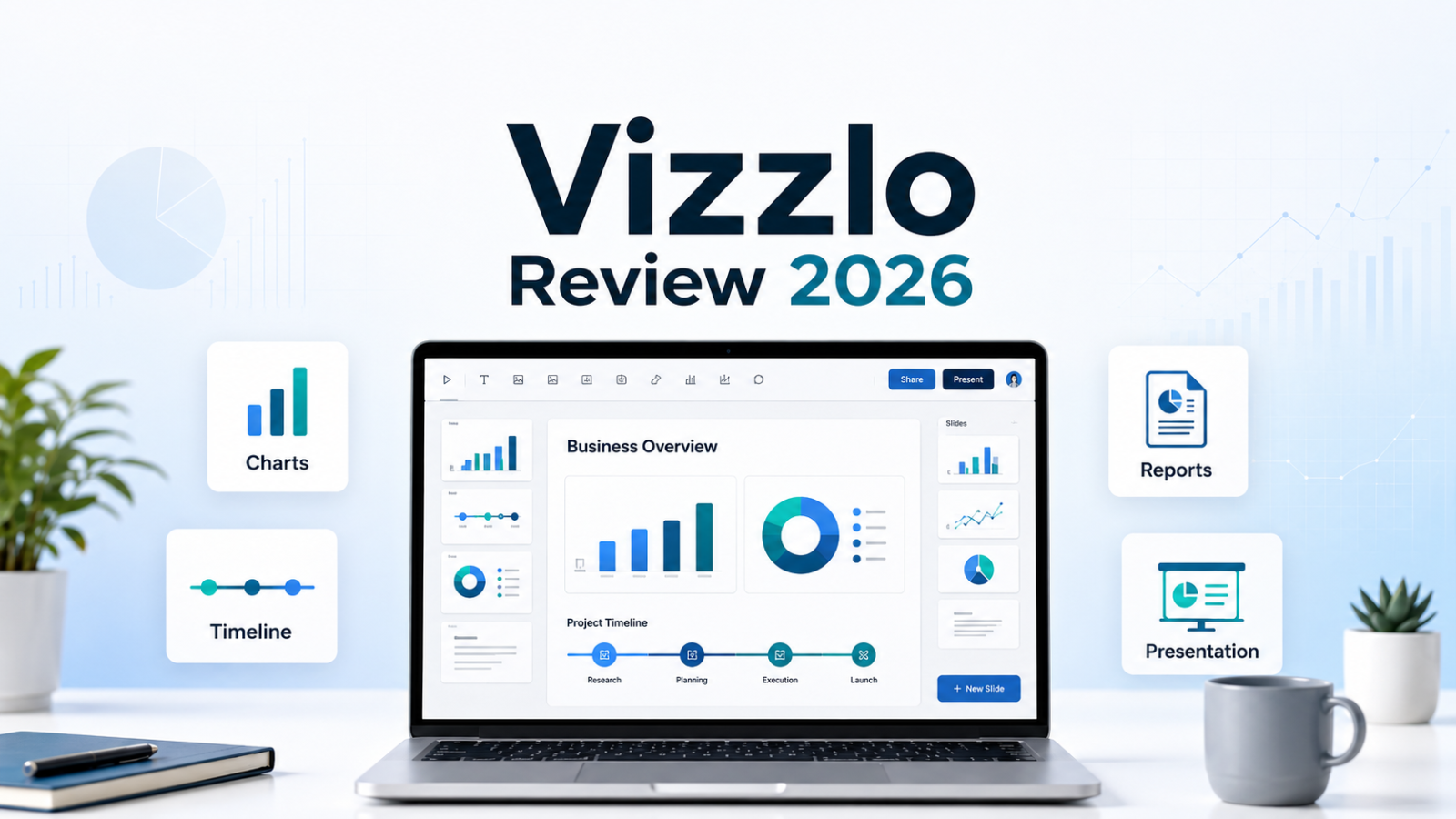
Vizzlo Review 2026: Pricing, Free Trial, AI Chart Maker & Best Plan

Candidcodes

1 week ago

Written & Reviewed by CandidCodes Editorial Team – SaaS & AI Tools Research

Our team reviewed Vizzlo’s official website, pricing page, chart gallery, Google Slides integration, PowerPoint add-in, desktop app, FAQ, data sync features, free account details, and publicly available product information before writing this review. This article was last updated May 2026.

Affiliate Disclosure: Some links in this article may be affiliate links. If you choose to sign up through them, we may earn a commission at no extra cost to you. We only recommend tools we have researched and believe offer genuine value.

Vizzlo Review 2026 — AI chart maker, business graphics, PowerPoint charts, Google Slides charts, pricing, and free trial
Vizzlo Review 2026: professional charts, business graphics, AI Chart Vizzard, PowerPoint, Google Slides, pricing, and free trial.

Vizzlo Quick Summary

Best for: consultants, founders, marketers, educators, analysts, project managers, sales teams, and business professionals who need polished charts, timelines, Gantt charts, business graphics, and presentation-ready visuals without wrestling with spreadsheet formatting.

Not best for: users who only need basic pie charts, teams looking for advanced BI dashboards, or data analysts who need heavy statistical modeling rather than presentation visuals.

Best value point: Vizzlo combines 120+ chart and business graphic types, AI-assisted chart generation, Google Slides integration, PowerPoint add-in, desktop apps, branded themes, data sync, and team collaboration features in one visualization workflow.

Current deal: No public coupon code was provided. Use the CandidCodes affiliate link to check the latest Vizzlo pricing, free trial, and active deal availability.

Best first step: Start with the free account or 14-day trial, create one real chart for a report or presentation, test export quality, and only upgrade after confirming Vizzlo saves time compared with PowerPoint, Google Slides, or spreadsheet charts.

If your current chart workflow is still “open Excel, fight the axis labels, paste into PowerPoint, resize everything, then pretend the slide looks intentional,” Vizzlo exists because apparently humanity needed a less cursed way to make business graphics.

Vizzlo is an online chart and business graphics platform designed to help users create professional data visualizations for presentations, reports, pitch decks, dashboards, education, and business communication. It supports more than 120 chart and diagram types, including timelines, Gantt charts, SWOT matrices, waterfall charts, maps, funnels, project graphics, process diagrams, and many presentation-ready visuals.

This Vizzlo review covers what the platform does, who it is best for, current pricing, free trial details, AI Chart Vizzard, Google Slides and PowerPoint integrations, key features, pros and cons, alternatives, and whether Vizzlo is worth using in 2026.

Check the latest Vizzlo pricing, free trial, and product details:

Vizzlo pricing plans 2026 free trial

Vizzlo Review 2026: Pricing, Features, Free Trial & Best Plan

CANDIDCODES · MAY 2026

Start Vizzlo Free Trial →

CandidCodes Rating: 4.6 / 5

★★★★☆

Ease of Use 4.5  •  Chart Portfolio 4.8  •  Presentation Workflow 4.7  •  AI Chart Generation 4.4  •  Team Collaboration 4.5  •  Value for Money 4.5

Best for: professionals who need polished charts and business visuals for presentations, reports, pitch decks, education, client work, and internal communication.

Best feature: The combination of 120+ chart types, AI Chart Vizzard, PowerPoint and Google Slides integrations, branded themes, data sync, and export-ready visuals.

Main downside: Vizzlo is strongest for presentation-ready charts and business graphics, not deep BI dashboards or advanced statistical analysis. If you need complex data modeling, you may still need spreadsheet, BI, or analytics tools alongside it. Naturally, no single SaaS has agreed to solve every human problem for $19/month. Rude, but fair.

Best first step: Try Vizzlo with one real presentation chart, test how quickly you can edit, export, and reuse it, then decide whether the workflow saves enough time to justify upgrading.

Why Most Business Charts Look Worse Than the Data Behind Them

Most teams do not struggle because they lack data. They struggle because turning that data into a clear, polished, presentation-ready visual takes too much time. Spreadsheet charts often look generic. PowerPoint charts take manual formatting. Google Slides charts can be limited. And when a report has to look client-ready, those tiny design problems suddenly become very expensive.

Vizzlo solves a specific problem: creating professional charts and business graphics faster, without forcing users to rebuild layouts from scratch every time. Instead of starting with a blank slide or a spreadsheet chart, users can choose from ready-made chart types, apply themes, edit data, customize visuals, and insert graphics into presentations or exports.

The real value is not just that Vizzlo makes charts. The value is that Vizzlo helps make business visuals look intentional: timelines, Gantt charts, process diagrams, maps, funnels, matrices, waterfall charts, dashboards, and presentation graphics that are easier to explain and easier to reuse.

Without Vizzlo With Vizzlo
Manual chart formatting in Excel, PowerPoint, or Google Slides Start with ready-made chart types and business graphics
Basic charts that need design cleanup before presenting Presentation-ready visuals with themes, layouts, and styling controls
Separate workflows for PowerPoint, Google Slides, desktop, and web Use Vizzlo across web, Google Slides, PowerPoint, and desktop workflows
Charts become outdated when data changes Link charts to external datasets and use data sync for updates
Hard to keep charts on-brand across a team Use custom themes, team folders, permissions, and brand controls

Quick Verdict

Vizzlo is worth testing if you regularly create charts, timelines, Gantt charts, diagrams, reports, pitch decks, executive presentations, education materials, or client-ready business visuals.

It is not ideal if you only need occasional simple charts, advanced BI dashboards, or deep data science features. Vizzlo is a visual communication tool first, not a full analytics warehouse pretending to be a slide deck.

Best starting option: Use the free account or 14-day trial, create one real chart, export or insert it into your presentation, and compare the workflow against your current tool stack.

Best long-term value: Vizzlo Professional makes sense for solo professionals who create charts regularly. Vizzlo Teams makes more sense when multiple people need shared folders, permissions, brand consistency, and collaborative chart workflows.

Best Vizzlo Deal Right Now

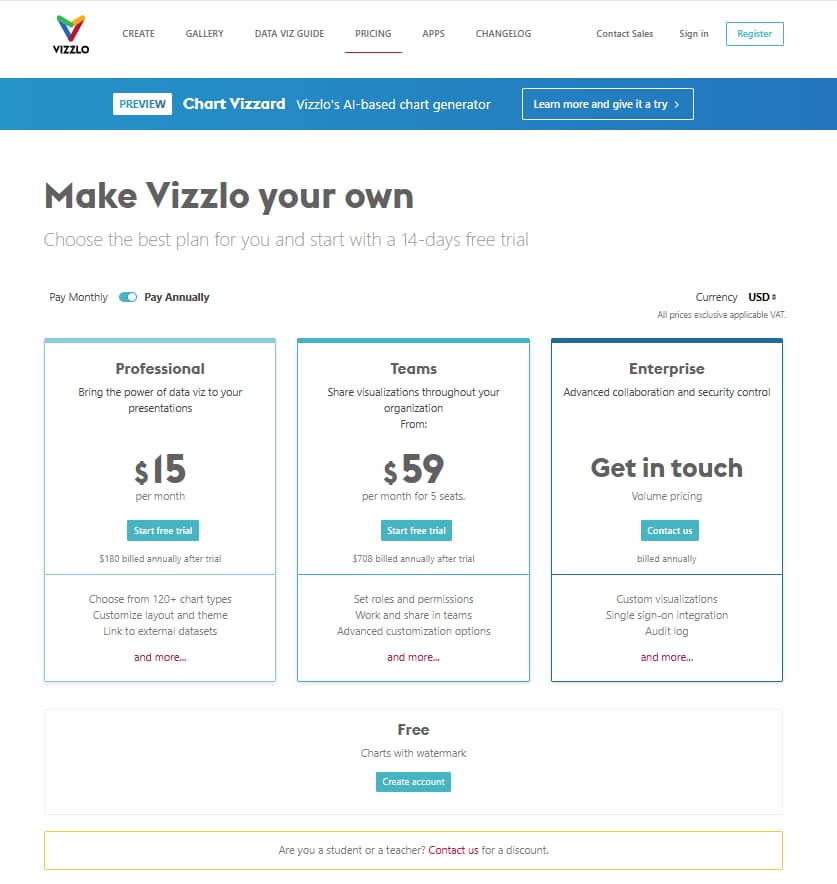
Vizzlo offers a free account and a 14-day trial for paid plans. The public pricing page currently lists Professional at $19/month billed monthly after trial, Teams from $69/month for 5 seats, and Enterprise with volume pricing. No public coupon code was provided for this review, so use the CandidCodes affiliate link to check the latest available deal.

  • Free account available with Vizzlo-branded images and watermark
  • 14-day free trial listed on the pricing page
  • Professional plan for solo users and business professionals
  • Teams plan for collaboration, permissions, and shared workflows
  • Enterprise plan for advanced controls, SSO, audit log, and custom visualizations

Check Vizzlo Current Pricing →

What Is Vizzlo?

Vizzlo is a chart and business graphics platform for creating professional data visualizations online and inside presentation workflows. It is designed for users who need to turn data, processes, timelines, milestones, strategies, comparisons, and abstract business ideas into polished visuals quickly.

The platform supports more than 120 chart and graphic types, including charts, diagrams, timelines, project visuals, maps, matrix graphics, funnels, process diagrams, waterfall charts, Gantt charts, and business graphics used in presentations and reports.

In plain English: Vizzlo helps you create charts and presentation visuals that look like they were designed on purpose, not assembled during a caffeine emergency ten minutes before the meeting.

Vizzlo is available through its web app, Google Slides add-on, PowerPoint add-in for Windows, and desktop apps for Windows and Mac. That makes it useful for people who need visuals inside their actual workflow instead of exporting, importing, resizing, and quietly losing patience with humanity.

Need to turn meeting notes and action items into clearer reports or presentations?

Who Should Use Vizzlo?

Vizzlo may be a good fit for:

  • Consultants creating client-ready charts and strategy visuals
  • Startup founders building pitch decks and investor reports
  • Project managers creating timelines, Gantt charts, and roadmap visuals
  • Marketers building campaign reports, funnels, comparison charts, and dashboards
  • Sales teams creating business presentations and data-backed proposals
  • Educators and students creating clearer charts for academic or training presentations
  • Teams that need consistent visual style, shared folders, permissions, and branded chart templates

If your workflow also includes writing SEO content around your reports or visual assets, our SEOWriting.ai Review 2026 covers AI SEO writing and long-form content production.

Vizzlo may not be the right fit if you only need free basic charts, advanced BI dashboards, complex statistical modeling, or developer-level charting libraries for custom applications.

Vizzlo vs Manual Chart Creation

Manual chart creation usually starts in Excel or Google Sheets, then moves into PowerPoint or Google Slides, then gets manually styled, resized, adjusted, and repaired after someone changes one number. It works, technically. So does carrying water in a bucket with a hole in it. The problem is time, consistency, and design quality.

Vizzlo is better when you need repeatable, polished visuals. It gives users chart templates, business graphics, layout controls, themes, integrations, and sync options that reduce the repetitive formatting work. The benefit is not just prettier charts. The benefit is faster communication.

Latest Vizzlo Pricing 2026

Vizzlo currently offers a Free option, Professional, Teams, and Enterprise. The public pricing page lists Professional at $19/month billed monthly after trial and Teams from $69/month for 5 seats billed monthly after trial. Vizzlo also promotes a 14-day free trial and notes that prices are exclusive of applicable VAT. Annual billing may show lower monthly-equivalent pricing, so always verify the final checkout page before subscribing.

Vizzlo pricing 2026 — Free Professional Teams Enterprise 14-day free trial and paid plans
Vizzlo pricing 2026: Free, Professional, Teams, Enterprise, 14-day free trial, and paid plan options.

Plan Public Pricing Best For Main Use Case
Free Free account Users testing Vizzlo before upgrading Create documents, use chart types, themes, and download Vizzlo-branded images with watermark.
Professional $19/month billed monthly after trial Solo professionals, consultants, analysts, educators, and creators 120+ chart types, layout and theme customization, external datasets, and professional presentation visuals.
Teams From $69/month for 5 seats billed monthly after trial Teams that need shared workflows and permissions Roles and permissions, team sharing, collaboration, shared folders, and advanced customization options.
Enterprise Volume pricing / contact sales Larger organizations and enterprise teams Custom visualizations, single sign-on, audit log, advanced collaboration, and security controls.

Pricing note: Vizzlo pricing, billing terms, trial availability, included features, VAT, annual billing discounts, and enterprise terms may change. Always confirm final pricing and plan details on the official checkout page before subscribing.

💰 Is Vizzlo Worth Paying For? Practical ROI Breakdown

The Manual Way

❌ Spreadsheet charts need cleanup
❌ PowerPoint resizing eats time
❌ Google Slides visuals feel limited
❌ Brand styling is inconsistent
❌ Reports need repeated edits
❌ Last-minute chart fixes waste hours

With Vizzlo

✓ 120+ chart and business graphic types
✓ Presentation-ready visuals faster
✓ AI Chart Vizzard helps start quicker
✓ PowerPoint and Google Slides workflow
✓ Themes and branding stay consistent
✓ Data sync can reduce repeat updates

Bottom line: Vizzlo is easiest to justify if charts are part of your real work. If cleaner visuals help you create reports, pitch decks, client presentations, or internal updates faster, the subscription can pay for itself in saved formatting time.

Want to check the latest Vizzlo pricing?

Use the CandidCodes affiliate link to check the latest free trial, plan pricing, and current deal availability.

Check Vizzlo Current Pricing →

Does Vizzlo Have a Free Trial?

Vizzlo’s pricing page promotes a 14-day free trial for paid plans. Vizzlo also offers a free account that includes unlimited documents, access to chart types, themes and color palettes, custom themes, and Vizzlo-branded image downloads with watermark.

Before paying, test these areas:

  • Create one real chart for a report or slide deck
  • Try a timeline, Gantt chart, waterfall chart, SWOT matrix, or map
  • Test export quality for PNG, PDF, or presentation use
  • Try the Google Slides or PowerPoint workflow if you use presentations often
  • Check whether Vizzlo’s themes match your brand or client style
  • Test whether data sync or external dataset support matters for your workflow
  • Compare total time saved against manually building the same visual in your current tools

Want to test Vizzlo before paying?

Start Vizzlo Free Trial →

Key Features of Vizzlo

1. 120+ Chart Types and Business Graphics

Vizzlo’s strongest feature is its portfolio of more than 120 chart types and business graphics. This includes classic charts, timelines, Gantt charts, process diagrams, SWOT analysis, waterfall charts, maps, funnel-style visuals, milestone plans, percentage charts, pictographs, and many other presentation-ready visual formats.

This matters because business communication often needs more than bar charts and pie charts. Strategy decks, consulting reports, investor updates, project plans, and internal presentations need visuals that explain process, priority, comparison, timeline, ownership, geography, portfolio structure, and progress.

Vizzlo chart types and business graphics gallery with timelines diagrams maps Gantt charts and presentation visuals
Vizzlo chart types: timelines, business graphics, diagrams, maps, Gantt charts, and presentation-ready visuals.

2. AI Chart Vizzard

Vizzlo promotes Chart Vizzard as its AI-based chart generator. The practical use case is simple: instead of manually choosing the right chart type, users can use AI assistance to generate charts tailored to their data and then customize them inside Vizzlo’s chart editor.

This can be useful when you know what data you have but are not sure which visual format communicates it best. AI chart generation should not replace judgment, but it can reduce the blank-page problem and help users get to a workable chart faster.

Vizzlo AI Chart Vizzard for generating editable charts from data
Vizzlo Chart Vizzard: AI-assisted chart generation with editable visuals inside the Vizzlo chart editor.

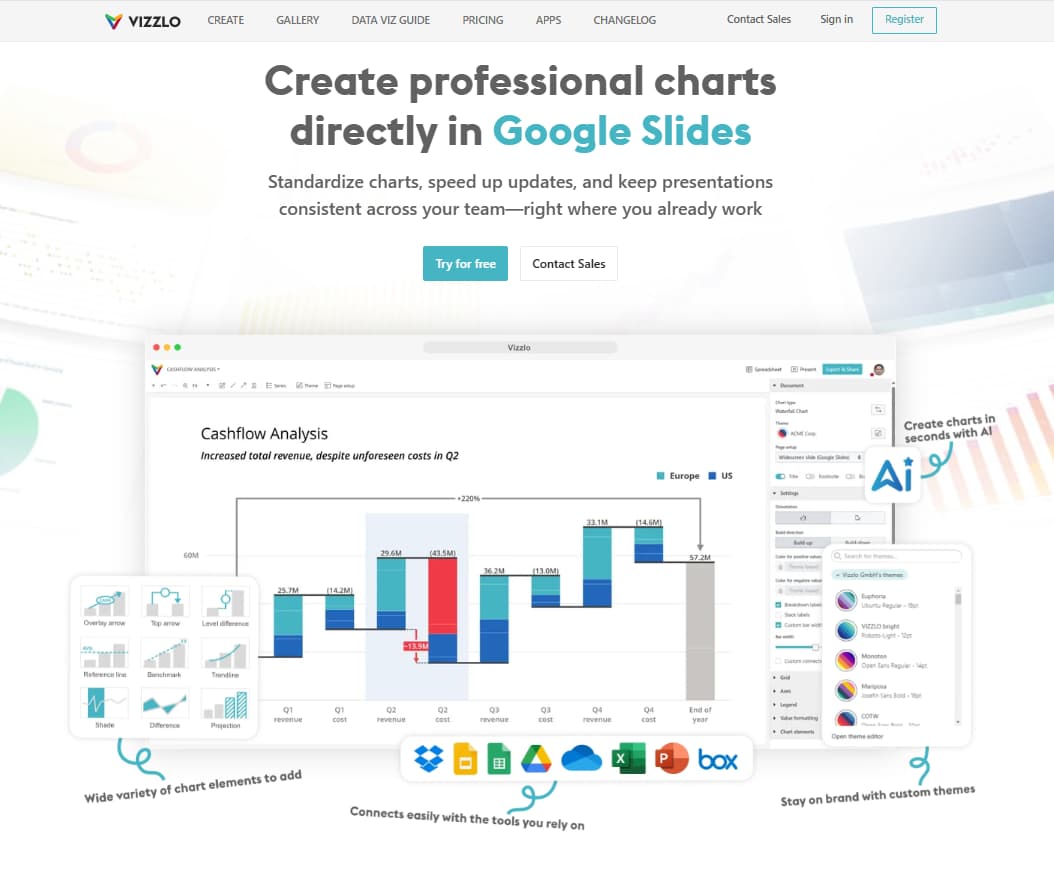
3. Google Slides Integration

Vizzlo integrates with Google Slides through an official add-on. Users can create new visualizations, summon charts and folders, and keep visualizations accessible from within a slide workflow. This is especially useful for teams that build presentations in Google Workspace and want polished charts without switching between too many tools.

For teams producing content across multiple channels, our Vista Social Review 2026 covers social scheduling, analytics, and content distribution after your visual assets are ready.

Vizzlo Google Slides add-on for creating and editing charts inside presentations
Vizzlo for Google Slides: create, edit, and update presentation-ready charts directly in Google Slides.

4. PowerPoint Add-in and Desktop App

Vizzlo also supports PowerPoint workflows through its Windows PowerPoint add-in and desktop app. Users can access Vizzlo graphics from the PowerPoint ribbon, add charts to slides, and edit charts without leaving the presentation environment.

Vizzlo Desktop also supports Windows and Mac workflows, allowing users to create charts, work offline, store local documents, open and edit Vizzlo files, and export charts in custom sizes. This is useful for professionals who need presentation visuals even when they are not working entirely inside a browser.

Vizzlo PowerPoint add-in and desktop app for creating business charts inside presentations
Vizzlo PowerPoint and desktop workflow: create charts, edit visuals, work offline, and build presentation graphics faster.

5. Data Sync and External Dataset Support

Vizzlo supports external datasets and data sync, including connections to cloud storage providers such as Google Drive, OneDrive, Dropbox, and Box. This helps keep charts updated when the underlying data changes, which matters for recurring reports, dashboards, shared presentations, and embedded visuals.

Data sync is especially helpful for teams that reuse the same charts across weekly or monthly reports. Instead of rebuilding visuals manually, users can connect charts to supported data sources and keep visuals refreshed with fewer repetitive updates.

Vizzlo data sync and external dataset support with Google Drive OneDrive Dropbox and Box
Vizzlo data sync: connect charts to external datasets and cloud storage providers to keep visuals updated.

6. Team Collaboration, Branding, and Enterprise Controls

Vizzlo Teams and Enterprise are built for shared visual workflows. Teams can use roles and permissions, shared folders, editing rights, project folders, team collaboration, custom themes, template charts, and brand controls. Enterprise adds more advanced options such as single sign-on, audit log, custom visualizations, and centralized controls.

This is useful when charts are not just individual assets but part of a company’s communication system. Consultants, agencies, sales teams, and larger organizations often need consistency across visual reports, client decks, internal updates, and executive presentations.

If your team also needs client portals, workflows, invoicing, and project management around report delivery, our SuiteDash Review 2026 covers an all-in-one business management platform for service teams.

Vizzlo team collaboration branding roles permissions shared folders and enterprise controls
Vizzlo Teams and Enterprise: shared folders, permissions, branded themes, templates, and enterprise-ready controls.

Ready to explore Vizzlo features?

Use the CandidCodes affiliate link to check Vizzlo’s latest free trial and active deal availability.

Explore Vizzlo Features →

Need better charts for presentations, reports, and business communication?

Vizzlo helps you create polished charts, timelines, Gantt charts, diagrams, maps, and business graphics across web, Google Slides, PowerPoint, and desktop workflows.

120+ chart types and business graphics
AI Chart Vizzard for faster chart creation
Google Slides and PowerPoint integrations
Data sync with supported cloud storage providers
Team collaboration, themes, roles, and permissions

Try Vizzlo Free →

Charts · Business Graphics · PowerPoint · Google Slides · Data Visualization

Vizzlo Plans: What to Compare Before Upgrading

What to Compare Why It Matters Best For
Watermark removal Free accounts can export Vizzlo-branded images. Paid plans matter if you need client-ready or brand-neutral outputs. Consultants, teams, businesses, and client-facing reports
Chart types and export formats Confirm whether the chart types and export quality you need are included in your plan. Presentation creators and reporting teams
Google Slides and PowerPoint workflow The value increases if you create visuals directly inside presentations rather than as one-off image exports. Teams using Google Workspace or Microsoft Office
Team roles and permissions Teams and Enterprise plans are more relevant if multiple users need shared folders, editing rights, and brand consistency. Agencies, sales teams, and organizations
Data sync and external datasets Useful if your charts need to stay updated from cloud-hosted spreadsheets or linked data files. Recurring reports, dashboards, and shared presentations

Vizzlo Pros and Cons

Pros

  • More than 120 chart types and business graphics for presentation use
  • AI Chart Vizzard helps generate editable charts faster
  • Strong workflow for PowerPoint, Google Slides, web, and desktop users
  • Useful chart categories include timelines, Gantt charts, SWOT, waterfall charts, maps, diagrams, funnels, and process visuals
  • Free account available for testing with Vizzlo-branded exports
  • Professional and Teams plans support more serious business workflows
  • Data sync and external dataset support can reduce repetitive chart updates
  • Team features include roles, permissions, shared editing, folders, and brand controls
  • Enterprise options include SSO, audit log, custom visualizations, and advanced controls

Cons

  • Not a full BI dashboard platform for advanced analytics
  • Free exports include Vizzlo branding or watermark, which may not be ideal for client-facing use
  • Some advanced collaboration, branding, and enterprise controls require higher-tier plans
  • AI chart generation still requires human judgment to choose the right visualization
  • Pricing, VAT, annual discounts, and plan limits should be confirmed at checkout before subscribing

Which Vizzlo Plan Should You Choose?

Choose the Free option if:

You want to test Vizzlo’s chart editor, chart portfolio, themes, and export workflow before paying. This is the right first step if you are unsure whether Vizzlo’s visuals are enough of an upgrade over your current chart tools.

Choose Vizzlo Professional if:

You create polished charts regularly and need watermark-free, presentation-ready visuals for reports, pitch decks, business presentations, education materials, or client work. This is likely the best fit for solo professionals, founders, marketers, analysts, consultants, and educators.

Choose Vizzlo Teams if:

Multiple people need to create, share, edit, and manage visuals together. Teams is a better fit when you need roles, permissions, team folders, shared editing rights, and more consistent business graphics across a group.

Choose Vizzlo Enterprise if:

Your organization needs advanced controls such as SSO, audit logs, custom visualizations, volume pricing, centralized governance, or deeper brand management. This is more relevant for larger companies and organizations with strict presentation or reporting standards.

Avoid upgrading too fast if:

You only create a few simple charts per year or do not need watermark-free exports. Test the free plan first. If you find yourself repeatedly rebuilding visuals manually, then upgrading starts to make more sense. Very tragic that the spreadsheet had to hurt you first, but here we are.

Ready to compare Vizzlo plans?

Use the CandidCodes affiliate link to check the latest Vizzlo pricing and free trial availability.

View Vizzlo Plans →

Is Vizzlo Worth It?

Vizzlo is worth considering if charts and business visuals are a regular part of your work. The platform is strongest when used for presentation-ready visuals: timelines, Gantt charts, project plans, business diagrams, comparisons, waterfalls, maps, strategy matrices, and polished charts for reports or slide decks.

The tool becomes more valuable when the same visuals need to be updated, reused, shared, presented, or kept on-brand. If you are creating charts for clients, executive updates, investor decks, sales reports, educational materials, or team presentations, Vizzlo can save enough design and formatting time to justify testing a paid plan.

If your only need is one basic bar chart every few months, Vizzlo may be more tool than you need. If your work depends on making data understandable and credible quickly, Vizzlo is much easier to justify.

If you also need visual ad creatives for campaigns, our Arcads AI Review 2026 covers AI video ad creation, while our PagerGPT Review 2026 covers AI agents and workflow automation for broader productivity systems.

Ready to test Vizzlo?

Try Vizzlo Free →

Vizzlo Alternatives to Consider

Canva: Better for general design, social graphics, and simple presentation visuals. Vizzlo is stronger for business-specific charts and structured data visualizations.

Visme: Useful for infographics, presentations, and visual content. Compare it with Vizzlo if you need broader design assets beyond charts.

Datawrapper: Strong for data journalism and web-embedded charts. Vizzlo is more presentation-focused, especially for business graphics and slide workflows.

Flourish: Better for interactive storytelling and animated data visualizations. Vizzlo is better for presentation-ready business visuals.

PowerPoint / Google Slides native charts: Good enough for basic charts. Vizzlo becomes more useful when you need better chart variety, design control, business graphics, and repeatable visual workflows.

Vizzlo: Best for professionals who create business charts, timelines, project visuals, diagrams, maps, Gantt charts, and polished presentation graphics regularly.

How Vizzlo Fits Into a Broader Content Stack

Vizzlo works best as the visual communication layer in a broader business or content stack. A practical workflow might look like this: Fireflies.ai captures meetings and action items, SEOWriting.ai helps produce supporting written content, Vizzlo turns data into charts and visuals, Vista Social distributes content across social channels, and SuiteDash manages client workflows if you are delivering reports or strategy assets as a service.

For teams using social campaigns to promote visual reports or webinars, our Sociamonials Review 2026 covers contests, giveaways, referral campaigns, and UGC workflows. For B2B teams turning reports into prospecting assets, our UpLead Review 2026 covers lead generation and verified contact data.

Frequently Asked Questions

What is Vizzlo used for?

Vizzlo is used to create professional charts, business graphics, timelines, Gantt charts, maps, diagrams, project visuals, and data visualizations for presentations, reports, pitch decks, education, and business communication.

How much does Vizzlo cost?

Vizzlo offers a Free option, Professional, Teams, and Enterprise plans. The public pricing page currently lists Professional at $19/month billed monthly after trial and Teams from $69/month for 5 seats billed monthly after trial. Enterprise uses volume pricing. Always verify the final price, VAT, billing cycle, and plan terms on the official checkout page before subscribing.

Does Vizzlo have a free trial?

Yes. Vizzlo promotes a 14-day free trial for paid plans. Vizzlo also offers a free account that allows users to test the platform with Vizzlo-branded exports and watermark limitations.

Does Vizzlo work with Google Slides?

Yes. Vizzlo offers a Google Slides add-on that lets users create, edit, and update charts directly inside Google Slides.

Does Vizzlo work with PowerPoint?

Yes. Vizzlo offers a PowerPoint add-in for Windows through its desktop app, allowing users to access Vizzlo charts and edit visuals inside the PowerPoint workflow.

What is Vizzlo Chart Vizzard?

Chart Vizzard is Vizzlo’s AI-based chart generator. It helps users generate editable charts tailored to their data, then refine and customize the visuals in Vizzlo’s chart editor.

Can Vizzlo sync chart data?

Yes. Vizzlo supports linking charts to external datasets and cloud files from supported providers such as Google Drive, OneDrive, Dropbox, and Box. Linked charts can be refreshed to keep visuals up to date.

Is Vizzlo worth it?

Vizzlo is worth testing if you regularly create business charts, presentation visuals, reports, timelines, or project graphics. It is less necessary if you only need simple charts occasionally. Start with the free account or trial to test whether it saves enough formatting time for your workflow.

Current Vizzlo Offer — May 2026

Vizzlo offers a free account and a 14-day free trial for paid plans. No public coupon code was provided for this review. Use the CandidCodes affiliate link to check the latest pricing, trial, and deal availability.

Try Vizzlo Free →

Final Verdict

Vizzlo is a strong business chart and data visualization platform for professionals who need polished visuals for presentations, reports, pitch decks, project plans, and executive communication. Its biggest strength is the combination of 120+ chart types, AI Chart Vizzard, business graphics, Google Slides integration, PowerPoint workflow, desktop apps, data sync, themes, and team collaboration features.

The platform is especially useful when charts are not just decorative, but part of how you explain strategy, progress, performance, timelines, forecasts, and business decisions. It saves the kind of formatting time that quietly eats entire afternoons and then has the audacity to call itself “just one quick slide.”

For consultants, marketers, analysts, project managers, educators, and teams that create presentation visuals often, Vizzlo is worth testing in 2026. Start with the free account or 14-day trial, build one real chart, and upgrade only if the workflow clearly saves time and improves output quality.

Try Vizzlo Before Building Your Next Business Presentation

Use Vizzlo to create one real chart, timeline, Gantt chart, or business graphic, then compare the result against your current PowerPoint, Google Slides, or spreadsheet workflow.

Vizzlo Free Account + 14-Day Trial

Vizzlo lets users start with a free account and offers a 14-day trial for paid plans. No public coupon code was provided for this review, so check the latest deal through the CandidCodes affiliate link before upgrading.

✓ 120+ chart types and business graphics
✓ AI Chart Vizzard for faster chart creation
✓ Google Slides and PowerPoint integrations
✓ Free account and 14-day trial options
✓ Teams and Enterprise features for collaboration and brand control

Start Vizzlo Free Trial →

Pricing, trial terms, VAT, billing options, and feature availability may change. Confirm final details before subscribing.

Try Vizzlo Now → Charts · Business Graphics · AI Chart Vizzard · PowerPoint · Google Slides

Explore more AI tool reviews, SaaS deals, presentation tools, and marketing software breakdowns on CandidCodes.

Popular Blog

Mooncool TK2 Electric Trike Review 2026: New Commuter Pick With 6 Colors

Mooncool TK1 Folding Electric Trike Review 2026: Best Value Commuter Pick?

Best Electric Trikes for Seniors 2026: Comfort, Stability, Range and Deals

Mooncool TK Pro Review 2026: Is the Top Model Worth It?

Best Mooncool Electric Trikes 2026: TK1 vs TK Pro vs TK2 vs FT1 Compared

Mooncool Review 2026: Are Mooncool Electric Trikes Worth It?