SEOWriting.ai Review 2026: Pricing, AI SEO Articles, WordPress Auto-Publishing & Buyer Verdict
SEOWriting.ai is built for bloggers, affiliate publishers, niche site builders, and WordPress users who need fast SEO article drafts, product review formats, AI images, metadata, and publishing workflows without starting every post from a blank page like a medieval content monk.
Why Trust This SEOWriting.ai Review?
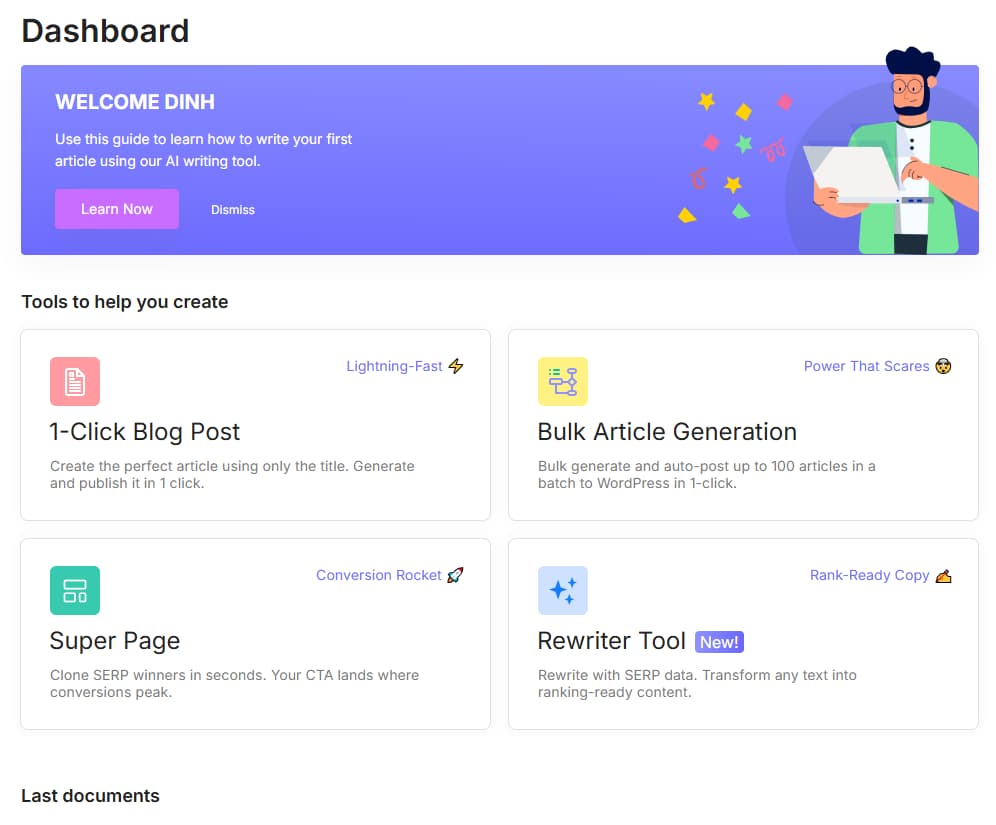
We reviewed SEOWriting.ai like a buyer would: what it helps publish, how the pricing tiers compare, where WordPress auto-publishing saves time, and where human editing is still non-negotiable. AI can draft faster. It cannot magically become judgment, research, or taste. Tragic, but useful.
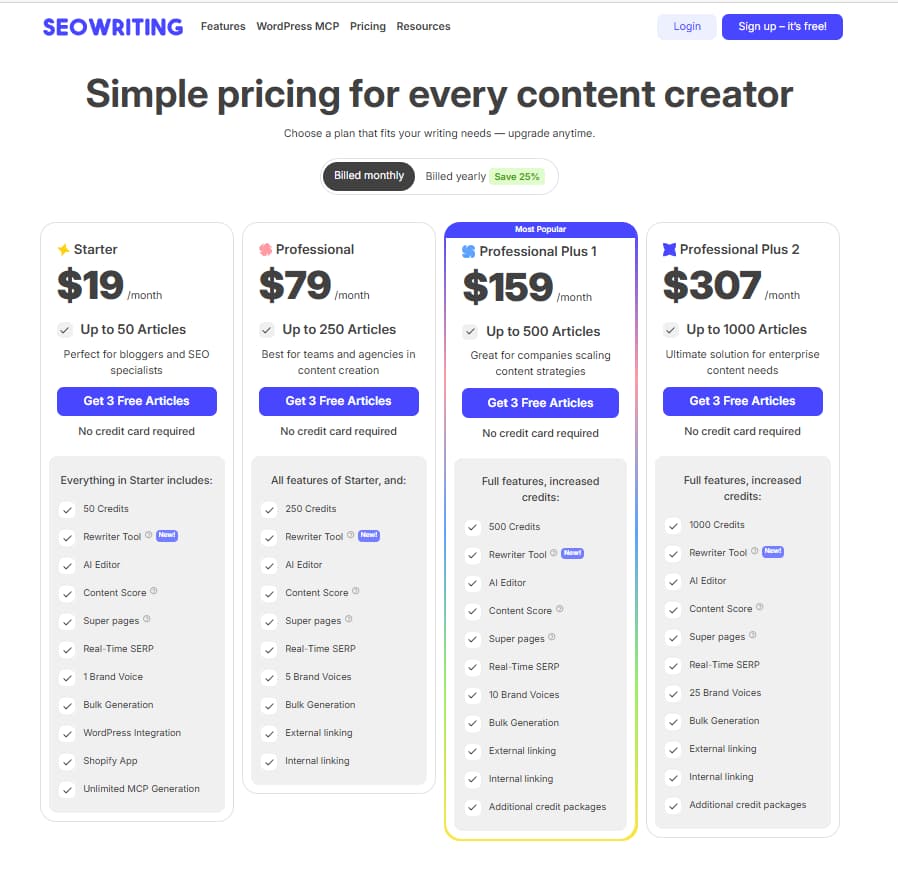
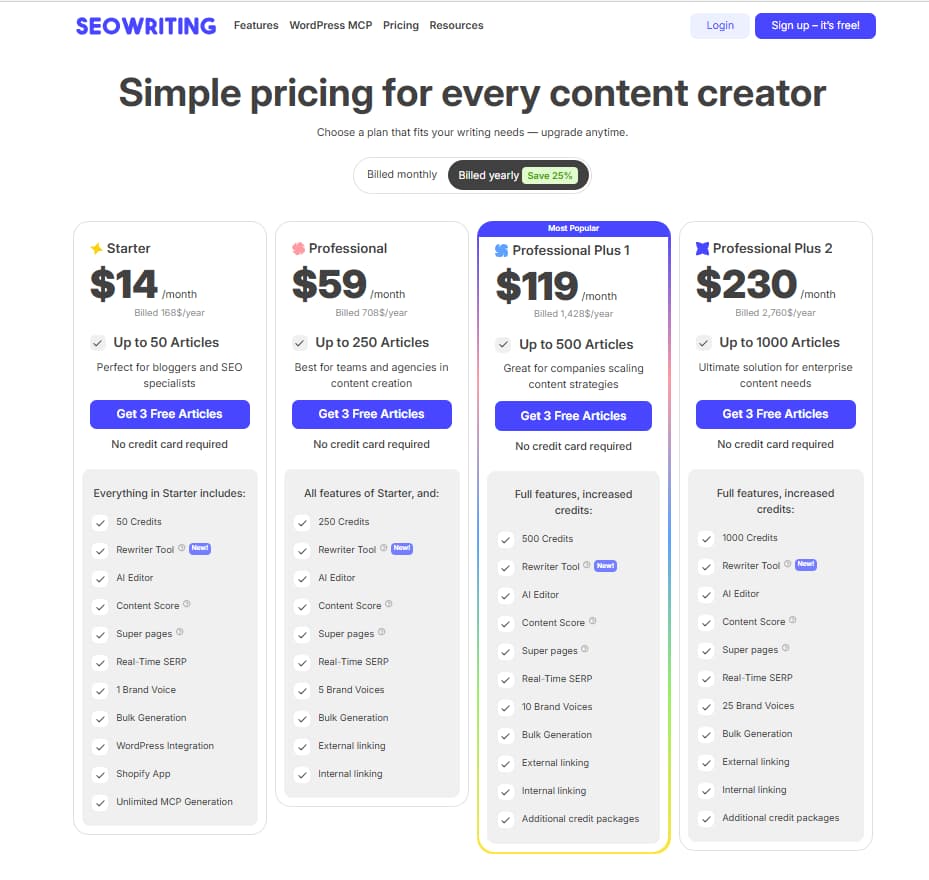
The live pricing screenshots show monthly and yearly billing. Monthly is the safer first paid test for most users, while yearly lowers the effective monthly price after the workflow proves useful.
The SEOWriting.ai affiliate link is kept exactly as provided: https://seowriting.ai?fp_ref=03111983.
The review focuses on actual publishing work: SEO article drafts, affiliate content, metadata, AI images, and WordPress handoff.
No ranking guarantees. No “AI prints money” nonsense. Just what the tool can speed up and where the publisher still has to verify facts.
How We Checked SEOWriting.ai
This review is based on the existing CandidCodes SEOWriting.ai article draft, its pricing notes, feature breakdown, affiliate workflow analysis, and the internal cluster links provided for the SEOWriting.ai content set. It is a buyer workflow review, not a long-term traffic test, because no AI writing tool should be judged by vibes and two screenshots alone. Humanity has tried worse, naturally.
Step 1: Pricing and access check
We separated free access, Starter, and Professional plan logic so readers can understand which tier makes sense before they pay. The safest path is to test free output first, then upgrade only if the workflow saves real editing time.
Step 2: Publishing workflow check
We evaluated the workflow around SEO article generation, metadata, images, affiliate formats, and WordPress auto-publishing. These are the parts that matter when a publisher is producing content clusters instead of one lonely blog post shouting into the void.
Step 3: Quality-control check
We treated AI output as a draft, not a finished article. Facts, pricing, product claims, internal links, screenshots, and original commentary still need a human review layer before publishing.
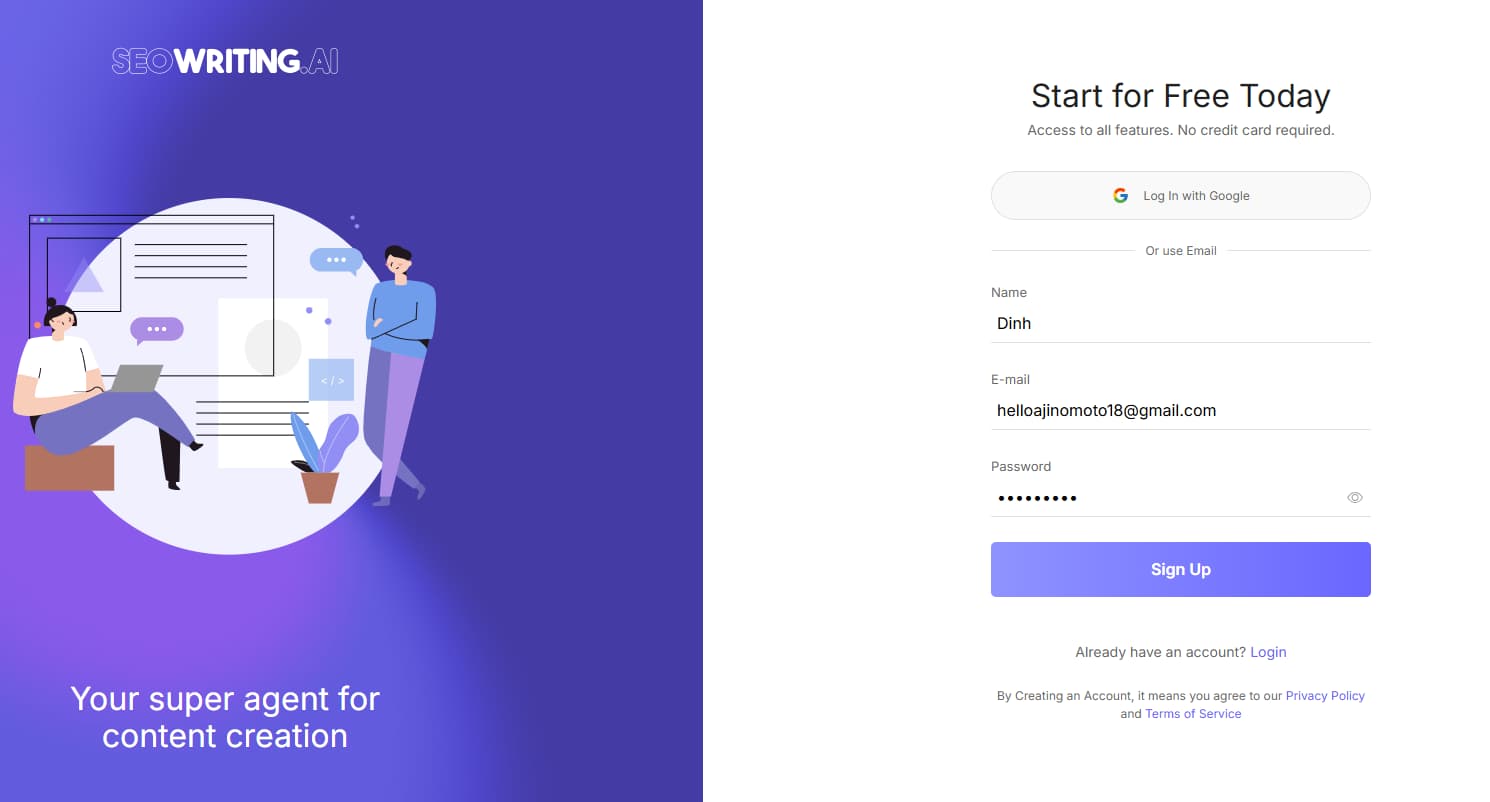
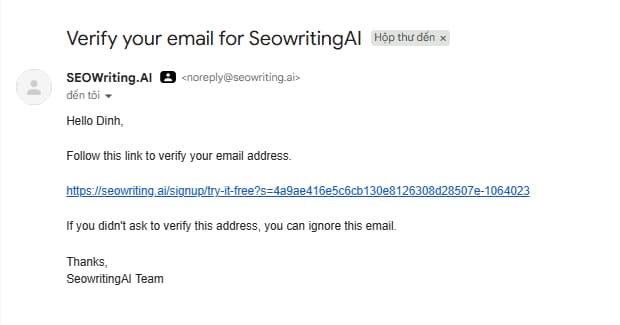
SEOWriting.ai is strongest as a production assistant for SEO publishers. It can reduce first-draft friction, especially for affiliate and WordPress workflows. It does not replace keyword strategy, source checking, editorial judgment, or original screenshots.
30-Second Verdict
SEOWriting.ai is worth testing if your main bottleneck is structured SEO content production. It is best for bloggers, affiliate publishers, and WordPress users who need article drafts, review-style formats, AI images, metadata, and publishing support in one workflow.
The best use case is not “generate and publish.” The better workflow is: generate, edit, verify, add internal links, add screenshots, then publish. Boring? Yes. Also how money pages avoid becoming AI landfill with a domain name.
Best for
Affiliate publishers, niche site builders, WordPress bloggers, and small content teams building repeatable SEO article workflows.
Best plan
Starter monthly is the cleanest first paid test. Yearly makes more sense only after SEOWriting.ai proves it saves enough editing and publishing time.
Watch out
Do not publish untouched AI drafts. Verify pricing, claims, product details, links, and anything that could affect trust or compliance.
What Is SEOWriting.ai?
SEOWriting.ai is an AI writing platform focused on SEO articles, blog posts, affiliate content, product reviews, AI-generated images, metadata, and WordPress-ready publishing workflows. Unlike broad AI copywriting tools that try to write everything from ads to poems nobody asked for, SEOWriting.ai is positioned around search-focused long-form publishing.
That positioning matters. A generic AI writer can help you draft text, but a search publisher usually needs structure: headline options, headings, meta descriptions, affiliate article formats, image support, and a clean path into WordPress. SEOWriting.ai tries to bundle those steps into a faster workflow.

Looking for the deal page?
Check the dedicated SEOWriting.ai coupon and free plan guide before upgrading, especially if you want the latest offer wording.
Read coupon guideWho Should Use SEOWriting.ai?
Affiliate Publishers
SEOWriting.ai fits publishers building product reviews, comparison posts, “best tools” roundups, and buying guides. It can produce structure quickly, but product facts, affiliate links, pricing, screenshots, and final recommendations still need manual review.
WordPress Bloggers
WordPress auto-publishing makes sense when formatting and upload work becomes repetitive. It is especially useful for sites publishing several SEO articles per week where manual copy-paste starts eating the calendar like a tiny bureaucratic monster.
Niche Site Builders
For long-tail informational content and content clusters, SEOWriting.ai can reduce first-draft time. It works best when paired with keyword research, internal linking, and a clear editorial checklist.
Small Content Teams
Teams can use SEOWriting.ai to standardize draft formats, metadata, and publishing handoff. It helps create a repeatable process without asking every writer to build the article skeleton from scratch.
Not for Technical SEO Teams
It does not replace crawling, backlink analysis, rank tracking, log-file analysis, or deep SERP optimization tools. Use Ahrefs, Semrush, Screaming Frog, or Surfer-style tools for those jobs.
Not for Untouched AI Bulk Publishing
If the plan is to publish hundreds of unedited AI drafts, the tool is not the problem. The workflow is. Search engines and readers are already tired enough.
Why AI SEO Publishing Workflow Matters in 2026
AI writing tools are easy to buy and easy to misuse. The difference between a helpful SEO workflow and a low-trust content farm is usually what happens after the first draft. SEOWriting.ai helps with speed, structure, and publishing handoff, but the conversion value comes from editing, proof, screenshots, internal links, and buyer-specific judgment.
Use SEOWriting.ai as a draft engine, not a final editor
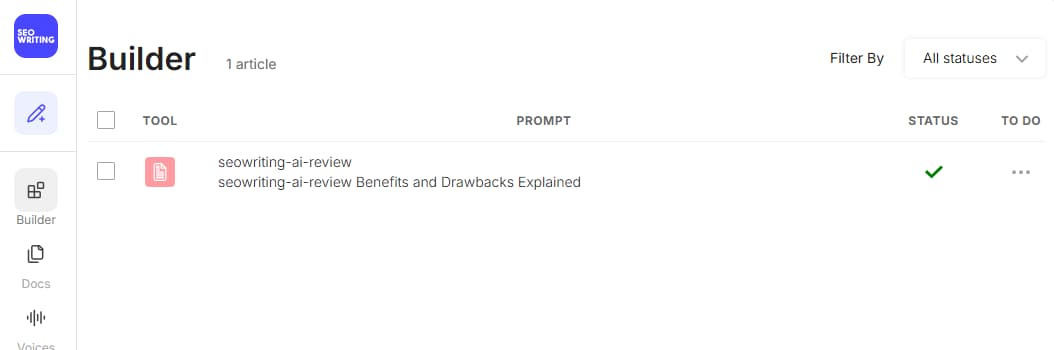
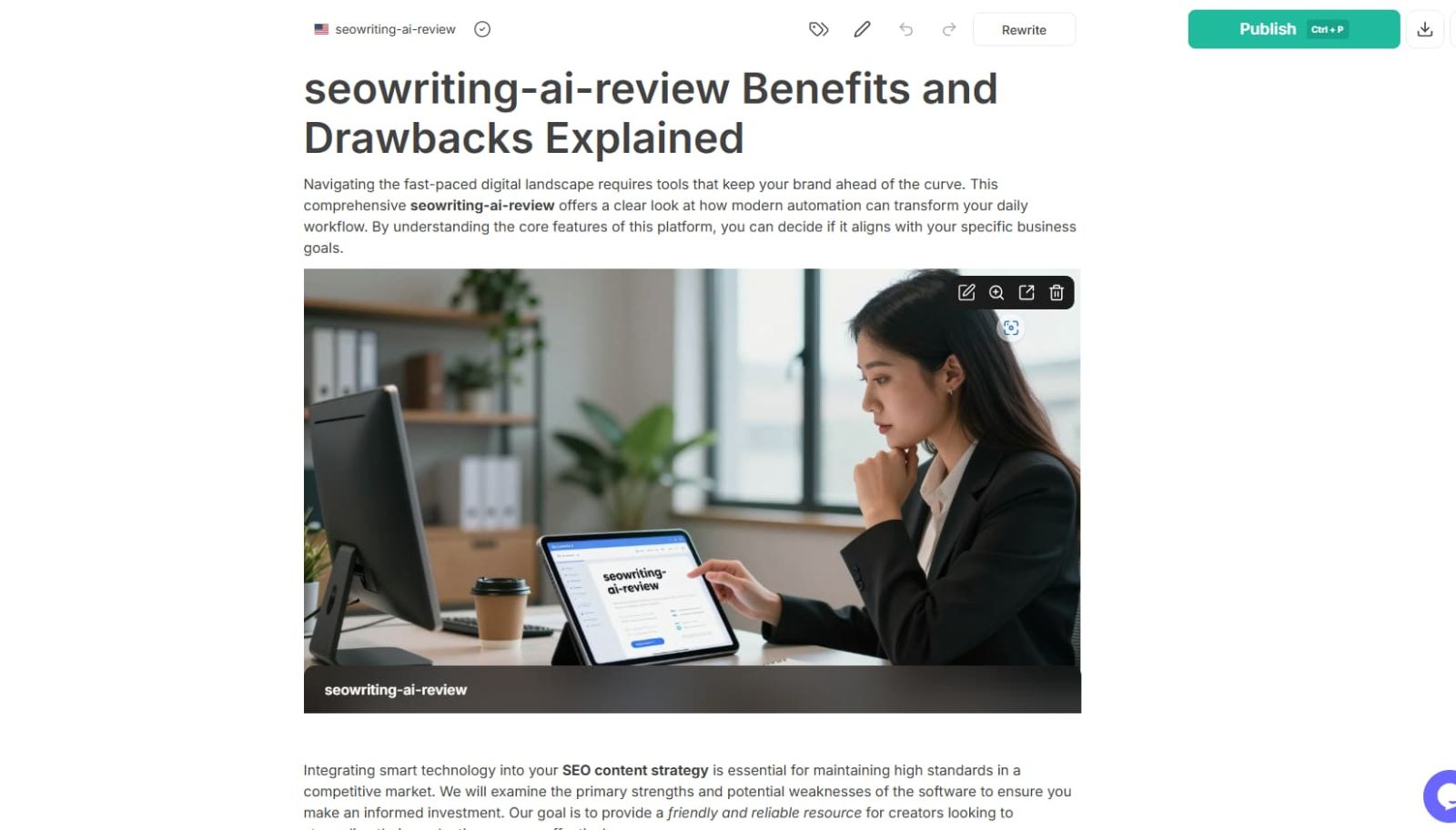
Builder queue → article draft output
We also checked the actual article-builder flow instead of stopping at signup screens. The workflow starts inside the Builder queue and then produces a draft article that still needs human editing, source checks, screenshots, and internal links before publishing.
Building affiliate content with SEOWriting.ai?
The dedicated publisher workflow guide explains how to use it for product reviews, buying guides, and cluster content without wrecking trust.
Read affiliate workflowSEOWriting.ai Pricing 2026
SEOWriting.ai pricing currently shows monthly and yearly billing options. Monthly pricing is the safer first paid test for most new users: Starter is shown at $19/month and Professional at $79/month. Yearly billing lowers the effective monthly price to $14/month for Starter and $59/month for Professional, but it only makes sense after the tool proves it fits your publishing workflow. SaaS pricing changes fast because apparently stable billing pages were too merciful, so readers should confirm current pricing, limits, and billing terms before paying.
| Plan | Live price snapshot | Best for | Main value | Watch out |
|---|---|---|---|---|
| Free | $0 / limited access | Testing output quality | Lets users test article generation before paying | Limited usage and not ideal for full content clusters |
| Starter | $19/mo monthly $14/mo effective price when billed yearly |
Solo bloggers and small affiliate publishers | Good first paid step for SEO article drafts and workflow testing | Lower output than higher tiers |
| Professional | $79/mo monthly $59/mo effective price when billed yearly |
Niche site builders and heavier publishing workflows | Better fit for ongoing article production and affiliate clusters | Still needs human editing and quality control |
| Professional Plus | Professional Plus tiers shown on the pricing page | Higher-volume content teams | More room for scale when the workflow already works | Do not upgrade before proving content quality |
Pricing note: this page is written for buyer guidance, not as a live pricing guarantee. Monthly pricing is usually the safer starting point for new users; yearly billing is the better value only after the workflow proves useful. Verify SEOWriting.ai’s current plan limits, billing cycle, and renewal terms before checkout.
Which SEOWriting.ai Plan Should You Pick?
Start free if you have not tested output quality. Move to Starter monthly when the drafts save more time than they create in editing. Move to yearly only after the workflow proves useful. Move to Professional when you are building content clusters at volume and already have a review process.
Starter Monthly
Best for most solo publishers who want to test real SEO article production without committing to a full-year subscription upfront.
Generate one real article draft, edit it, and compare the saved time against writing manually.
Choose Starter monthly when you want a practical paid workflow for blog posts, SEO drafts, and affiliate content without locking into annual billing too early.
Upgrade only when you are producing multiple articles, clusters, or WordPress posts consistently.
Need the pricing-only breakdown?
Use the dedicated SEOWriting.ai pricing article for plan-focused internal linking and buyer-intent traffic.
Read pricing guideKey Features That Matter in Real Work
SEOWriting.ai is most useful when each feature supports a real publishing step. Fancy buttons are cute. A repeatable article workflow is what actually saves time.
SEO Article Generation
Generate structured long-form drafts from keywords or topics, including headings, body content, and a search-focused article skeleton.
Affiliate Article Formats
Useful for review posts, product roundups, comparison articles, and “best X for Y” buying guides where structure matters before the editing stage.
WordPress Auto-Publishing
Reduces formatting and copy-paste friction when moving drafts into WordPress, especially for publishers managing several posts or niche sites.
AI Images
Can support basic article visuals, although premium affiliate thumbnails and product screenshots should still be created or selected manually.
SEO Metadata
Helps prepare titles, descriptions, and article structure so editors start from a more complete draft.
Multilingual Support
Helpful for international content expansion, but local search intent and translation quality still need review before publishing.
How to Use SEOWriting.ai Without Damaging Trust
AI SEO tools touch claims, product information, pricing, and reader trust. That means the workflow needs a quality gate before publishing. “The AI said it confidently” is not a source. It is just autocomplete wearing a blazer.
Best Way to Test SEOWriting.ai Before Paying Long-Term
Start with one real article. Pick a keyword you would actually publish. Generate the draft, edit it, check facts, add screenshots, add internal links, and compare the total time against writing manually. If the tool saves time without lowering trust, it earns a place in the workflow.
SEOWriting.ai vs Jasper vs Surfer SEO
SEOWriting.ai competes less as a generic copywriting tool and more as a publishing assistant for SEO articles and affiliate workflows. Jasper is broader for brand copy and campaigns. Surfer SEO is stronger for SERP-guided optimization. Different tools, different jobs, because apparently one dashboard cannot solve every human marketing problem.
| Category | SEOWriting.ai | Jasper | Surfer SEO | Best choice |
|---|---|---|---|---|
| SEO article drafts | Strong focus | Good but broader | Optimization-first | SEOWriting.ai |
| Affiliate content | Strong fit for reviews and roundups | Manual setup needed | Requires writer/editor workflow | SEOWriting.ai |
| Brand copy | Not the main angle | Strong | Not the main angle | Jasper |
| SERP optimization | Useful structure | Limited SEO-specific depth | Strongest | Surfer SEO |
| WordPress publishing | Core workflow advantage | Not core focus | Not core focus | SEOWriting.ai |
Which AI writing tool should you choose?
Choose SEOWriting.ai if your goal is SEO article production and WordPress publishing. Choose Jasper if your team needs broader brand copy. Choose Surfer SEO if you already have writers and mainly need content optimization guidance.
Want the direct comparison?
The SEOWriting.ai vs Jasper article should handle comparison-intent traffic and link back to this review as the pillar.
Read SEOWriting.ai vs JasperSEOWriting.ai for Affiliate Publishers
For CandidCodes-style affiliate sites, SEOWriting.ai is useful because it fits the exact workflow where publishers need many structured pages: reviews, coupon pages, pricing articles, comparisons, alternatives, and workflow guides. The tool helps draft faster, but the money is still in accuracy, proof, and conversion-focused editing.
Review articles
Use SEOWriting.ai to generate the first structure, then add screenshots, pricing checks, buyer verdicts, and internal links.
Coupon and deal pages
Use the tool for explanatory copy, but never invent coupon codes or discounts. Only use visible, verified offers. Tiny detail, large legal and trust implications.
Comparison posts
Use drafts for table structure and positioning, then add real differences, pricing notes, and who-should-pick-what logic.
Pros & Cons
-
You publish SEO articles regularly.
SEOWriting.ai is strongest when draft speed and repeatable structure matter. -
You run affiliate or niche sites.
The review, roundup, and WordPress workflow can save real production time. -
You already edit before publishing.
The tool works best when paired with fact-checking, screenshots, and internal links. -
You want a practical first paid plan.
Starter monthly is accessible enough for testing a serious workflow without locking yourself into a full year too early.
-
You need technical SEO audits.
It does not replace crawling, backlink analysis, rank tracking, or deep SEO diagnostics. -
You expect finished articles from one click.
The output still needs review, proof, sources, and buyer-specific editing. -
You publish in sensitive niches.
Medical, legal, finance, and safety topics need expert oversight. -
You only need brand ad copy.
A broader copywriting tool like Jasper may be a better fit for campaigns and ads.
Is SEOWriting.ai Worth It?
SEOWriting.ai is worth testing if your site needs structured SEO content faster and you already have a quality-control process. It is especially useful for affiliate publishers and WordPress bloggers who need repeatable article drafts rather than blank-page suffering disguised as strategy.
The Starter monthly plan is the cleanest first paid test for most solo publishers. Starter yearly becomes more logical only after the draft workflow has already proven it saves time. Professional makes sense when you are producing clusters consistently. Do not upgrade just because a pricing page has a bigger button. The internet has enough expensive optimism.
Start free, test one real article, then upgrade only if the draft reduces production time without lowering quality. Used correctly, SEOWriting.ai can be a useful SEO publishing assistant. Used lazily, it becomes another tool for manufacturing content nobody trusts.
SEOWriting.ai FAQ
What is SEOWriting.ai used for?
SEOWriting.ai is used for generating SEO articles, blog posts, affiliate content, product reviews, AI images, metadata, and WordPress-ready drafts.
Does SEOWriting.ai have a free plan?
Yes. The source draft notes free starting access, so users can test the article generation workflow before choosing a paid plan.
How much does SEOWriting.ai cost?
The live pricing screenshot shows Starter at $19/month and Professional at $79/month when billed monthly. Yearly billing lowers the effective monthly price to $14/month for Starter and $59/month for Professional. Pricing and limits can change, so confirm the live pricing page before subscribing.
Is SEOWriting.ai good for affiliate content?
Yes. It is a strong fit for affiliate reviews, product roundups, buying guides, comparison posts, and long-tail SEO articles, as long as the publisher manually verifies facts, pricing, and affiliate links.
Can SEOWriting.ai publish to WordPress?
Yes. SEOWriting.ai supports WordPress auto-publishing workflows, which can reduce manual formatting and upload work.
Is SEOWriting.ai better than Jasper?
SEOWriting.ai is better for SEO article production and WordPress publishing workflows. Jasper is broader and may fit brand marketing, ad copy, and campaign content better.
What is the best SEOWriting.ai plan?
For most solo publishers, Starter monthly is the best first paid test. Starter yearly is better only after the workflow proves useful, while Professional fits higher-volume content clusters.
Final Verdict: Is SEOWriting.ai Worth Trying?
SEOWriting.ai is worth trying if your content workflow needs faster SEO article drafts, affiliate article structure, metadata, AI image support, and WordPress publishing help. It is not a magic ranking machine. It is a production assistant, and like most assistants, it works better when the human in charge is not asleep at the dashboard.