HomeDesigns.ai Review 2026 — AI Interior Design, Room Redesign & Virtual Staging

Candidcodes

1 week ago

Written & Reviewed by CandidCodes Editorial Team – SaaS & AI Tools Research

Our team reviewed HomeDesigns.ai’s official website, pricing plans, AI room redesign workflow, virtual staging tools, design style options, rendering quality, and publicly available product details before writing this review. This article was last updated May 2026.

Affiliate Disclosure: Some links in this article may be affiliate links. If you choose to sign up through them, we may earn a commission at no extra cost to you. We only recommend tools we have researched and believe offer genuine value.
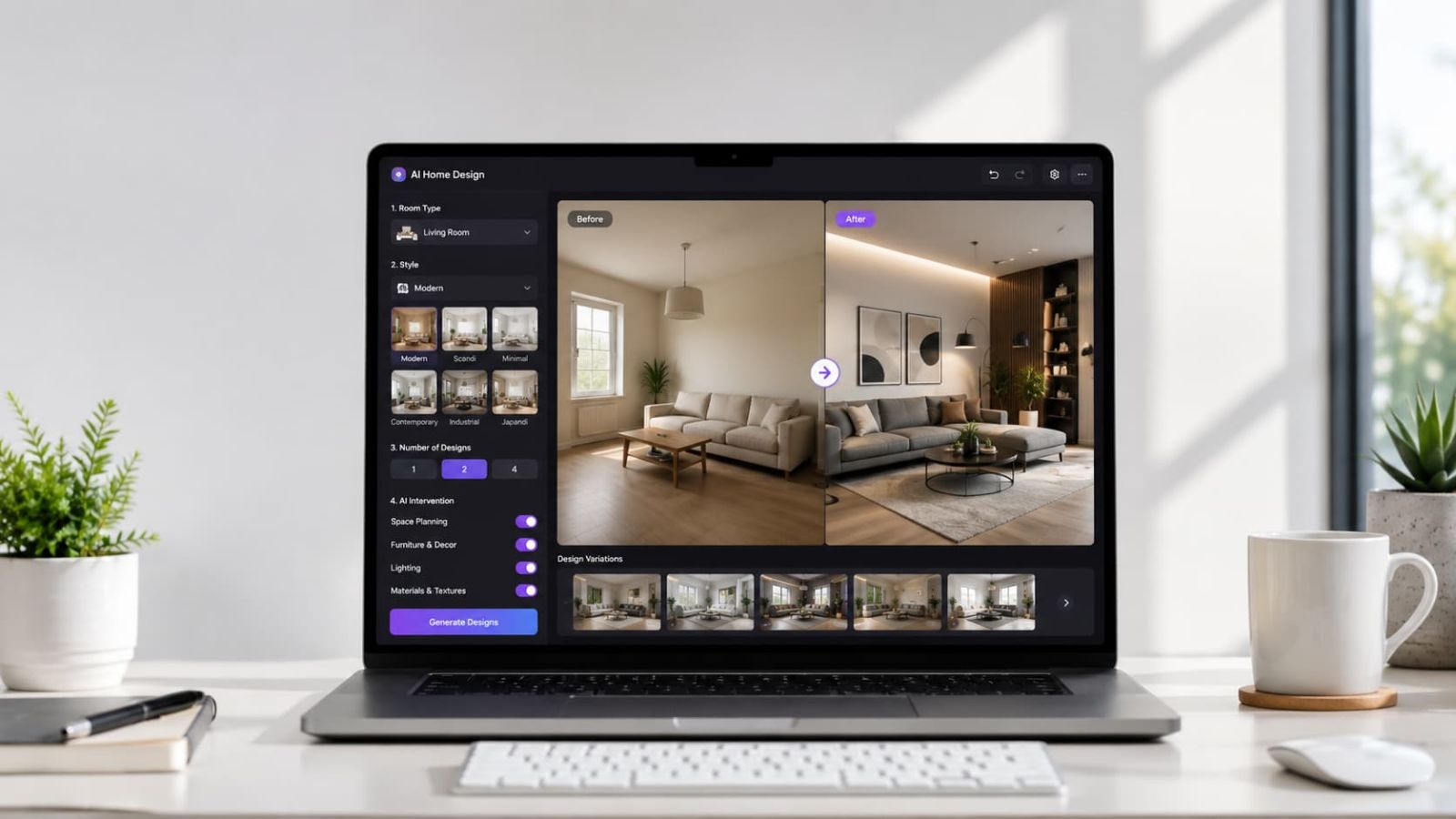
HomeDesigns.ai Review 2026 — AI interior design tool for room redesign, virtual staging, and home renovation visualization
HomeDesigns.ai Review 2026: AI room redesign, virtual staging, 80+ design styles, and home renovation visualization.

HomeDesigns.ai Quick Summary

Best for: homeowners planning renovations, real estate agents needing virtual staging, Airbnb hosts optimizing room photos, interior design enthusiasts, architects, and property developers who want to visualize space redesigns before spending money on physical changes.

Not best for: users who need technical CAD drawings, precise floor plan software with measurements, or full project management tools for contractor coordination.

Best value point: HomeDesigns.ai Pro at $11/month (yearly) delivers 1,000 AI room redesigns, 80+ design styles, virtual staging, and commercial license — replacing tools that cost $500+ per room from traditional agencies.

Best first step: Start free, upload a real room photo, test 3 different styles, and compare the AI output against your design vision before upgrading.

If your home renovation plan currently lives in a Pinterest board full of contradictory aesthetics and a notes app that just says “maybe blue walls?” — HomeDesigns.ai was built for that situation.

HomeDesigns.ai is an AI-powered interior design platform used by 2.63M+ users worldwide. Upload any room photo — interior, exterior, or garden — and the AI generates photorealistic redesigns in under 30 seconds across 80+ design styles. No design experience, no expensive software, no waiting days for a designer to send you a concept.

This HomeDesigns.ai review covers what the platform does, who it is best for, current pricing, free trial details, key features, pros and cons, alternatives, and whether it is worth using in 2026.

Check the latest HomeDesigns.ai pricing and platform details:

HomeDesigns.ai pricing plans 2026

HomeDesigns.ai Review 2026: Pricing, Features & Best Plan

CANDIDCODES · MAY 2026

Try HomeDesigns.ai Free →

CandidCodes Rating: 4.6 / 5

★★★★☆

Ease of Use 4.8  •  AI Design Quality 4.6  •  Style Variety 4.7  •  Virtual Staging 4.5  •  Value for Money 4.7

Best for: homeowners, real estate agents, Airbnb hosts, and design enthusiasts who want fast AI room redesigns without hiring a designer.

Best feature: 1,000 AI redesigns/month at $11/mo (yearly) — with virtual staging, 80+ styles, and commercial license included on the Pro plan.

Main downside: AI outputs are visual concepts, not technical drawings. Furniture dimensions and material specs still need human review before making physical purchases.

Best first step: Upload a real room photo, test 3 styles, and evaluate the rendering quality before upgrading.

Why Most Home Renovation Projects Start Wrong (And How HomeDesigns.ai Fixes It)

Most renovation mistakes happen before the first purchase. Without a clear visual of the finished room, homeowners make decisions based on imagination — and imagination is notoriously bad at predicting how a terracotta accent wall will actually look next to grey furniture in afternoon light.

Hiring a designer for concept visuals costs $500–$2,000+ per room. 3D rendering software requires months of learning. Pinterest shows other people’s rooms, not yours. The result: most people spend money on physical changes they end up regretting.

HomeDesigns.ai compresses the concept stage to under 30 seconds — upload your room photo, select a style, get a photorealistic redesign. Iterate on styles without spending a dollar on paint, furniture, or contractor time. At $11/month on the yearly plan, it costs less than a single stock photo.

❌ Without HomeDesigns.ai ✓ With HomeDesigns.ai
Interior designer consultation: $500–$2,000+ per room AI redesign From $9/mo (yearly) — unlimited style testing
Virtual staging agency: $100–$300 per room AI virtual staging included on Pro and Expert plans
3D rendering software: $50–$200/month + learning curve No software skills needed — upload photo, get result in 30 sec
Pinterest boards show other rooms, not your space AI redesigns your actual room in your chosen style
Discover bad design choices after spending money Test 80+ styles before any physical changes

Quick Verdict

Best for: homeowners, real estate agents, Airbnb hosts, architects, and interior design enthusiasts who want photorealistic room redesign visuals fast and affordably.

Not ideal for: users needing technical CAD drawings, precise floor plans, or full renovation project management software.

Best plan: Pro at $11/mo yearly — 1,000 designs/month, 80+ styles, virtual staging, commercial license.

Best first step: Start free → test on a real room → upgrade only when confident in the output quality.

Best HomeDesigns.ai Deal Right Now — May 2026

Annual billing saves up to 50% compared to monthly. No coupon needed — the yearly discount is applied automatically at checkout.

  • Individual: $9/mo billed yearly (was $27/mo monthly) — 100 designs, 40+ styles
  • Pro: $11/mo yearly (was $29/mo monthly) — 1,000 designs, 80+ styles, Virtual Staging, Commercial License
  • Expert: $14/mo yearly (was $37/mo monthly) — 2,000 designs, 100+ styles, Video Generation, 2D to 3D Floorplans, 5 seats

See HomeDesigns.ai Plans & Start Free →

What Is HomeDesigns.ai?

HomeDesigns.ai is an AI-powered interior and exterior design platform trusted by 2.63M+ users in 170+ countries. It transforms photos of any space — rooms, exteriors, gardens — into photorealistic AI redesigns across 80+ design styles, instantly.

The platform supports Personal Use, Professional Use, and Business Use cases, with features ranging from basic room redesign to virtual staging, 2D to 3D floorplans, video generation, furniture finder, and color/texture swapping.

In plain English: HomeDesigns.ai lets you see exactly what your space will look like after a redesign — before you spend a single dollar on furniture, paint, or contractors.

Creating content around home design, real estate, or Airbnb?

Who Should Use HomeDesigns.ai?

HomeDesigns.ai may be a good fit for:

  • Homeowners planning renovations who want to visualize results before spending
  • Real estate agents needing fast, affordable virtual staging for listings
  • Airbnb and short-term rental hosts improving room aesthetics to boost bookings
  • Interior design enthusiasts exploring style options for their own spaces
  • Architects and designers creating quick concept visuals for client presentations
  • Property developers visualizing unit interiors for marketing materials
  • Home stagers reducing physical staging costs with AI visualization

If you also need to manage client relationships for your design or real estate business, our SuiteDash Review 2026 covers client portal management, project tools, and invoicing.

HomeDesigns.ai may not be the right fit if you need technical CAD drawings, precise floor plans, or a full renovation project management platform.

Latest HomeDesigns.ai Pricing 2026

HomeDesigns.ai offers three paid plans — Individual, Pro, and Expert — with up to 50% savings on annual billing. All plans include a cancel anytime option. No coupon needed — the annual discount applies automatically.

HomeDesigns.ai pricing 2026 — Individual $8/mo, Pro $11/mo, Expert $14/mo on yearly billing
HomeDesigns.ai pricing 2026: Individual $9/mo, Pro $11/mo, Expert $14/mo — billed yearly. Monthly rates: $27, $29, $37.

Plan Monthly Price Yearly Price Designs/Mo Best For
Individual $27/mo $9/mo billed yearly 100 Homeowners & design enthusiasts — 40+ styles, interiors, exteriors, gardens
Pro ⭐ Most Popular $29/mo $11/mo billed yearly 1,000 Airbnb hosts & real estate agents — 80+ styles, Virtual Staging, Commercial License
Expert $37/mo $14/mo billed yearly 2,000 Architects & agencies — 100+ styles, Video Generation, 2D to 3D Floorplans, 5 seats

💰 HomeDesigns.ai Value Breakdown — Is It Worth It?

Traditional Costs

❌ Interior designer: $500–$2,000+ per room
❌ Virtual staging agency: $100–$300 per room
❌ 3D software license: $50–$200/month
❌ Turnaround: days to weeks

HomeDesigns.ai Pro — $11/mo yearly

✓ 1,000 AI redesigns/month
✓ Virtual staging included
✓ 80+ styles, Commercial License
✓ Results in under 30 seconds

Bottom line: At $11/month on the yearly Pro plan, HomeDesigns.ai delivers more design volume than most renovation projects will ever need — at a cost that pays for itself after a single avoided bad purchase decision.

Want to lock in the 50% yearly discount?

See HomeDesigns.ai Plans →

Does HomeDesigns.ai Have a Free Trial?

HomeDesigns.ai offers free access from its official website — enough to test the AI on a real room before committing. Before upgrading, test these:

  • Upload a real photo of a room you actually want to redesign
  • Test at least 3 different design styles on the same room
  • Evaluate rendering quality — furniture realism, lighting, proportions
  • Check the before/after comparison view
  • Test virtual staging if relevant to your use case
  • Assess how well the AI preserves your room’s structure while applying the new style

Want to test HomeDesigns.ai before paying?

Try HomeDesigns.ai Free →

Key Features of HomeDesigns.ai

1. AI Room Redesign — Interior, Exterior & Garden

HomeDesigns.ai generates photorealistic redesigns from any room photo in under 30 seconds. The AI maintains the room’s architectural structure while replacing furniture, colors, textures, and decor according to the selected style. It works across interiors, exteriors, and gardens — making it one of the most versatile AI design tools available.

The quality difference from basic filters is significant: the AI understands spatial relationships, lighting direction, and material rendering — producing outputs that look like actual design proposals rather than digital collages.

HomeDesigns.ai AI room redesign — interior, exterior and garden in under 30 seconds
HomeDesigns.ai AI redesign: upload any room photo and get a photorealistic redesign in under 30 seconds.

2. 80+ Interior Design Styles

HomeDesigns.ai supports 80+ design styles on the Pro plan and 100+ on Expert — modern, Scandinavian, minimalist, industrial, farmhouse, bohemian, Art Deco, mid-century modern, coastal, Japanese, and many more. Users can apply different styles to the same room photo to directly compare how each transforms the space.

Style variety is the feature that converts hesitant users fastest. Most homeowners don’t know their preferred style until they see their own room transformed. Testing 10 styles in 5 minutes costs nothing extra on a paid plan — and replaces the kind of back-and-forth that usually takes weeks with a designer.

HomeDesigns.ai 80+ interior design styles including modern, Scandinavian, industrial, farmhouse
HomeDesigns.ai: 80+ design styles on Pro — modern, Scandinavian, industrial, farmhouse, bohemian, and more.

3. Virtual Staging for Real Estate & Airbnb

HomeDesigns.ai includes 1-Click Virtual Staging on the Expert plan — transforming empty or sparsely furnished room photos into fully styled spaces for listings, rental platforms, or marketing materials. Traditional virtual staging agencies charge $100–$300 per room; AI staging delivers comparable results at a fraction of the cost with same-day turnaround.

For real estate agents managing multiple listings or Airbnb hosts refreshing property photos seasonally, the volume economics are compelling. If your real estate business also needs outbound lead generation, our UpLead Review 2026 covers B2B contact data and prospecting platforms for property businesses.

HomeDesigns.ai virtual staging for real estate listings and Airbnb
HomeDesigns.ai virtual staging: transform empty rooms into fully furnished spaces for listings and rental platforms.

4. Before/After Comparison

HomeDesigns.ai includes a built-in before/after comparison view — original room and AI redesign side by side. This is essential for client presentations, renovation planning conversations, and sharing concepts with contractors before making physical decisions.

The comparison view also helps users evaluate whether the AI preserved the room’s structure accurately — important for assessing whether the output is useful for their specific space.

HomeDesigns.ai before and after room comparison view
HomeDesigns.ai before/after comparison: view original and redesigned room side by side for renovation planning.

5. Multiple Room & Space Types

HomeDesigns.ai supports 40+ space types on Individual, 80+ on Pro, and 100+ on Expert — living rooms, bedrooms, kitchens, bathrooms, dining rooms, home offices, exteriors, gardens, and commercial spaces. The platform is not limited to residential use; it handles retail, offices, restaurants, and hospitality interiors.

Multi-space support makes the platform practical for whole-home renovation planning and commercial interior concepts. For businesses managing client relationships alongside design operations, our SuiteDash Review 2026 covers client portal and project management tools.

HomeDesigns.ai multiple room and space types — living room, bedroom, kitchen, exterior, garden
HomeDesigns.ai space types: 80+ room and outdoor types on Pro including interiors, exteriors, and gardens.

6. High-Resolution Rendering, Furniture Finder & More

Beyond redesign, HomeDesigns.ai includes a Furniture Finder (find real products matching the AI-generated design), Color & Texture Swap Mode, Auto-Fill Empty Spaces, Sky Colors Mode, Design Transfer Mode, and on the Expert plan: 2D to 3D Floorplans, Video Generation, and Budget Estimator.

For creators sharing AI interior design content on social media, our Vista Social Review 2026 covers multi-platform scheduling, analytics, and social media management for design and real estate content.

HomeDesigns.ai high-resolution rendering, furniture finder, and advanced features
HomeDesigns.ai advanced features: Furniture Finder, Color Swap, 2D to 3D Floorplans, Video Generation, and more.

Ready to explore HomeDesigns.ai?

Start HomeDesigns.ai Free →

Want to visualize your room before spending money on renovations?

AI room redesign across 80+ interior design styles
Virtual staging for real estate and rental listings
Before/after comparison built in
Interiors, exteriors, gardens — 80+ space types
Pro plan from $11/mo yearly — Commercial License included

Try HomeDesigns.ai Free →

HomeDesigns.ai Plans: What to Compare Before Upgrading

What to Compare Why It Matters Best For
Designs per month Individual: 100 / Pro: 1,000 / Expert: 2,000. Know your volume before choosing. Anyone doing multiple rooms or high-frequency redesigns
Virtual Staging access 1-Click Virtual Staging is on Expert plan. Pro has Beautiful Redesign Mode as an alternative. Real estate agents and Airbnb hosts
Commercial License Required if using outputs for client work, listings, or marketing materials. Included on Pro and Expert. Real estate agents, designers, architects
2D to 3D Floorplans Expert plan only. Useful for architects and property developers needing spatial planning visuals. Architects and property developers
Team seats Expert plan includes up to 5 seats for team use. Individual and Pro are single-user plans. Design agencies and real estate teams

HomeDesigns.ai Pros and Cons

Pros

  • Extremely easy to use — no design skills or software knowledge required
  • Results in under 30 seconds — fastest AI design tool tested
  • 80–100+ interior design styles across all paid plans
  • Covers interiors, exteriors, and gardens in one platform
  • Virtual staging included at a fraction of traditional agency costs
  • Pro plan at $11/mo yearly is exceptional value for 1,000 designs/month
  • Commercial License included on Pro and Expert
  • Furniture Finder helps bridge AI concept to real products
  • 2D to 3D Floorplans on Expert for spatial planning
  • Rated 4.8/5 from 1,300+ reviews — 2.63M+ users worldwide

Cons

  • AI outputs are visual concepts — not technical drawings or precise measurements
  • Furniture placement and dimensions are AI estimates, not specifications
  • Output quality depends on original photo quality and lighting conditions
  • 1-Click Virtual Staging is Expert plan only
  • Not a replacement for a professional designer on complex structural renovations

Which HomeDesigns.ai Plan Should You Choose?

Choose Individual ($9/mo

yearly) if:

You are a homeowner with a single renovation project and 100 designs per month is enough. Good for exploring style options before committing to a direction. Entry point is low enough to test without meaningful financial risk.

Choose Pro ($11/mo yearly) if:

You regularly redesign multiple rooms, need a Commercial License for professional use, or want 1,000 designs per month for high-volume testing. The Pro plan is the best value point for most active users — the jump from Individual to Pro is $3/month for 10x the design volume.

Choose Expert ($14/mo yearly) if:

You need 1-Click Virtual Staging, 2D to 3D Floorplans, Video Generation, Budget Estimator, or team seats for up to 5 users. The Expert plan is designed for professionals — architects, interior designers, real estate teams, and property developers.

Avoid upgrading too fast if:

You have not tested the platform with your actual rooms. AI output quality varies depending on photo quality, room type, and style. Start free, validate the results, then choose the plan that matches your actual usage volume.

Ready to choose your HomeDesigns.ai plan?

View HomeDesigns.ai Plans →

Is HomeDesigns.ai Worth It?

Yes — for homeowners, real estate agents, Airbnb hosts, and design professionals who regularly need room visualization, HomeDesigns.ai at $11/month on the yearly Pro plan is one of the better-value AI design tools available. The speed (under 30 seconds), style range (80+), and volume (1,000 designs/month) make it practical for real workflows rather than occasional curiosity.

The platform delivers best results when used as a decision-support tool — not a finished design deliverable. Use the AI outputs to narrow down direction, communicate more clearly with contractors and designers, and avoid costly mistakes before committing to physical changes.

If you generate photorealistic AI concepts and then ignore them when purchasing actual furniture and materials, that is a workflow problem, not a platform failure. The tool shows you the vision. Acting on it accurately is still your job.

Running social media campaigns for your design or real estate business?

HomeDesigns.ai vs Alternatives

RoomGPT: Early AI room redesign tool with simpler interface. HomeDesigns.ai has significantly more style options, higher design volume limits, commercial licensing, and additional features like virtual staging and 2D to 3D floorplans.

REimagineHome: Similar core functionality. Worth testing alongside HomeDesigns.ai on the same room photo to compare rendering quality directly before deciding.

Midjourney / DALL-E: General AI image generators — require detailed text prompts and cannot accept room photos as input. HomeDesigns.ai is purpose-built for room redesign using your actual space.

Traditional Virtual Staging: Human-edited staging produces more precise results but costs $100–$300 per room with 24–48 hour turnaround. HomeDesigns.ai is better for high-volume, fast-turnaround needs.

HomeDesigns.ai: Best for users wanting fast AI room redesign with 80+ styles, virtual staging, commercial license, and value pricing — particularly the Pro plan at $11/mo yearly.

How HomeDesigns.ai Fits Into a Broader Workflow

HomeDesigns.ai works best as the visual concept layer. A practical stack: HomeDesigns.ai for room visualization, a CRM or client portal for managing projects, and a social media tool for distributing before/after content.

For design businesses using AI video ads to promote their services, our Arcads AI Review 2026 covers AI video generation for property marketing campaigns. For Airbnb hosts and real estate businesses needing local search visibility, our Localo Review 2026 covers Google Business Profile optimization.

Frequently Asked Questions

What is HomeDesigns.ai used for?

HomeDesigns.ai is used to generate AI-powered redesigns of rooms, exteriors, and gardens from uploaded photos — across 80+ design styles. It supports virtual staging, before/after comparison, furniture finding, color swapping, and 2D to 3D floorplan generation.

How much does HomeDesigns.ai cost?

HomeDesigns.ai has three paid plans. Monthly: Individual $27/mo, Pro $29/mo, Expert $37/mo. Yearly (save 50%): Individual $9/mo, Pro $11/mo, Expert $14/mo. All plans include a cancel anytime option.

Does HomeDesigns.ai have a free trial?

Yes. HomeDesigns.ai offers free access to test AI redesigns before choosing a paid plan. Upload a real room photo and test several styles before committing.

Which HomeDesigns.ai plan is best value?

The Pro plan at $11/mo yearly is the best value for most users — 1,000 designs per month, 80+ styles, Commercial License, and virtual staging access, for $3/month more than the Individual plan.

Is HomeDesigns.ai good for real estate virtual staging?

Yes. HomeDesigns.ai supports virtual staging — 1-Click Virtual Staging is available on the Expert plan. Pro plan users can use Beautiful Redesign Mode for similar staging-like results at a lower price point.

What design styles does HomeDesigns.ai support?

HomeDesigns.ai supports 40+ styles on Individual, 80+ on Pro, and 100+ on Expert — including modern, Scandinavian, minimalist, industrial, farmhouse, bohemian, Art Deco, mid-century modern, coastal, Japanese, and many more.

Can HomeDesigns.ai redesign exteriors and gardens?

Yes. HomeDesigns.ai supports interiors, exteriors, and gardens — making it more versatile than most AI interior design tools that focus only on indoor spaces.

Is HomeDesigns.ai worth it for homeowners?

Yes — especially at $9/mo on the Individual yearly plan. For homeowners planning renovations, the cost of a single avoided bad design decision typically exceeds the annual subscription cost.

Current HomeDesigns.ai Deal — May 2026

Save up to 50% with yearly billing — no coupon needed, discount applies automatically at checkout.

✓ Individual: $9/mo yearly (100 designs, 40+ styles)
✓ Pro: $11/mo yearly (1,000 designs, 80+ styles, Commercial License)
✓ Expert: $14/mo yearly (2,000 designs, Virtual Staging, 2D to 3D Floorplans)

Start Free → Upgrade When Ready

Final Verdict

HomeDesigns.ai is the most accessible and cost-effective AI room redesign tool available in 2026. At $11/month on the yearly Pro plan, it delivers 1,000 AI redesigns, 80+ design styles, commercial licensing, and virtual staging — a combination that replaces hundreds of dollars in traditional design and staging costs for the right use cases.

The platform is rated 4.8/5 from 1,300+ reviews and used by 2.63M+ users in 170+ countries — numbers that reflect genuine utility rather than marketing noise. Its biggest strength is speed and accessibility: under 30 seconds from upload to photorealistic redesign, with zero design skills required.

For homeowners planning renovations, real estate agents staging listings, and Airbnb hosts optimizing room photos, HomeDesigns.ai is worth trying in 2026 — particularly with free access available to validate quality before any payment is required.

Try HomeDesigns.ai Before Your Next Renovation Decision

Start free — upload a real room photo, test multiple styles, and see your space transformed before making any physical changes.

🛡 Start Free — Save 50% With Yearly Billing

✓ Free access — test before you pay
✓ Pro plan: $11/mo yearly — 1,000 designs, 80+ styles
✓ Commercial License included on Pro & Expert
✓ Cancel anytime — no lock-in

Start Free → Upgrade to Pro at $11/mo Yearly

Free access available  ·  50% off with yearly billing  ·  Cancel anytime

Try HomeDesigns.ai Now → AI Interior Design · Room Redesign · Virtual Staging · 80+ Styles · From $9/mo

Explore more AI tool reviews, SaaS deals, and software breakdowns on CandidCodes.

Popular Blog

Mooncool TK2 Electric Trike Review 2026: New Commuter Pick With 6 Colors

Mooncool TK1 Folding Electric Trike Review 2026: Best Value Commuter Pick?

Best Electric Trikes for Seniors 2026: Comfort, Stability, Range and Deals

Mooncool TK Pro Review 2026: Is the Top Model Worth It?

Best Mooncool Electric Trikes 2026: TK1 vs TK Pro vs TK2 vs FT1 Compared

Mooncool Review 2026: Are Mooncool Electric Trikes Worth It?