📊 Social Media Management✓ Free plan available📅 Updated May 2026⭐ G2 Leader 2026🔥 14-day free trial
✦ Review intent✦ Pricing intent✦ Alternative intent✦ Trial intent
Vista Social Review 2026: Pricing, Free Plan & 10% Discount Code
📅 May 2026⏱️ 15 min read🔎 Research-based🔗 Affiliate links
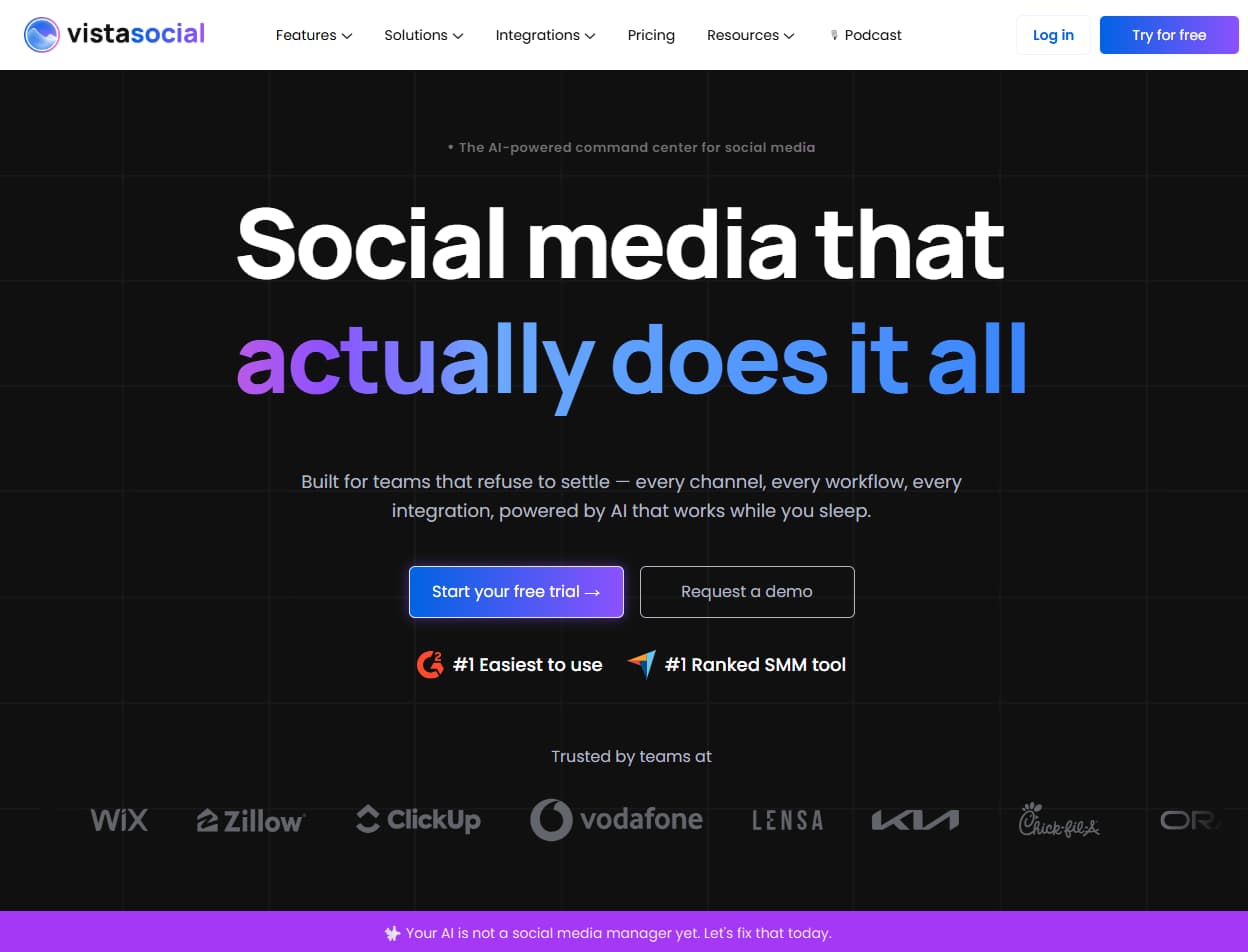
Vista Social is a modern all-in-one social media management platform built for agencies, SMBs and social media managers. In this review we break down real pricing, every key feature with operational use cases, honest comparisons against Hootsuite and Buffer, and a clear verdict on who it's actually built for.
Vista Social Review 2026: social scheduling, unified inbox, analytics, AI captions, reporting, and agency workflow context.
30-second verdict
What you need to know upfront
Industry insight
Most social media tools fail when teams scale beyond simple scheduling. Inbox management and approval workflows typically become the operational bottleneck first — and those are exactly the two areas where Vista Social invests most of its product differentiation at the Professional tier.
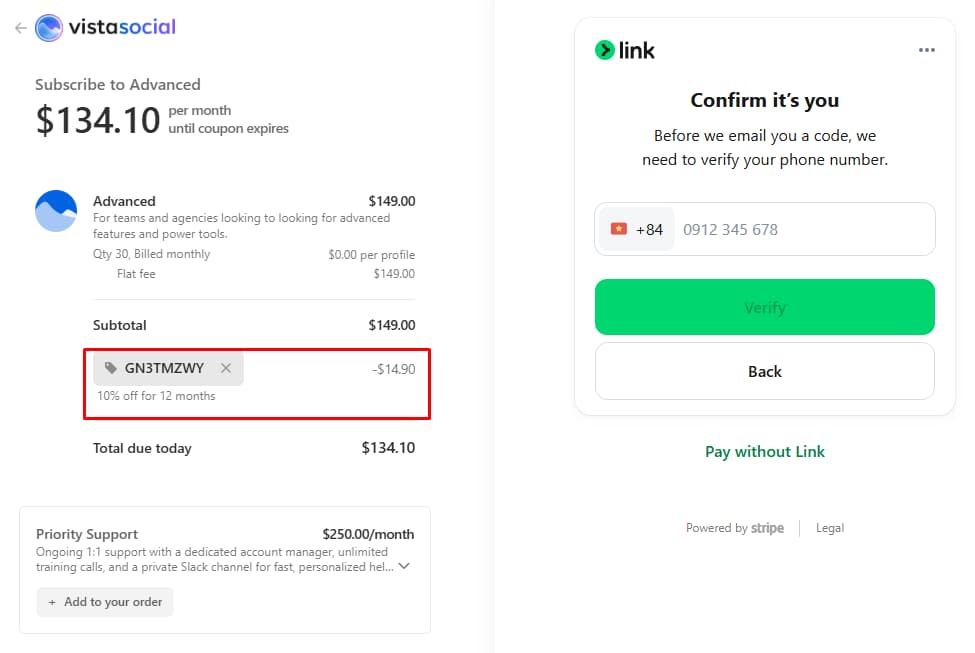
We tested the Vista Social coupon flow through the live signup and checkout path. The code Gn3TMZWy was applied at checkout and showed 10% off for 12 months on the Advanced plan, reducing the checkout price from $149.00 to $134.10.
Live coupon check summary
This is not just a copied coupon code. We created an account, opened the onboarding flow, selected a paid plan, and confirmed the discount directly on the checkout screen.
Verified codeGn3TMZWy
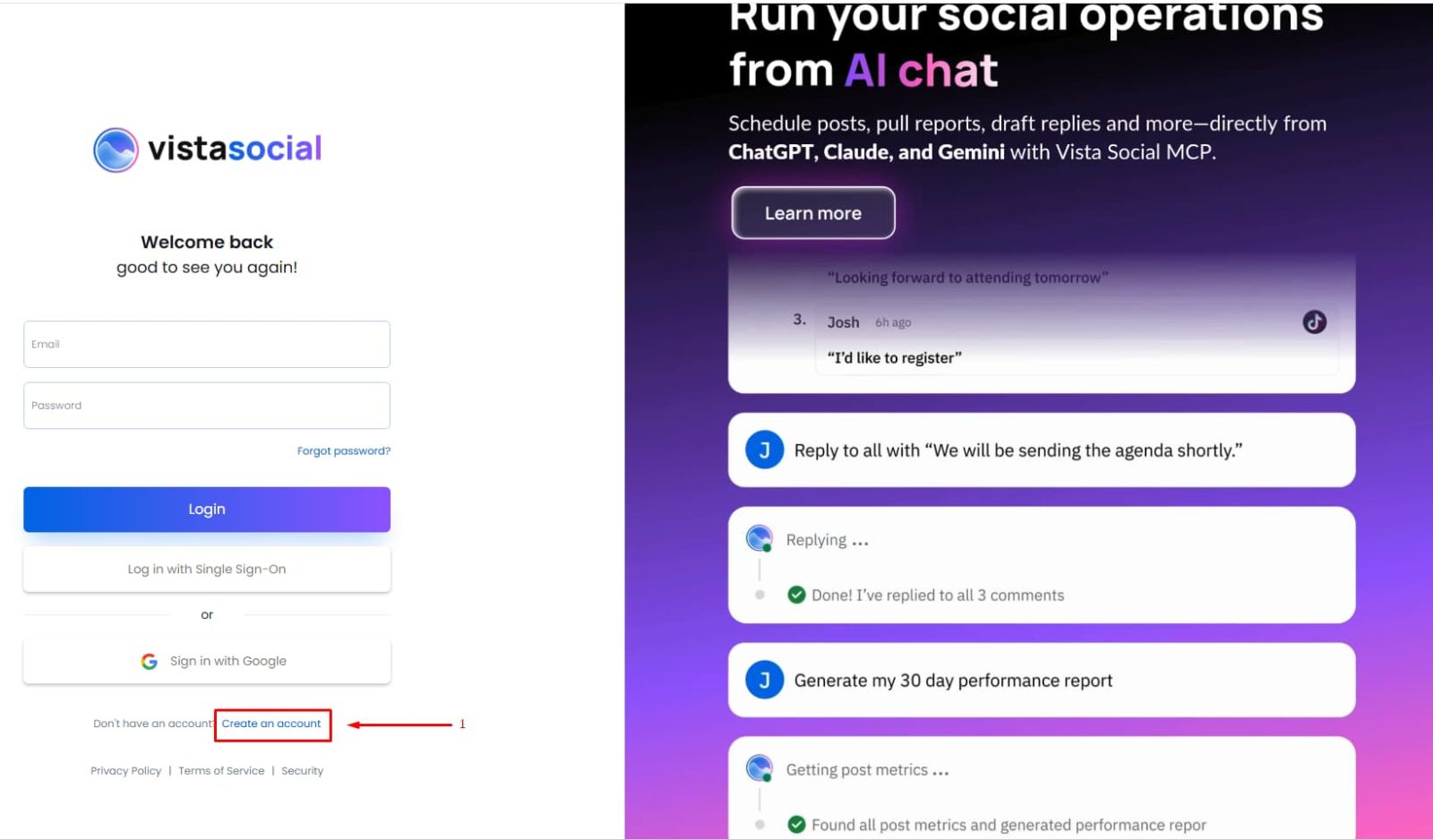
Step 1
Create a Vista Social account
Start from the Vista Social login page and choose “Create an account.”
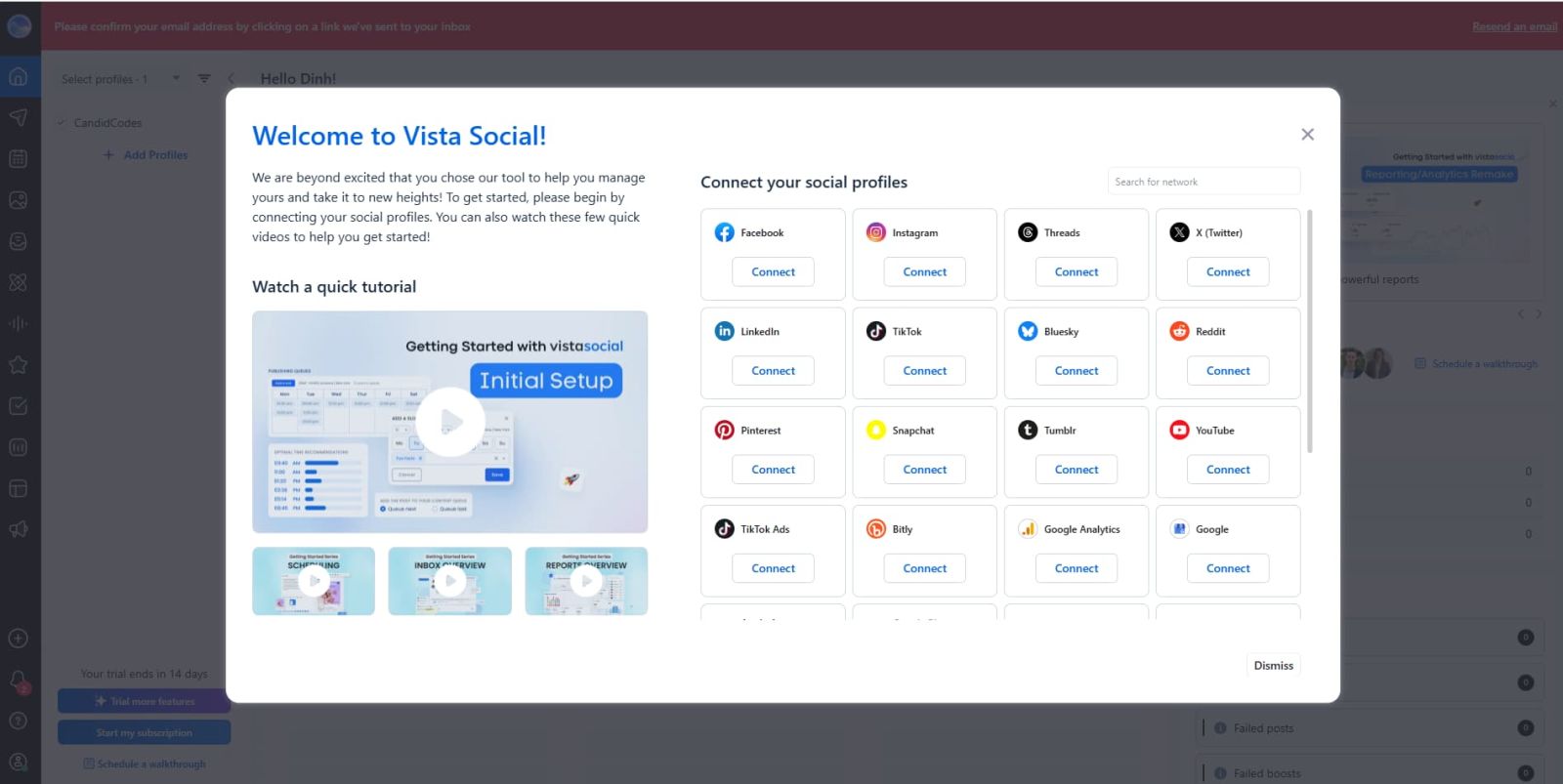
Step 2
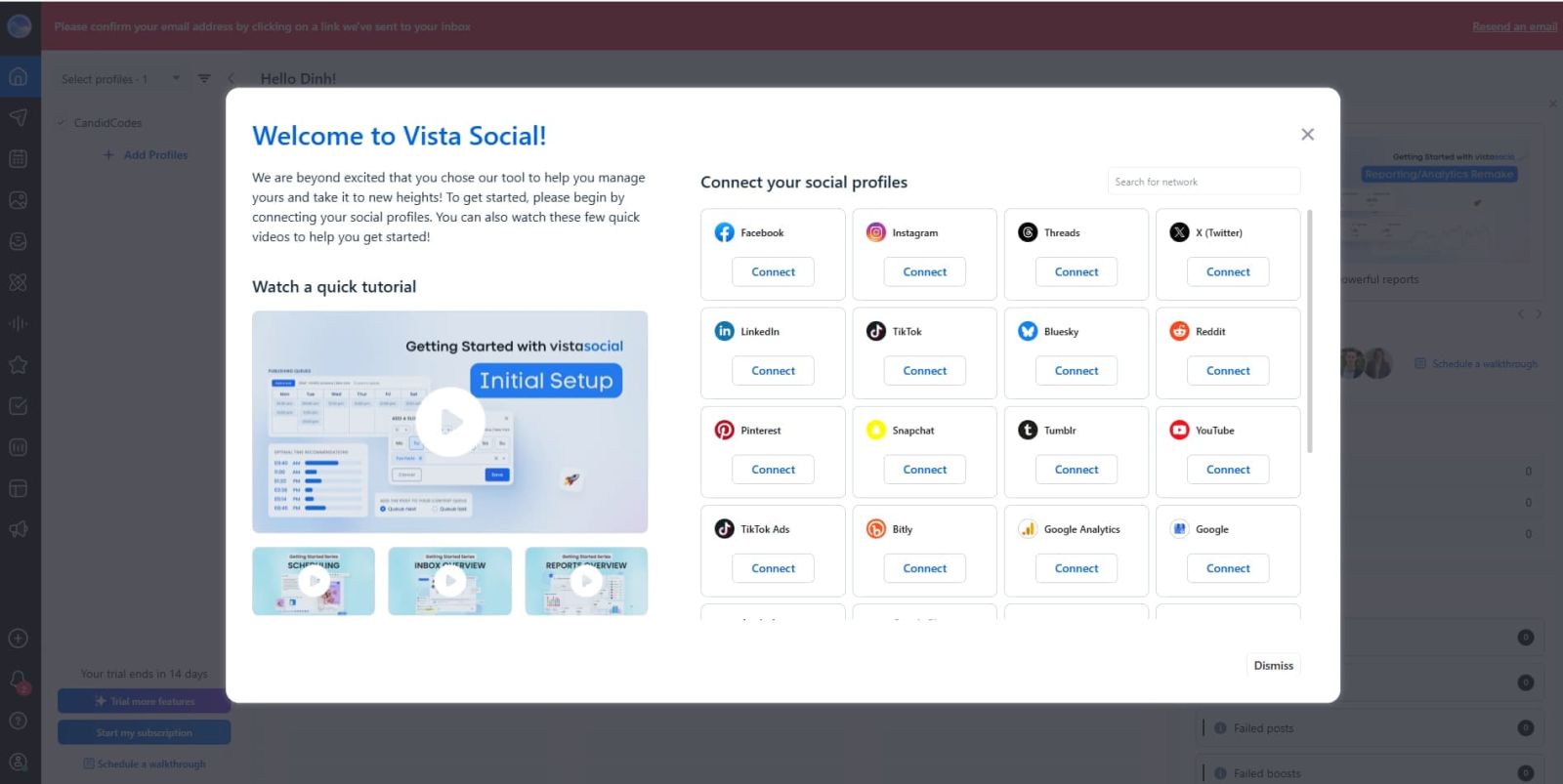
Complete onboarding and connect profiles
Vista Social onboarding asks users to connect social profiles before using the dashboard.
Step 3
Apply coupon code Gn3TMZWy at checkout
Coupon code Gn3TMZWy applied at checkout, showing 10% off for 12 months.
⚠️ Coupon availability, discount duration, and final checkout pricing can change. Always confirm the discount on the live Vista Social checkout page before paying.
Editorial Trust Check
Why Trust This Vista Social Review?
We reviewed Vista Social as a social media operations platform, checked the live pricing flow, tested the Gn3TMZWy discount code at checkout, and compared the buyer fit against Hootsuite and Buffer. The goal is simple: show whether Vista Social is worth using before readers click, trial, or pay.
Review method
How We Researched Vista Social
For this Vista Social review, we reviewed the official website, pricing information, feature pages, public review signals, and competing social media management workflows before updating this article.
Step 1: Pricing check
We checked the plan ladder, annual vs monthly logic, free trial positioning, and where features become meaningful for agencies and SMB teams.
Step 2: Workflow check
We evaluated publishing, inbox, AI captions, approvals, reviews, analytics, and client reporting as one connected workflow.
Step 3: Buyer comparison
We compared Vista Social with Hootsuite and Buffer to clarify when each tool makes sense instead of pretending one tool wins every universe.
Pricing
Vista Social pricing & plans 2026
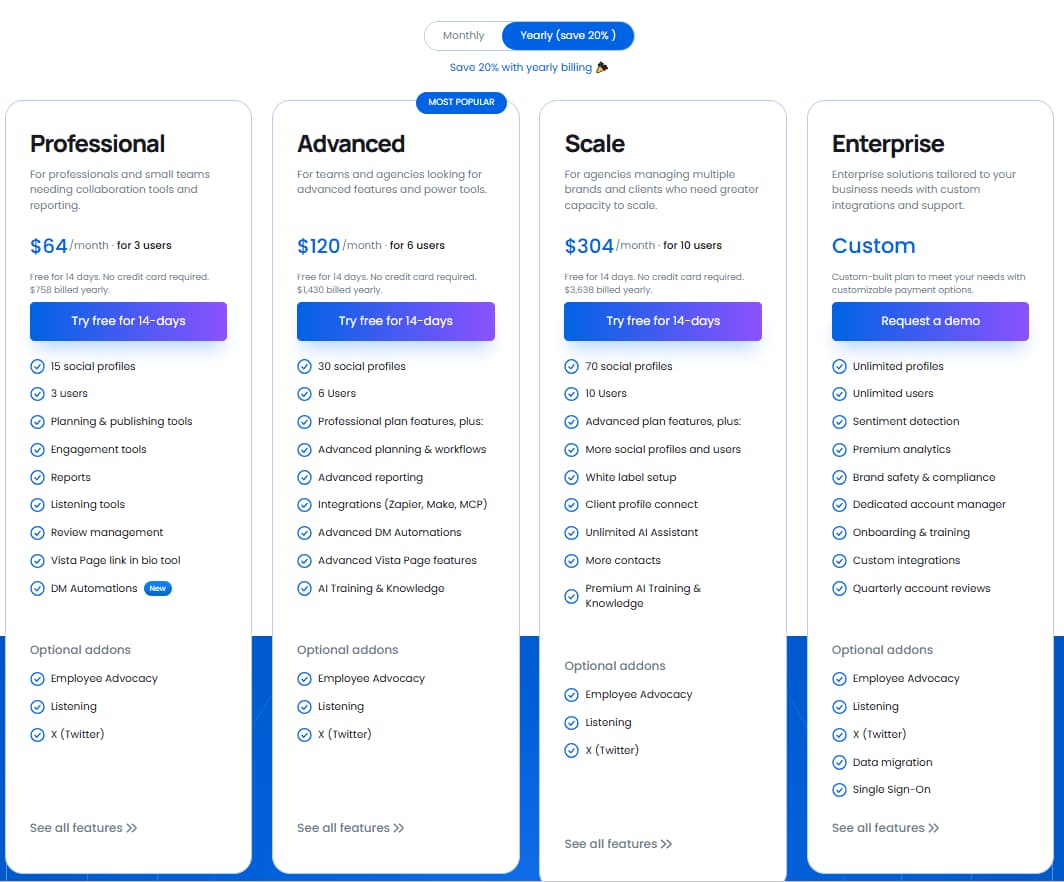
Vista Social currently separates paid plans into Professional, Advanced, Scale, and Enterprise tiers. Annual billing lowers the monthly equivalent, while add-ons such as Listening, Employee Advocacy, and X publishing can change the real monthly cost. Always verify the live pricing page before purchasing.
Vista Social pricing screenshot placeholder: upload the current official pricing image here to strengthen trust before the pricing breakdown.
Pricing context
The Professional plan at $64/month billed yearly is the most interesting value tier in this category. At this price point, most competitors offer scheduling only. Vista Social adds a full unified inbox, DM automation and review management — features that Hootsuite reserves for plans starting at $99/month.
⚠️ For the full feature-by-feature pricing matrix, check the live Vista Social pricing page. This review keeps the main plan breakdown short so mobile readers do not have to scroll through a spreadsheet pretending to be a blog post.
Plan Advisor
Which Vista Social Plan Should You Pick?
Pick by team size, client workflow, approval needs, add-ons, and reporting pressure. The cheapest plan is not always cheaper once Listening, X publishing, and advocacy features start asking for their own little software tribute.
Best overall pick
Professional Annual
Best starting point for most agencies and social teams that need scheduling, inbox, DM workflows, analytics, and enough AI credits before paying Scale-level pricing.
$64/mobilled yearly
01
Choose Professional
Use this when you need the strongest value tier: 15 profiles, 3 users, DM contacts, AI credits, publishing, reviews, and a real team workflow.
Best value
02
Choose Advanced
Use this when you need more profiles, more users, larger DM contacts, more AI credits, and stronger collaboration.
Growing team
03
Choose Scale
Use this when 70 profiles, 10 users, 100,000 DM contacts, API access, and larger operations matter.
Large ops
04
Choose Enterprise
Use this if your team needs custom limits, priority support, 1-on-1 training, dedicated account management, or custom procurement terms.
Custom
⚠️ Prices and feature limits can change. Confirm the live Vista Social pricing page before purchasing, especially for add-ons like Listening, Employee Advocacy, and X publishing.
Comparison · Alternative intent
Vista Social vs Hootsuite vs Buffer
How Vista Social stacks up against the two most commonly compared alternatives at similar price points.
Analyst perspective
The Hootsuite comparison is the most relevant one to make. Hootsuite built its dominance in a pre-unified-inbox era. Vista Social was architected after that shift — which is why inbox management feels native rather than bolted on. The $84/month cost difference buys very little additional functionality for most agencies under 20 clients.
Feature
Vista Social Professional · $64/mo yearly
Hootsuite Pro · $99/mo
Buffer Essentials · $6/mo
Social profiles
8 profiles
10 profiles
1 channel
Unified inbox
Full inbox
Yes
No
DM automation
Yes
No
No
AI caption assistant
Yes (built-in)
Add-on
Yes
Social listening
Add-on
Included
No
White-label reports
Advanced+ only
Yes
No
Review management
All paid plans
Add-on
No
Free trial
14 days, no CC
30 days
Free plan
Buyer situation
Choose Vista Social when...
Choose Hootsuite when...
Choose Buffer when...
Agency workflow
You need inbox, approvals, reports, reviews, and client-ready workflows at a lower price.
You need a mature enterprise brand stack and budget is less sensitive.
You only need lightweight publishing and simple team collaboration.
Pricing pressure
You want serious agency features without jumping into $99+/month software.
You can justify the cost through enterprise governance or existing team adoption.
You want the cheapest clean scheduling workflow.
Inbox and engagement
Unified inbox, DM automation, and review management matter daily.
You need broad social management with enterprise-style monitoring.
You do not need an inbox-heavy workflow.
Reporting
You need white-label client reports and agency-ready summaries.
You need larger reporting infrastructure and stakeholder familiarity.
You need simple post performance and basic analytics.
🔄
Need to automate CRM sync after publishing? Pair Vista Social with SendX for email follow-up automation, or SuiteDash for full client portal management alongside social workflows.
Features · Operational use cases
Key Vista Social features — with real workflow context
Each feature below includes the specific operational scenario where it delivers measurable value — not just a description of what it does.
Use a real Vista Social dashboard or workflow screenshot here to make the feature section feel researched instead of floating in SaaS vapor.
📅
Publishing & scheduling
Visual drag-and-drop calendar with bulk upload, optimal send-time suggestions, and direct publishing to Instagram, TikTok, LinkedIn, Facebook, Pinterest, YouTube, Threads, Bluesky and more. Platform-specific post preview before publishing reduces formatting errors across channels.
Use caseDesigned for agencies managing 15–50 client accounts simultaneously. Bulk scheduling from a CSV or RSS feed eliminates individual post composition time — an agency publishing 200+ posts weekly can reclaim 8–12 hours of manual scheduling work per month.
💬
Unified social inbox + DM automation
All DMs, comments, mentions and reviews from every connected platform flow into a single filterable stream. Assign conversations to team members, set up automated DM reply sequences, and build lead capture flows directly from Instagram and Facebook inboxes.
Use caseCritical for e-commerce brands running "comment READY to get the link" campaigns. The DM automation converts comment engagement into lead capture without manual follow-up — brands report 3–5× reply rate improvement versus manual DM workflows at comparable tooling cost.
📈
Analytics & white-label reporting
Cross-channel dashboards covering engagement, reach, follower growth and post-level performance. On Advanced plans: white-label PDF reports with custom branding, scheduled auto-delivery to clients, and competitor benchmarking built in.
Use caseStrongest value for agencies that bill clients monthly reporting fees. Auto-delivering branded PDFs to 20+ clients replaces a reporting workflow that previously cost 4–6 hours per month. At $25/user the math is straightforward.
🤖
AI caption assistant
ChatGPT-powered caption generation, rewriting, hashtag suggestions and tone adjustment built directly into the post composer. Supports brand voice customization. Works across all connected channels with platform-specific optimization suggestions.
Use caseHigh-value for agencies managing 30+ client posts weekly where caption fatigue slows publishing velocity. The AI assistant doesn't replace strategy — it eliminates the mechanical writing bottleneck that delays scheduling queues on Monday mornings.
⭐
Review management
Monitor and respond to reviews across Google Business, Facebook, Yelp, TripAdvisor, OpenTable and Trustpilot from a single dashboard. Automate review request workflows and receive alerts for new negative reviews before they compound.
Use caseIndispensable for agencies managing multi-location restaurant or retail chains. A client with 12 locations and 6 review platforms would otherwise require 72 individual platform logins weekly. Vista Social consolidates this into a single response queue.
🔗
Link-in-bio (Vista Pages)
Drag-and-drop editor for building link-in-bio pages, mini landing pages and campaign hubs. Custom branding, form capture and built-in analytics. Supports multiple pages per profile with conversion tracking.
Use caseParticularly useful for product launches or event promotion on Instagram and TikTok where the single bio link is the primary conversion point. Replacing a separate Linktree subscription ($9/mo) with built-in Vista Pages directly reduces tool stack cost.
⚡ Example: Agency content workflow with Vista Social
1
Connect all client Instagram, TikTok and LinkedIn profiles
All accounts visible in one workspace — no platform switching
2
Upload content calendar via CSV bulk scheduling
30 posts scheduled across 3 clients in under 20 minutes
3
Use AI assistant to generate and refine captions per brand voice
Eliminates caption bottleneck — copywriter focuses on strategy not mechanics
4
Send drafts through approval workflow to client
Client approves via shared link — no email back-and-forth
5
Route all incoming DMs and comments to unified inbox
Community manager handles 3 clients from one screen
6
Auto-export white-label PDF report at month-end
Client receives branded report automatically — zero manual prep
📅
Managing client scheduling but struggling with task coordination? See how FlowSavvy handles time-blocking and workload management alongside social content calendars — useful for solo social media managers juggling multiple client deadlines.
Analysis
Pros & cons
BUY IF:
✅You need inbox-heavy workflows: Unified inbox + DM automation at Professional tier is unusual at this price.
✅You manage many platforms: Vista Social supports 15+ social networks including Bluesky, Threads and newer platforms.
✅You want fast onboarding: The interface is intuitive with a minimal learning curve for social teams.
✅You manage reviews: Review management is built into all paid tiers at no extra cost.
✅You run client reporting: White-label portal and custom domain support agency client access.
DON'T BUY IF:
❌You need built-in social listening: Social listening is a paid add-on, not included in any base plan.
❌You need employee advocacy: Employee advocacy requires a separate add-on purchase.
❌You rely heavily on Stories: Instagram Stories scheduling can be limited by Meta API restrictions.
❌You need perfect comment handling: Some G2 reviewers have flagged comment management as inconsistent.
❌You are price-sensitive at scale: Scale plan costs jump significantly for smaller agencies.
🚫 Vista Social may NOT be the right tool if...
You only post once or twice per week and don't manage client inboxes — Buffer's free plan is sufficient
Your primary need is enterprise-grade social listening or brand monitoring at scale — Brandwatch or Sprout Social are more complete
You need deep LinkedIn analytics or advanced LinkedIn-specific features — LinkedIn's own tools are more capable here
You're a solo creator managing one personal brand with basic scheduling needs — the free plan may be enough but paid tiers won't add meaningful value
Your agency requires custom API integrations or developer-level access — API is locked to the Scale plan at $65+/mo
Being clear about limitations builds trust. If Vista Social isn't the right fit, compare the related guides below before buying.
Fit assessment
Who should use Vista Social?
Positioning insight
Vista Social occupies the clearest value position in the mid-market: more capable than Buffer and Later for teams managing inboxes, but less expensive than Sprout Social and Hootsuite for agencies that don't need enterprise compliance features. The Professional plan is the tipping-point offering that makes the category choice straightforward for most agencies under 30 clients.
✓ Freelance social media managers
Affordable entry price, strong inbox tools and AI captions make solo client management efficient at Professional tier.
✓ Marketing agencies (5–50 clients)
White-label reports, approval workflows and multi-account management are built for agency operational needs at scale.
✓ SMBs with active social presence
Price-to-feature ratio is among the strongest in this category for teams needing real scheduling and analytics without enterprise pricing.
✓ Multi-location local businesses
Review management across Google, Yelp and TripAdvisor from one dashboard is the key differentiator for chains and franchises.
✕ Enterprise brands needing deep listening
Social listening is an add-on and less mature than Sprout Social or Brandwatch at enterprise volume.
✕ Solo users needing simple scheduling only
Buffer's free plan or Later's basic tier may be sufficient and cheaper. Vista Social's value requires using inbox and reporting features.
Final verdict · Review intent
Is Vista Social worth it in 2026?
9.1
★★★★★
Overall score
Features
9.2
Value
9.5
Ease of use
9.0
Support
8.5
Vista Social has quietly become one of the strongest value propositions in social media management. For the Professional plan price of $64/month, it delivers a feature set that rivals tools costing three to five times more. The unified inbox, DM automation, review management and AI assistant together represent genuine operational utility.
The main caveats are real: social listening as a paid add-on is disappointing at this maturity level, and comment management inconsistencies surfaced in multiple G2 reviews. But for the target audience — agencies and SMBs managing active social accounts across multiple clients — these are manageable trade-offs against the pricing advantage.
If you're currently paying for Hootsuite or Sprout Social and not using their enterprise compliance or deep listening features, Vista Social is worth a serious evaluation. The 14-day free trial requires no credit card — there's no meaningful risk in testing it against your existing workflow before committing.
💬
Using Vista Social for community management but need multi-channel messaging too?ControlHippo handles WhatsApp and SMS in a unified inbox alongside social — relevant if your clients also manage customer support outside social platforms.
Public review signals
What Users Are Saying About Vista Social
Vista Social has public review signals across software review platforms and official product resources. Ratings, review counts, pricing, and plan details can change, so check the current sources directly before choosing a plan.
Yes. Vista Social includes a permanent free plan supporting 1 user and up to 9 social profiles with core scheduling and basic analytics. It is a genuine free tier — useful for testing the platform or for solo users with minimal publishing needs. The free plan does not include DM automation, approval workflows or white-label reporting.
Vista Social is significantly more affordable. The Professional plan at $64/month billed yearly delivers comparable scheduling and inbox features to Hootsuite Pro at $99/month. Hootsuite includes social listening in its plans while Vista Social charges an add-on — but for most agencies under 30 clients this trade-off is easily justified by the $84/month cost difference per user.
Yes. All paid plans include a 14-day free trial with no credit card required. You get full access to Professional features during the trial period — enough time to test the unified inbox, bulk scheduling and reporting tools with real client accounts before committing.
Most agencies will find the Advanced plan at $25/user/month most appropriate. It unlocks white-label PDF reports, client approval workflows and multiple team member seats — all critical for client-facing agency operations. Only upgrade to Scale if you're managing 70+ social profiles or require API access for custom integrations.
Yes. Vista Social supports direct publishing for Instagram feed posts, carousels, reels and stories. Note that some Instagram Stories formats are subject to Meta API restrictions that affect all third-party tools. Standard feed posts, carousels and reels publish directly with no mobile notification required.
Vista Social meets GDPR standards. HIPAA compliance is available via a signed Business Associate Agreement on eligible plans. If HIPAA compliance is a requirement for your use case, contact Vista Social sales directly to confirm current eligibility before subscribing.
Vista Social supports 15+ networks including Facebook, Instagram, LinkedIn, TikTok, Pinterest, YouTube, Twitter/X, Reddit, Snapchat, Threads, Bluesky and Google Business. It is one of the few tools at this price point to support newer platforms like Bluesky and Threads alongside the major networks.
Start the 14-day free trial — no credit card required. Professional plan includes unified inbox, DM automation, AI assistant and full scheduling from day one. Use exclusive code Gn3TMZWy at checkout for 10% off any plan.
 G2 ReviewsUseful for checking sentiment around usability, support, inbox workflows, scheduling, reporting, and agency adoption.Check G2 →
  Capterra ReviewsHelpful for quick feedback on value, ease of use, customer support, and small-team use cases.Open Capterra →
  Official Pricing PageBest source for current plan limits, trial details, add-ons, billing terms, and feature availability.Check pricing →