CoinLedger Review 2026: Pricing, Coupon Code, Crypto Tax Reports, DeFi & NFT Support
Written & Reviewed by CandidCodes Editorial Team – SaaS, Finance Software & Tax Tool Research
Our team reviewed CoinLedger’s official website, pricing page, crypto tax report workflow, DeFi tax software page, professional services page, help center pricing notes, supported tax report features, wallet and exchange import workflow, export options, refund language, coupon availability, and publicly available platform details before writing this review. This article was last updated May 2026.
Affiliate Disclosure: Some links in this article may be affiliate links. If you choose to sign up or purchase through them, we may earn a commission at no extra cost to you. We only recommend tools we have researched and believe offer genuine value.
Important Tax Disclaimer: This article is for general informational and review purposes only. It is not tax, legal, investment, or financial advice. Cryptocurrency tax rules vary by country and personal situation. Always review your reports carefully and consult a qualified tax professional if you are unsure how to file.

CoinLedger Review 2026: crypto tax software, pricing, coupon code CRYPTOTAX10, DeFi and NFT tax reports, portfolio tracking, and tax software exports.
CoinLedger Quick Summary
Best for: crypto investors, NFT users, DeFi users, active traders, long-term holders, tax filers with multiple wallets or exchanges, and anyone who wants to import transactions, preview gains/losses, generate tax reports, and export reports to tax software or an accountant.
Not best for: users looking for personalized tax advice inside a blog review, people with extremely complex tax situations who need a dedicated crypto tax professional, or anyone expecting software to replace legal/tax judgment.
Best value point: CoinLedger lets users import transactions, connect wallets and exchanges, preview capital gains and losses for free, track a crypto portfolio, detect missing data, support DeFi/NFT activity, and pay only when they want to download or export a full tax report.
Current deal: Use coupon code CRYPTOTAX10 for 10% off if the code is accepted at checkout. Coupon availability, eligibility, and plan coverage can change, so verify the final discount before payment.
Best first step: Start free, import your wallets and exchanges, preview your report, check for missing cost basis or transaction errors, then choose a paid plan only when you are ready to download/export the final tax report.
Crypto taxes are the part of investing where the blockchain suddenly stops being futuristic and starts acting like a spreadsheet with trust issues. CoinLedger exists for exactly that moment: when your wallets, exchanges, DeFi swaps, staking rewards, NFTs, transfers, and capital gains all decide to hold a family reunion inside your tax season.
CoinLedger is crypto tax software that helps users import cryptocurrency transactions, calculate gains and losses, preview tax results, generate tax reports, and export those reports to tax filing software or share them with an accountant. It supports crypto trading, staking, NFTs, DeFi, on-chain wallet activity, margin trading, and international tax report workflows depending on user needs and local filing rules.
This CoinLedger review covers pricing, coupon code CRYPTOTAX10, free preview access, tax report plans, DeFi and NFT support, TurboTax/export options, pros and cons, alternatives, and whether CoinLedger is worth using in 2026.
Check the latest CoinLedger pricing, tax report plans, and coupon code details:
 |
CoinLedger Review 2026: Pricing, Coupon Code, Crypto Tax Reports & Best Plan CANDIDCODES · MAY 2026 |
CandidCodes Rating: 4.6 / 5
★★★★☆
Ease of Use 4.6 • Transaction Import 4.6 • DeFi & NFT Support 4.5 • Tax Report Workflow 4.7 • Export Options 4.6 • Value for Crypto Tax Filers 4.6
Best for: crypto users who need a structured way to import transactions, preview gains/losses, fix missing data, and generate downloadable tax reports.
Best feature: The combination of free import/preview, wallet and exchange syncs, DeFi/NFT support, error reconciliation, Form 8949/income/capital gains/audit trail reports, and tax software export options.
Main downside: CoinLedger can organize and calculate tax report data, but it does not remove the need to review your transactions carefully. Crypto tax situations can be messy, and software is not a substitute for qualified tax advice. Wonderful, yes, the one time you need certainty, the universe gives you tax nuance.
Best first step: Import your data for free, preview your gains/losses, check error reconciliation prompts, then purchase a report only when you are ready to download or export the forms.
Why Crypto Tax Reporting Gets Complicated Fast
Crypto tax reporting sounds simple until you actually try to do it. Buy crypto, sell crypto, pay taxes. Then real life adds wallet transfers, exchange migrations, staking rewards, DeFi swaps, liquidity pools, bridging, NFTs, airdrops, failed transactions, missing cost basis, and that one exchange account you forgot existed. Tax season, apparently, is where old wallets return like unpaid ghosts.
The problem is not just the number of trades. The real problem is clean data. Crypto transactions can spread across centralized exchanges, self-custody wallets, DeFi protocols, NFT marketplaces, staking platforms, and multiple chains. Without a dedicated tool, users often have to download CSVs, copy wallet addresses, reconcile missing data, calculate gains/losses, and format reports manually.
CoinLedger is designed to reduce that mess. It helps users import transactions, preview tax results, identify missing information, generate reports, and export to tax filing software or an accountant. It does not make taxes exciting. Nothing does. But it can make the process less like trying to decode ancient ruins written by Binance, MetaMask, and your past self.
| ❌ Without CoinLedger | ✓ With CoinLedger |
| Manually collect CSVs from exchanges and wallet history from blockchains | Import data through exchange API sync, CSV import, custom CSV import, and wallet address auto-sync |
| Calculate capital gains, losses, staking income, rewards, and transfers manually | Preview capital gains/losses and generate structured tax reports after import |
| Chase missing cost basis and transaction gaps across multiple platforms | Use error reconciliation tools to detect missing data and report issues |
| Prepare tax forms manually or send raw transaction history to an accountant | Generate reports such as Form 8949, income report, capital gains report, and audit trail report |
| Rebuild files for TurboTax, TaxAct, H&R Block, TaxSlayer, or accountant review | Export reports to supported tax software or send completed reports to a tax professional |
Quick Verdict
CoinLedger is worth considering if you traded crypto, used multiple exchanges, moved funds between wallets, earned staking/mining/interest income, used DeFi protocols, bought or sold NFTs, or need downloadable crypto tax reports for filing.
It is not ideal if you only need general tax education, have no taxable crypto activity, or need personalized tax strategy from a licensed professional. CoinLedger is tax software, not a human tax advisor hiding inside your browser. Thankfully. That would be unsettling.
Best starting option: Use CoinLedger for free to import transactions, preview capital gains/losses, and check whether the platform organizes your data correctly. Pay only when you need to download or export the tax report.
Best long-term value: CoinLedger becomes more valuable when you have many transactions, multiple wallets/exchanges, DeFi/NFT activity, or messy transaction history that would be painful to reconcile manually.
Best CoinLedger Deal Right Now
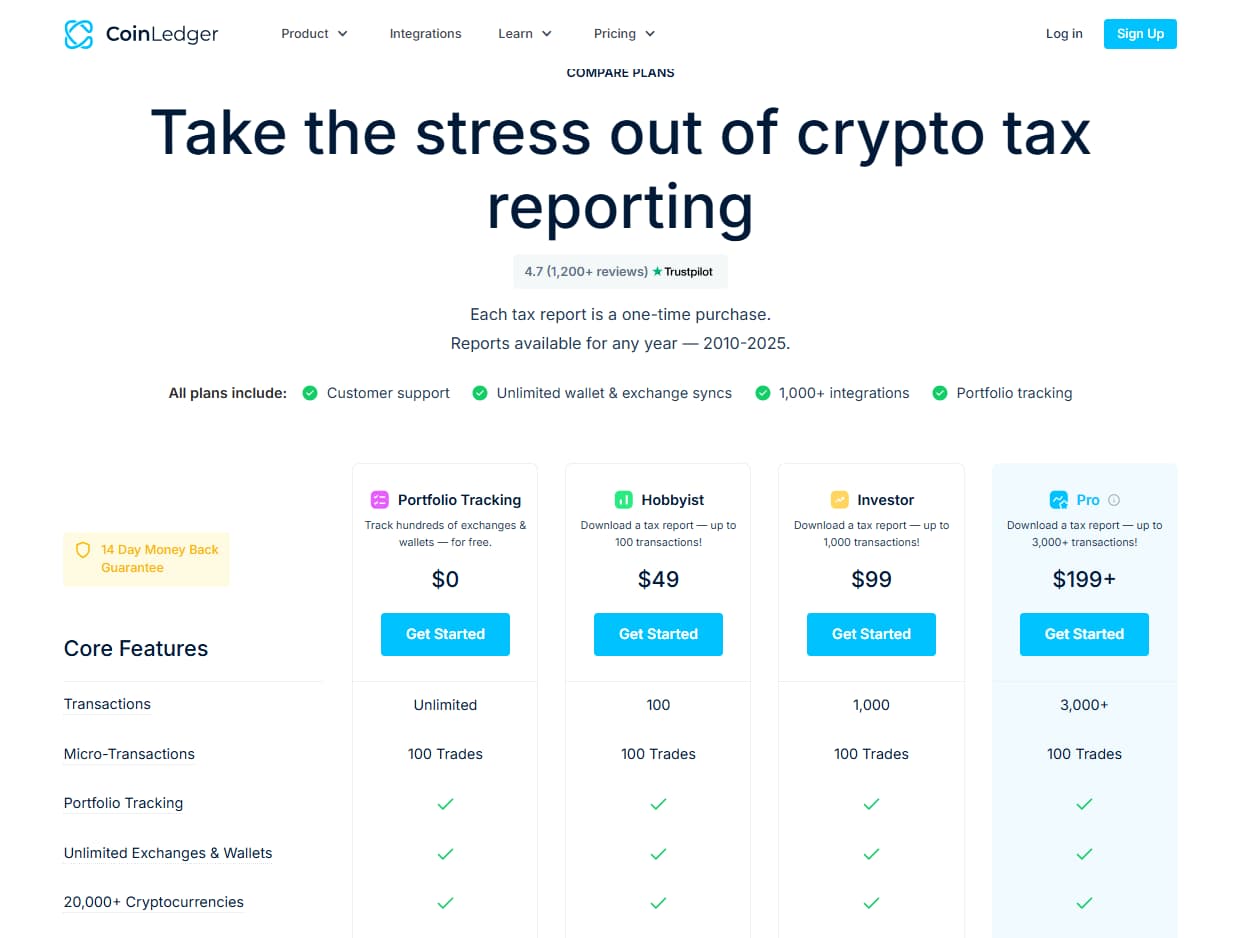
CoinLedger lets users import crypto transactions and preview gains/losses for free. Paid tax reports are one-time purchases based on transaction count. Use coupon code CRYPTOTAX10 for 10% off if the code is accepted at checkout. Pricing, transaction thresholds, refund terms, coupon eligibility, and final checkout totals may change, so always verify details before payment.
- Free portfolio tracking and free import/preview access
- Hobbyist: $49 for up to 100 transactions
- Investor: $99 for up to 1,000 transactions
- Pro: $199+ for 3,000+ transactions, with additional transactions available in-app
- 14-day money-back guarantee listed on the pricing page
- Use code CRYPTOTAX10 for 10% off if valid at checkout
What Is CoinLedger?
CoinLedger is cryptocurrency tax software that helps users import crypto transaction history, preview capital gains and losses, generate tax reports, and export those reports to supported tax software or accountants.
The platform supports exchange and wallet imports, portfolio tracking, DeFi activity, NFT transactions, margin trading, tax loss harvesting tools, error reconciliation, and downloadable tax reports such as IRS Form 8949, income reports, capital gains reports, international tax reports, and audit trail reports.
In plain English: CoinLedger helps crypto users turn messy wallet and exchange history into structured tax reports that are easier to review, export, and file.
CoinLedger is especially useful if your crypto activity is spread across more than one platform. If all you did was buy once on one exchange and never touch it again, your situation may be simple. If you used DeFi, NFTs, staking, multiple wallets, and random exchanges from three market cycles ago, congratulations, your transaction history is now a puzzle with tax consequences.
Creating long-form guides or tax software review content for affiliate SEO?
.jpg)
SEOWriting.ai Review 2026: AI SEO Writing, Blog Automation & Affiliate Content
CANDIDCODES · MAY 2026
Read full reviewWho Should Use CoinLedger?
CoinLedger may be a good fit for:
- Crypto investors who need capital gains and losses reports
- Users with multiple wallets, exchanges, and historical transaction data
- DeFi users who need on-chain activity imported and classified
- NFT users who need transaction history organized for tax reporting
- Staking, mining, interest, airdrop, or rewards income recipients
- Users who want to export reports to TurboTax, TaxAct, H&R Block, TaxSlayer, or an accountant
- People who want free portfolio tracking and report previews before paying
If your business workflow also needs client portals, invoices, or service operations around finance/tax clients, our SuiteDash Review 2026 covers CRM, client portals, and service management tools.
CoinLedger may not be the right fit if you need legal advice, tax filing strategy, country-specific interpretation, or a professional to file your complete tax return. In those cases, use software as a reporting tool and work with a qualified tax professional.
CoinLedger vs Manual Crypto Tax Reporting
Manual crypto tax reporting can work for users with very simple transaction history. If you made a few trades on one exchange, the manual route may be manageable. But once transactions spread across wallets, exchanges, DeFi protocols, NFTs, staking rewards, and bridge activity, the manual process becomes much harder.
CoinLedger becomes useful when transaction organization is the main pain point. It can import data, identify issues, calculate gains/losses, and generate reports in a structured format. It does not decide your tax position for you. It gives you better data and reports so you or your tax professional can file more confidently.
Latest CoinLedger Pricing 2026
CoinLedger’s pricing page currently says each tax report is a one-time purchase and reports are available for tax years 2010–2025. All plans include customer support, unlimited wallet and exchange syncs, 1,000+ integrations, and portfolio tracking. The page also lists a 14-day money-back guarantee.
CoinLedger pricing 2026: Hobbyist, Investor, Pro, transaction thresholds, one-time tax report purchase, and coupon code CRYPTOTAX10 if accepted at checkout.
Important pricing note: CoinLedger pricing, transaction limits, additional transaction tiers, tax year availability, refund rules, coupon eligibility, and checkout totals may change. Always confirm current details directly on CoinLedger before purchasing a tax report.
| Plan | Displayed Price | Transaction Limit | Best For |
| Free / Portfolio Tracking | $0 | Import and preview access | Users who want to connect wallets/exchanges, preview gains/losses, and track their portfolio before paying |
| Hobbyist | $49 Use CRYPTOTAX10 if valid |
Up to 100 transactions | Casual crypto users with a small number of transactions |
| Investor | $99 Use CRYPTOTAX10 if valid |
Up to 1,000 transactions | Users with regular trading, multiple platforms, or moderate transaction volume |
| Pro | $199+ Use CRYPTOTAX10 if valid |
3,000+ transactions | Active traders, DeFi/NFT users, and high-volume crypto users who may need additional transactions in-app |
💰 Is CoinLedger Worth Paying For? Practical ROI Breakdown
|
The Manual Way ❌ Download CSVs from multiple exchanges |
With CoinLedger ✓ Import wallets and exchanges into one workflow |
Bottom line: CoinLedger is easiest to justify when your transaction history is too messy to calculate manually with confidence. If it saves hours of reconciliation and produces organized reports for filing or accountant review, the paid report can be worth the cost for many crypto tax filers.
Want to check the latest CoinLedger pricing?
Use coupon code CRYPTOTAX10 for 10% off if accepted at checkout. Always confirm the final discount and plan details before payment.
Can You Try CoinLedger Before Paying?
Yes. CoinLedger lets users import crypto transaction history, view net capital gains and losses, and track a portfolio for free. Payment is required when you want to download and view the full tax report. That is a better first step than paying before you know whether your wallets, exchanges, and transaction history import cleanly.
Before buying a tax report, test these areas:
- Connect your main exchanges and wallets
- Import CSVs or custom CSVs where direct sync is not available
- Preview your gains and losses
- Check missing cost basis and error reconciliation prompts
- Review DeFi, NFT, staking, and income classifications carefully
- Confirm your transaction count before selecting a paid tier
- Check whether CRYPTOTAX10 applies at checkout
- Ask a tax professional if your situation is complex or unclear
Want to start with CoinLedger free?
Key Features of CoinLedger
1. Wallet and Exchange Import
CoinLedger supports multiple ways to import transaction data, including exchange API auto-sync, exchange CSV file import, custom CSV import, and wallet address auto-sync. This matters because crypto activity rarely stays in one tidy account. It spills across exchanges, wallets, bridges, and protocols like an overconfident intern managing database exports.
The platform is designed to help users gather transaction history in one place so gains, losses, income, and transfers can be calculated more consistently.
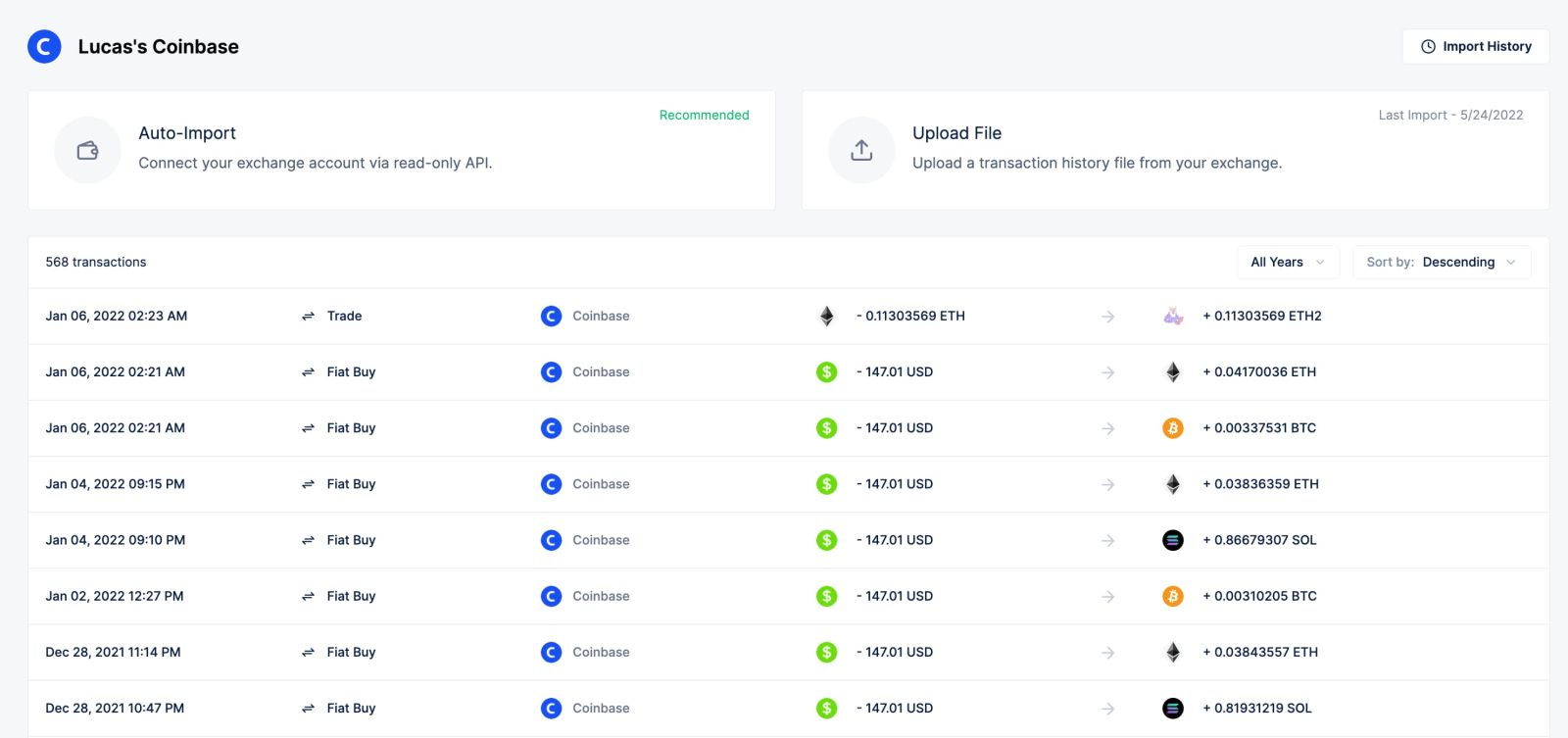
CoinLedger transaction import: connect exchanges, upload CSV files, use custom CSVs, or import wallet activity through public wallet addresses.
2. Crypto Tax Reports: Form 8949, Income, Capital Gains, and Audit Trail
CoinLedger’s paid tax reports can include Form 8949, international tax reports, income reports, capital gains reports, and audit trail reports. These reports help users organize taxable crypto activity into formats that are easier to file, export, or share with a tax professional.
The audit trail report is especially useful for recordkeeping because it documents the numbers used to calculate gains, losses, and income. In crypto tax work, good records are not glamorous, but neither is explaining missing transaction history during tax season. Pick your pain.
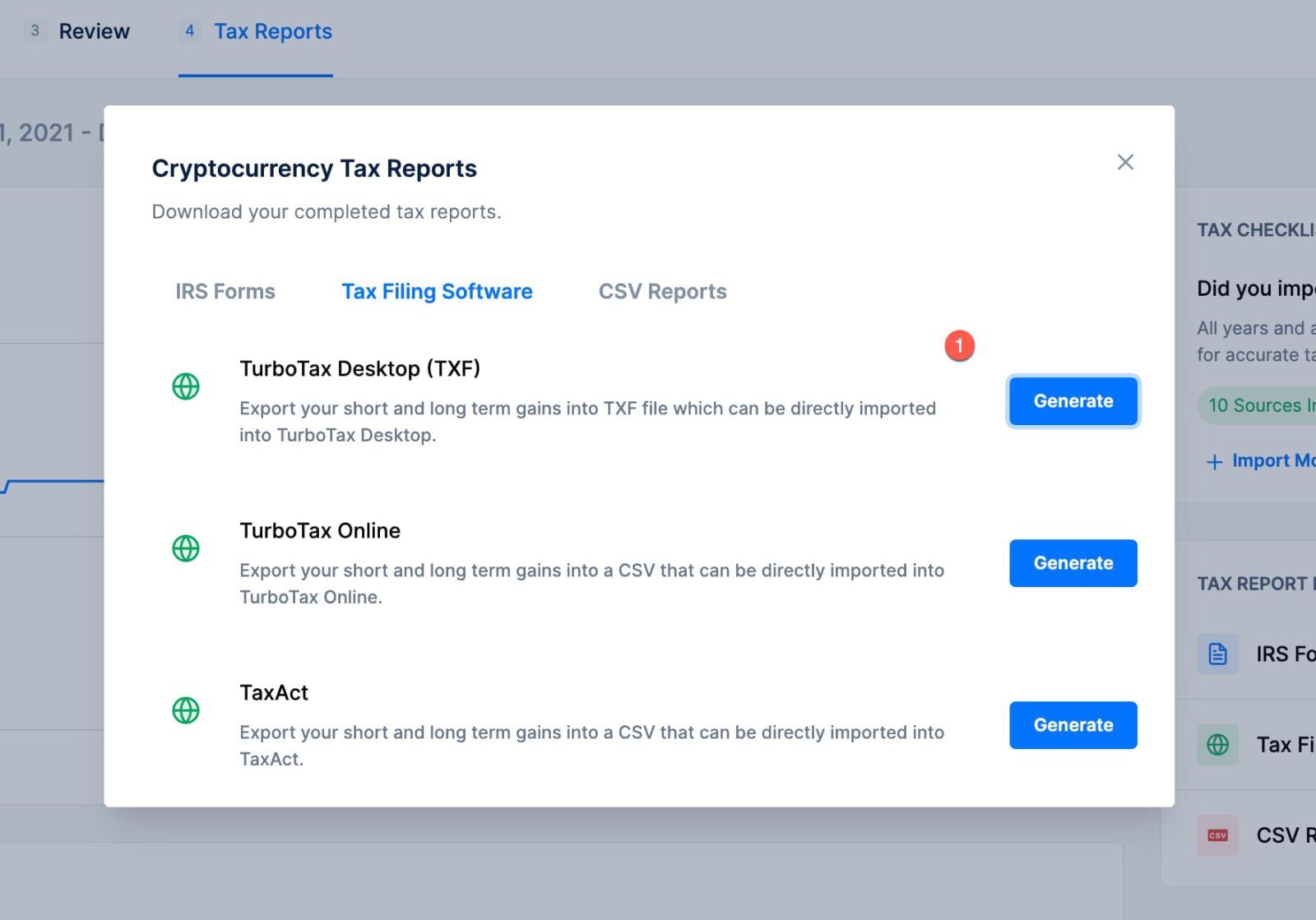
CoinLedger tax reports: Form 8949, income report, capital gains report, international reports, and audit trail records for review and filing.
3. DeFi, NFT, and On-Chain Support
CoinLedger supports DeFi and NFT activity, including on-chain wallet imports and transaction types such as swaps, liquidity pool deposits and withdrawals, yield farming, staking rewards, cross-chain bridging, and wallet-to-wallet transfers. It also supports hundreds of blockchains and protocols, according to the official DeFi tax software page.
This feature matters because DeFi and NFT transactions can create tax-reporting complexity quickly. A simple exchange-only workflow may not be enough when your activity includes decentralized protocols, NFTs, staking, LP positions, and wallet transfers across multiple chains.
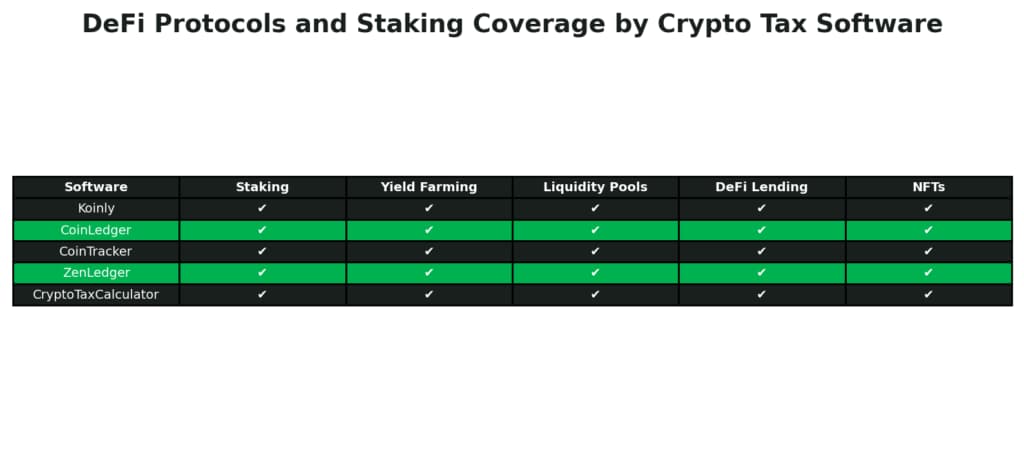
CoinLedger DeFi and NFT support: import on-chain activity, classify DeFi transactions, and organize crypto tax data across supported wallets, chains, and protocols.
4. Error Reconciliation and Missing Cost Basis Tools
CoinLedger includes error reconciliation tools designed to detect missing data, missing cost basis, and other issues before users download a final report. This is important because even one missing acquisition price or transfer classification can distort gains/losses.
The goal is not to blindly trust software. The goal is to use software to surface issues faster so you can review them before filing. Yes, tax software still requires human attention. The machines are not saving us today, just mildly reducing the mess.
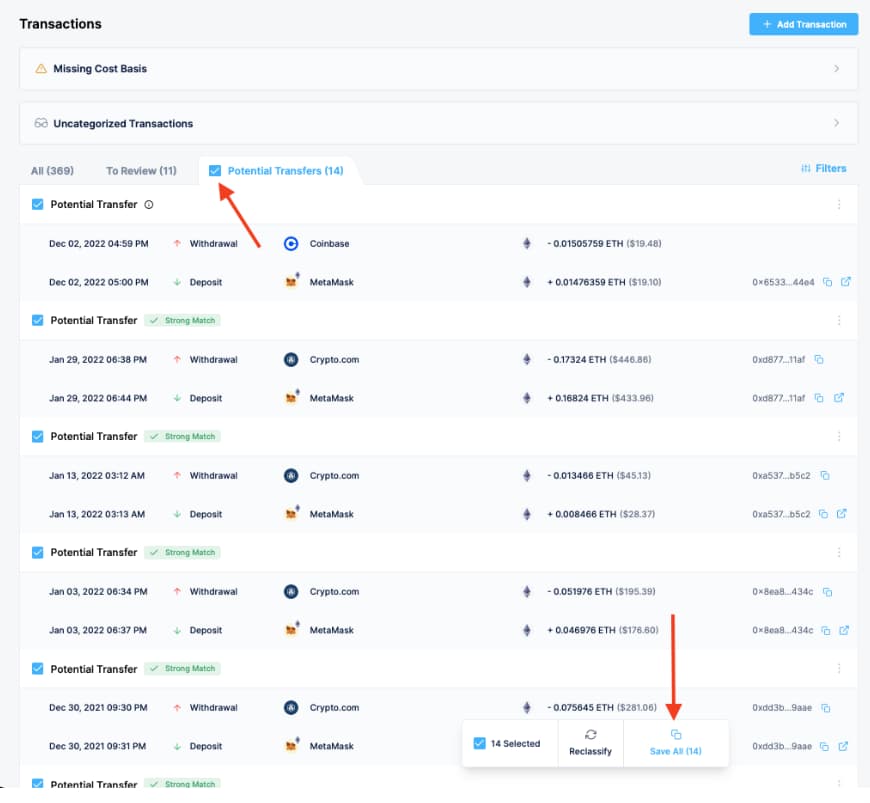
CoinLedger error reconciliation: detect missing cost basis, transaction gaps, and report issues before downloading tax forms.
5. Tax Software Exports and Accountant Workflow
CoinLedger supports exporting reports to tax software such as TurboTax Online, TurboTax Desktop, TaxAct, H&R Block Desktop, TaxSlayer, and other providers listed on the pricing page. Users can also send reports to accountants or tax professionals for review.
This is useful because calculating crypto gains/losses is only one part of tax season. The next step is getting the results into the broader filing workflow without manually rebuilding every number. Humanity invented software integration so people could stop copying numbers between tabs like digital monks.
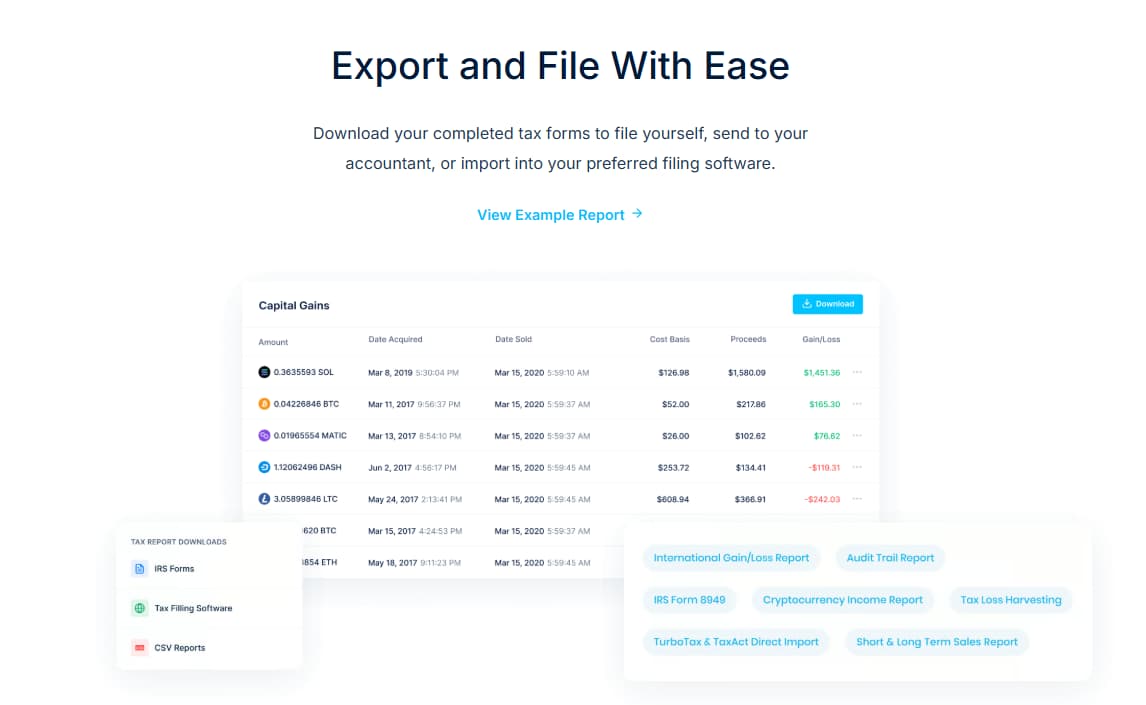
CoinLedger export options: send crypto tax reports to supported tax software or share reports with an accountant for review.
6. Professional Services and Expert Review Options
CoinLedger also offers professional crypto tax services for users who do not want to handle everything themselves. The official services page lists Done For You support at $500/hr and Tax Return Prep for US users starting at $1,000, plus Expert Review options where a CoinLedger expert reviews the account.
These services are not necessary for everyone. They may be more relevant for users with complex transaction history, large DeFi/NFT activity, missing data, or uncertainty around how to classify activity. Always confirm scope, pricing, and availability directly with CoinLedger before purchasing professional services.

CoinLedger professional services: Done For You support, Expert Review, and Tax Return Prep options for users who want extra help with crypto tax reporting.
Ready to explore CoinLedger features?
Use coupon code CRYPTOTAX10 for 10% off if accepted at checkout.
Need a cleaner way to organize crypto tax reports?
CoinLedger helps users import wallet and exchange history, preview capital gains and losses, detect missing data, support DeFi/NFT activity, generate tax reports, and export reports for filing or accountant review.
| ✓ | Import wallets, exchanges, CSVs, and on-chain activity |
| ✓ | Preview capital gains and losses before paying |
| ✓ | Generate Form 8949, income, capital gains, and audit trail reports |
| ✓ | Support DeFi, NFTs, staking, margin trading, and wallet activity |
| ✓ | Export reports to tax software or share with an accountant |
Crypto Tax Reports · DeFi · NFTs · TurboTax Export · Form 8949 · Portfolio Tracking
CoinLedger Plans: What to Compare Before Upgrading
| What to Compare | Why It Matters | Best For |
| Transaction count | CoinLedger pricing is based on transaction volume. Make sure your selected plan covers your imported billable transactions for the tax year. | Everyone choosing a paid report |
| Exchange and wallet coverage | The more platforms you use, the more important clean import options become. Test direct sync, CSV import, and wallet address import before buying. | Multi-exchange and self-custody users |
| DeFi and NFT activity | DeFi swaps, liquidity pools, staking, bridging, and NFTs can require careful review. Make sure imported classifications look reasonable before finalizing reports. | DeFi/NFT users and on-chain traders |
| Export workflow | If you use TurboTax, TaxAct, H&R Block, TaxSlayer, or an accountant, confirm the export format fits your filing workflow. | Users filing with tax software or professionals |
| Professional help | If your tax situation is complex, a Done For You or Expert Review service may be more appropriate than DIY only. | Complex filers, high-volume traders, and users with missing data |
CoinLedger Pros and Cons
Pros
- Free import, preview, and portfolio tracking before purchasing a tax report
- One-time tax report pricing based on transaction count
- Supports unlimited wallet and exchange syncs on listed plans
- 1,000+ integrations listed on the official pricing page
- Supports DeFi, NFTs, staking, margin trading, and wallet address imports
- Includes error reconciliation and missing cost basis tools
- Generates reports such as Form 8949, income report, capital gains report, international reports, and audit trail report
- Exports to tax software such as TurboTax, TaxAct, H&R Block, and TaxSlayer
- Professional services and Expert Review options available for users who need additional help
- Coupon code CRYPTOTAX10 may provide 10% off if accepted at checkout
Cons
- Users still need to review imported transactions and classifications carefully
- Crypto tax situations can require professional review, especially with complex DeFi/NFT activity
- Pricing depends on transaction count, so active traders may need higher tiers or additional transactions
- The coupon code should be verified at checkout because eligibility may change
- Software can help organize tax reports, but it cannot replace personalized tax advice
Which CoinLedger Plan Should You Choose?
Use Free / Portfolio Tracking first if:
You want to test whether CoinLedger imports your wallets, exchanges, and transaction history correctly. This is the safest first step because you can preview gains/losses before paying for a full report.
Choose Hobbyist if:
You have up to 100 transactions for the tax year and your crypto activity is relatively simple. This plan makes sense for casual users who need a downloadable tax report without high transaction volume.
Choose Investor if:
You have up to 1,000 transactions and regular trading or multiple platforms. Investor is a practical middle tier for users who need more room than Hobbyist but are not yet high-volume traders.
Choose Pro if:
You have 3,000+ transactions, active trading, DeFi/NFT activity, or more complex data. If you exceed the top plan’s transaction count, CoinLedger states that additional transactions can be purchased in-app.
Consider professional services if:
You are not comfortable handling crypto taxes yourself, have missing data, or want a professional review. CoinLedger lists Done For You support and Tax Return Prep options, but you should confirm current scope, pricing, availability, and whether the service fits your tax situation before buying.
Ready to compare CoinLedger plans?
Use coupon code CRYPTOTAX10 for 10% off if accepted at checkout.
Is CoinLedger Worth It?
CoinLedger is worth considering if you need a structured way to import crypto transactions, preview gains/losses, identify missing data, generate tax reports, and export those reports into your filing workflow.
Its strongest value is not that it magically makes taxes disappear. Humanity tried that. Governments objected. The real value is that CoinLedger turns scattered crypto activity into organized reporting outputs, which can reduce manual work and make review easier.
For users with multiple wallets, DeFi, NFTs, staking, trading, and exchange history, CoinLedger can save meaningful time compared with manual spreadsheets. For simple users with only a few transactions, the Free preview plus Hobbyist plan may be enough.
If your crypto/tax content strategy includes affiliate SEO, our SEOWriting.ai Review 2026 covers AI-assisted long-form content creation. For creators publishing social content around finance tools or SaaS education, our Sked Social Review 2026 covers social scheduling and approval workflows.
Need to turn finance, SaaS, or tax-tool reviews into social content?

Sked Social Review 2026: Instagram Scheduling, Grid Preview & Agency Tools
CANDIDCODES · MAY 2026
Read full reviewReady to test CoinLedger?
CoinLedger Alternatives to Consider
Koinly: A popular crypto tax software alternative with international support and portfolio tracking. Compare it with CoinLedger if you want another crypto tax reporting platform for wallets, exchanges, DeFi, and tax exports.
CoinTracker: Another well-known crypto portfolio and tax tracking tool. It may appeal to users who want portfolio tracking plus tax reporting, though pricing and transaction limits should be compared carefully.
TokenTax: Often positioned for users who want more tax professional support or full-service options. It may be more relevant for complex situations, but users should compare pricing carefully.
ZenLedger: A crypto tax platform that also supports tax reporting workflows for crypto users. Compare plan limits, integrations, DeFi/NFT coverage, and filing workflow before choosing.
Manual spreadsheets: Technically free, spiritually expensive. Fine for very simple histories, but painful when wallets, DeFi, NFTs, staking, income, and exchange CSVs start multiplying like gremlins after midnight.
CoinLedger: Best for users who want a beginner-friendly workflow, free preview, wallet/exchange syncs, DeFi/NFT support, error reconciliation, and structured tax report exports.
How CoinLedger Fits Into a Broader Finance Content Stack
CoinLedger works best as the crypto tax reporting layer. A practical content or affiliate workflow could look like this: CoinLedger for crypto tax reports, SEOWriting.ai for long-form SEO guides, Sked Social for social publishing, Fireflies.ai for meeting notes with accountants or partners, and SuiteDash for client portal or service workflows if running a finance-related service business.
For meeting notes and call summaries, our Fireflies.ai Review 2026 covers AI transcription and meeting summaries. For B2B outreach or partnership research, our UpLead Review 2026 and Clodura AI Review 2026 cover contact data and sales intelligence workflows.
Frequently Asked Questions
What is CoinLedger used for?
CoinLedger is used to import crypto transactions, preview capital gains and losses, track a crypto portfolio, detect missing data, generate crypto tax reports, and export reports to supported tax software or accountants.
How much does CoinLedger cost?
CoinLedger currently lists a free portfolio tracking/import option, Hobbyist at $49 for up to 100 transactions, Investor at $99 for up to 1,000 transactions, and Pro at $199+ for 3,000+ transactions. Pricing and transaction thresholds may change, so confirm current pricing before purchase.
Does CoinLedger have a coupon code?
Coupon code CRYPTOTAX10 may provide 10% off if accepted at checkout. Always verify the final discount, eligible plan, and checkout total before paying.
Can I use CoinLedger for free?
Yes. CoinLedger lets users import crypto transaction history, view net capital gains and losses, and track a portfolio for free. Payment is required when users want to download and view the full tax report.
Does CoinLedger support DeFi and NFTs?
Yes. CoinLedger supports DeFi and NFT activity, including on-chain wallet imports and transaction types such as swaps, liquidity pool deposits and withdrawals, yield farming, staking rewards, cross-chain bridging, and wallet-to-wallet transfers.
Can CoinLedger export to TurboTax?
Yes. CoinLedger’s pricing page lists TurboTax Online and TurboTax Desktop among supported tax software integrations, along with TaxAct, H&R Block Desktop, TaxSlayer, and others.
What reports does CoinLedger generate?
CoinLedger can generate reports such as IRS Form 8949, international tax reports, income reports, capital gains reports, audit trail reports, and tax loss harvesting tools depending on the plan and user data.
Is CoinLedger tax advice?
No. CoinLedger is software for organizing and generating crypto tax reports. It does not replace personalized tax, legal, or financial advice. Users with complex situations should consult a qualified tax professional.
Is CoinLedger worth it?
CoinLedger is worth testing if you need to import multiple crypto wallets or exchanges, organize gains/losses, handle DeFi/NFT activity, detect missing data, and generate reports for filing. Simple users may only need the Free preview and a lower-tier report.
Current CoinLedger Offer — May 2026
CoinLedger lets users import transactions and preview gains/losses for free. Paid reports are based on transaction count. Use coupon code CRYPTOTAX10 for 10% off if accepted at checkout. Pricing, coupon terms, tax year availability, and refund rules may change.
Start CoinLedger Free →Final Verdict
CoinLedger is a strong crypto tax software option for users who need to import wallet and exchange history, preview capital gains and losses, handle DeFi/NFT activity, detect missing data, and generate structured tax reports.
Its strongest value is the combination of free import/preview access, wallet and exchange syncs, supported tax reports, error reconciliation, DeFi/NFT support, tax software exports, and optional professional services for users who need extra help.
For simple crypto users, CoinLedger’s free preview plus lower transaction report tiers may be enough. For active traders, DeFi/NFT users, and people with messy transaction history, the platform can save time and make the tax-reporting process more organized. Just remember: software helps prepare reports, but your final tax filing decisions still deserve careful review.
Try CoinLedger Before Buying a Tax Report
Import your transactions, preview gains/losses, check missing data, and confirm your transaction count before purchasing a paid report.
CoinLedger Coupon Code: CRYPTOTAX10
Use code CRYPTOTAX10 for 10% off if the code is accepted at checkout. Start free, preview your report, then apply the code before purchasing a paid tax report.
✓ Free import and portfolio tracking
✓ Hobbyist, Investor, and Pro report tiers
✓ DeFi, NFT, staking, margin trading, and wallet sync support
✓ Form 8949, income, capital gains, and audit trail reports
✓ Export reports to supported tax software or accountants
Pricing, coupon eligibility, transaction limits, tax year availability, and refund rules may change. Confirm current terms before paying.
Try CoinLedger Now → Crypto Tax Reports · DeFi · NFTs · Form 8949 · Portfolio Tracking · TurboTax Export
Explore more finance software, SaaS reviews, AI tools, and affiliate deals on CandidCodes.