PagerGPT Review 2026: Pricing, AI Agents, Live Inbox, Integrations & Best Plan

CandidCodes

1 month ago

CandidCodes Research — Updated for 2026  ·  Start with PagerGPT →  ·  View Store Page →
HomeBlogAI Tools & SaaSPagerGPT Review 2026
🤖 AI Agent Builder✓ Magic Plan Available📅 Updated for 2026💬 Live Inbox + Integrations🛡️ Security & Guardrails
✦ Review intent✦ Pricing intent✦ Alternative intent✦ AI chatbot intent

PagerGPT Review 2026: Pricing, AI Agents, Live Inbox, Integrations & Best Plan

✍️ CandidCodes Editorial Team📅 Published: April 24, 2026 · Updated: May 20, 2026⏱️ 15 min read🔎 Research-based🔗 Affiliate links

PagerGPT is a no-code AI agent builder for teams that want to train custom AI agents on websites, documents and business tools, then deploy them across website chat, WhatsApp, Slack and other customer channels without turning every support workflow into a spreadsheet-shaped punishment.

Editorial review method
How CandidCodes evaluated PagerGPT

We reviewed PagerGPT’s official website positioning, AI agent workflow, integrations, security messaging, FAQ details and the pricing screenshots supplied to CandidCodes. Pricing numbers in this review are based only on the supplied monthly and yearly screenshots, not third-party listings or old cached pages.
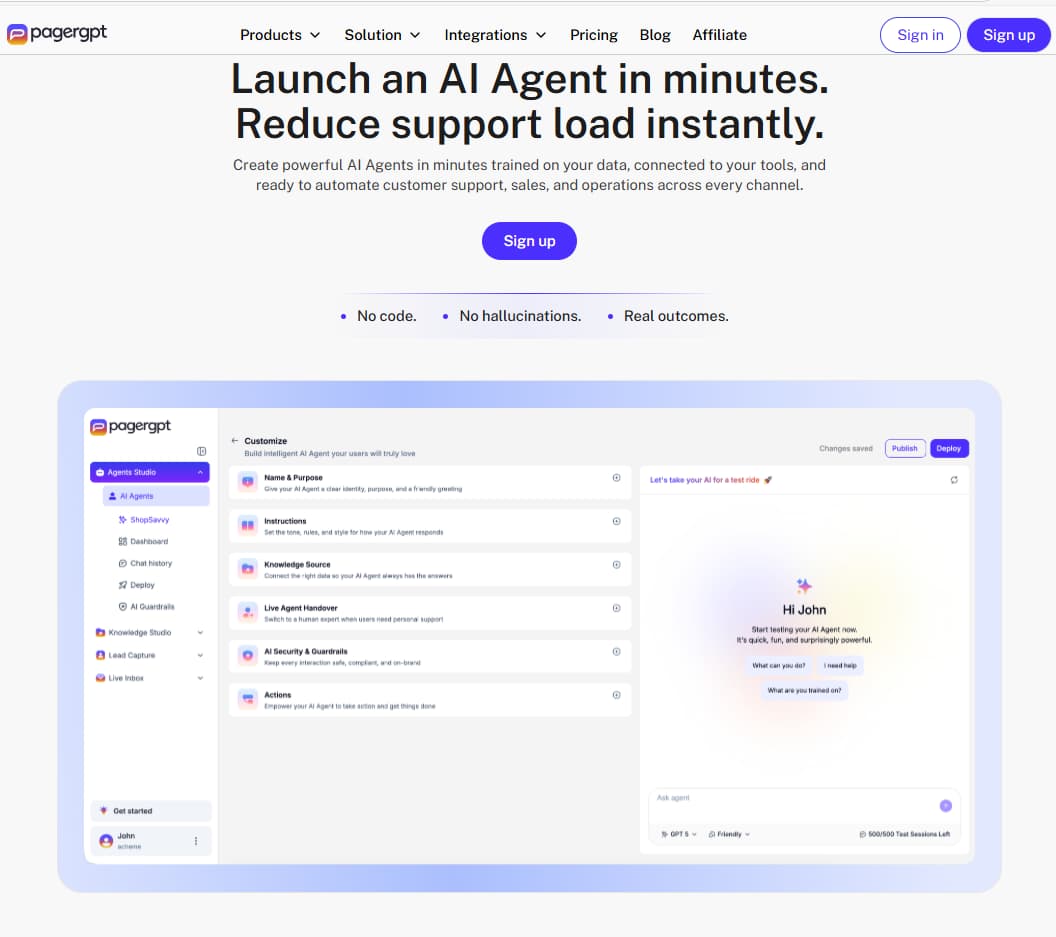
PagerGPT homepage AI agent builder interface 2026
PagerGPT positions itself as an AI agent builder for customer conversations, live inbox workflows and business automation.
$0
Magic plan shown
$99
Starter monthly view
$349
Business monthly view
15%
Yearly savings shown
30-second verdict

What you need to know upfront

Industry insight

PagerGPT is best judged as an AI agent and customer interaction platform, not as a generic chatbot widget. The key question is whether it helps your team train useful agents, connect support and sales tools, route conversations to humans and measure outcomes without needing a developer every time someone wants to change a workflow. Revolutionary concept: software doing the thing it was purchased to do.

Best for
Support, sales, ecommerce and SMB teams building AI agents
Starting price
$0/month Magic plan visible in screenshot
Best paid plan
Business for teams needing live inbox, sentiment and security tools
Main strength
Train, customize, integrate and deploy AI agents across channels
Watch out for
Plan limits vary by AI sessions, characters, agents, actions and live agents
Best CTA
Start with Magic or compare Starter vs Business before upgrading
Best current starting point
Start with the $0 Magic plan or test Starter before scaling
The supplied screenshots show a free Magic plan plus Starter and Business paid tiers. For one lean AI agent test, Magic is the lowest-risk start. For a serious support or sales workflow, Starter or Business will make more sense because paid plans expand training, actions, integrations and team features.
No coupon required
Pricing

PagerGPT pricing & plans 2026

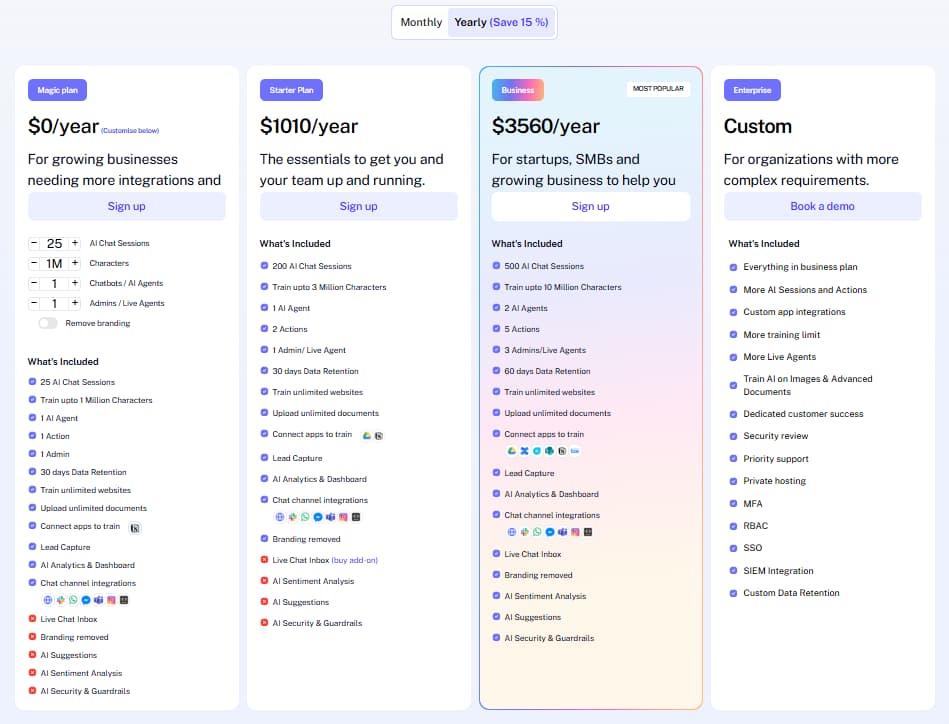
PagerGPT pricing in this review is based only on the monthly and yearly pricing screenshots supplied to CandidCodes. The monthly screenshot shows Magic at $0/month, Starter at $99/month, Business at $349/month and Enterprise as custom. The yearly screenshot shows Magic at $0/year, Starter at $1010/year, Business at $3560/year and Enterprise as custom, with the yearly toggle showing “Save 15%”.
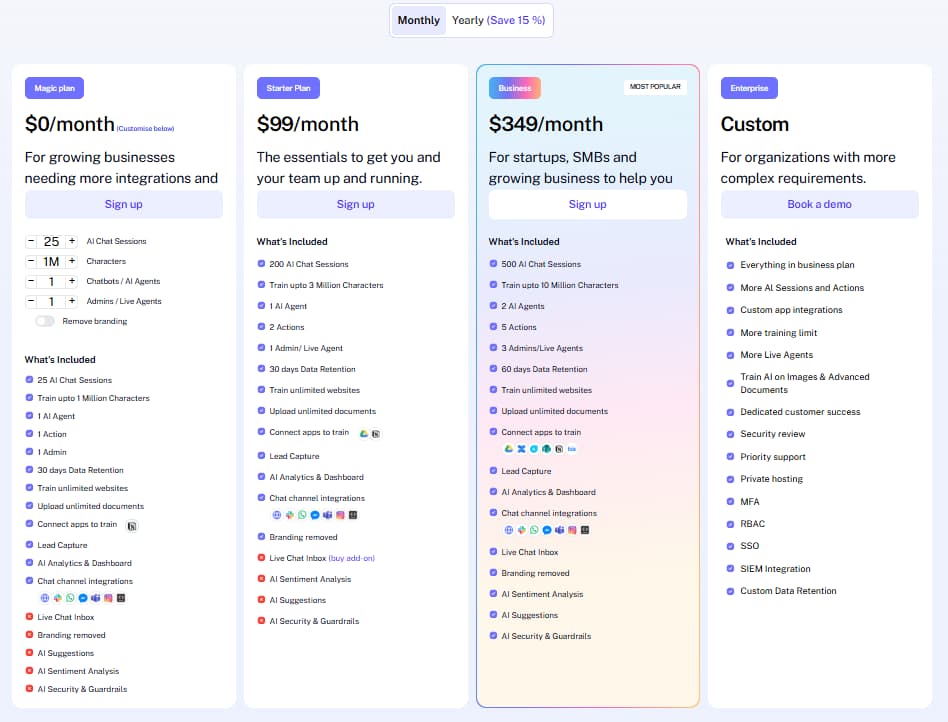
PagerGPT monthly pricing screenshot 2026
PagerGPT monthly pricing screenshot reviewed by CandidCodes, showing Magic at $0/month, Starter at $99/month, Business at $349/month and Enterprise as custom pricing.
PagerGPT yearly pricing screenshot 2026
PagerGPT yearly pricing screenshot reviewed by CandidCodes, showing yearly billing with a visible “Save 15%” label.
Pricing context

The useful way to compare PagerGPT plans is not only price. Look at AI chat sessions, training character limit, AI agents, actions, admins or live agents, retention period, live inbox, sentiment analysis, suggestions and security guardrails. This is where the Business plan becomes the practical upgrade for teams that need more than a basic agent test.

Pricing snapshot
Monthly and yearly pricing from supplied screenshots
Scroll horizontally if the cards do not fit your screen. The cards stay wide so plan text does not get crushed on mobile, because apparently tiny unreadable cards are still legal on the internet.
Mobile noteSwipe the pricing cards sideways to compare all four plans.
Free / configurable
Magic Plan
$0
/month
Yearly screenshot: $0/year. Screenshot notes “customise below”.
Best for testing PagerGPT with a small AI agent setup before paying.
  • Visible selection: 25 AI Chat Sessions
  • Train up to 1 Million Characters
  • 1 AI Agent, 1 Action and 1 Admin
  • 30 days Data Retention
  • Train unlimited websites and upload unlimited documents
  • ! Live Chat Inbox, branding removed, AI Suggestions, AI Sentiment Analysis and AI Security & Guardrails are not included in the visible plan view
Start Magic plan →
Starter paid plan
Starter Plan
$99
/month
Yearly screenshot: $1010/year. Good entry point for a serious AI agent workflow.
Best for teams that need more training capacity, more actions and basic branding removal.
  • Monthly screenshot shows 20 AI Chat Sessions; yearly screenshot shows 200 AI Chat Sessions
  • Train up to 3 Million Characters
  • 1 AI Agent and 2 Actions
  • 1 Admin / Live Agent and 30 days Data Retention
  • Branding removed and channel integrations shown
  • ! Live Chat Inbox appears as a buy add-on; sentiment, suggestions and security guardrails are not included in the visible plan view
Try Starter →
Custom enterprise
Enterprise
Custom
For organizations with more complex requirements.
Best for larger teams that need custom scale, advanced security and private deployment options.
  • Everything in Business plan
  • More AI Sessions and Actions
  • Custom app integrations and more training limit
  • More Live Agents, priority support and dedicated customer success
  • MFA, RBAC, SSO, SIEM integration and custom data retention
  • Private hosting and security review
Book a demo →
⚠️ Pricing and plan limits should be confirmed inside PagerGPT before subscribing. This review uses only the screenshots supplied to CandidCodes for pricing: Magic $0/month or $0/year, Starter $99/month or $1010/year, Business $349/month or $3560/year, Enterprise custom, and yearly billing showing “Save 15%”.
Plan detail Magic Starter Business Enterprise
Monthly price $0/month $99/month $349/month Custom
Yearly price $0/year $1010/year $3560/year Custom
AI agents 1 1 2 Custom / more scale
Actions 1 2 5 More AI sessions and actions
Admins / live agents 1 admin 1 admin / live agent 3 admins / live agents More live agents
Data retention 30 days 30 days 60 days Custom data retention
Best fit First test Small team setup Growing team workflow Security-heavy organization
Comparison · Alternative intent

PagerGPT vs Chatbase vs Botpress

PagerGPT should be compared against AI chatbot and AI agent platforms, not writing tools or generic help desk software. The main decision is whether you need a customer-facing AI agent that can be trained, customized, integrated, deployed and handed off to humans, or whether you only need a simple knowledge-base chatbot.

Feature PagerGPT Chatbase Botpress
Primary fit AI agents for customer support, sales and SMB workflows Knowledge-base chatbot and website chat use cases More flexible bot building and developer-friendly workflows
No-code setup Strong focus Strong focus Can be more technical depending on workflow
Live inbox Included in Business screenshot Depends on setup Depends on workflow and integrations
Training sources Website, documents and connected tools Knowledge sources and website content Knowledge bases, workflows and integrations
Best for Teams wanting agent + live customer workflow in one place Simple AI chat widget adoption Teams needing more custom automation logic
Features · Operational use cases

Key PagerGPT features with real workflow context
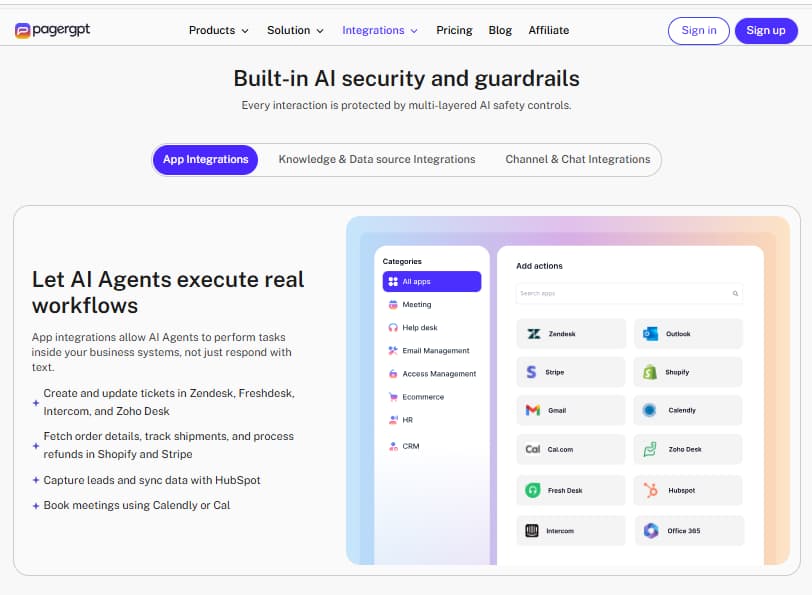
PagerGPT integrations and AI agent training workflow

PagerGPT’s integrations section shows how AI agents can connect with business apps, execute workflow actions, and support customer conversations across help desk, ecommerce, CRM, email, and calendar tools.


🎓
Train AI agents on your business knowledge
PagerGPT can be trained from websites, files, documents and connected tools so the AI agent has context before answering customers. This matters because a chatbot that knows nothing is not “AI”. It is a very confident intern.
Use caseUseful for support teams that need answers grounded in docs, product pages, policies and internal process knowledge.
⚙️
Customize tone, personality and workflows
Teams can shape how the AI agent responds, what tone it uses and how it follows sales or support workflows. This is important for brands that do not want every answer to sound like it was generated inside a filing cabinet.
Use caseGood for ecommerce, SaaS, agencies and service teams that need AI replies to match brand voice and escalation rules.
🔌
Integrations for support, sales and automation
PagerGPT positions integrations as part of the core workflow, including tools for support, CRM, scheduling and payments. The official site mentions apps such as Zendesk, Freshdesk, Zoho Desk, HubSpot, Pipedrive, Stripe, Calendly and Cal.com.
Use caseUseful when the AI agent needs to book meetings, route leads, answer ticket questions or connect customer conversations to existing business systems.
💬
Website chat, WhatsApp, Slack and live handoff
PagerGPT supports deployment across customer channels and includes live handoff logic for complex or sensitive conversations. The Business plan screenshot also includes Live Chat Inbox.
Use caseBest for teams that want AI to answer routine questions but still need humans to handle sales objections, edge cases and VIP customers.
📊
Analytics, sentiment and suggestions
The screenshots show AI Analytics & Dashboard across plans, while Business adds AI Sentiment Analysis and AI Suggestions. That makes Business the more complete plan for optimizing conversations, not just launching them.
Use caseUseful for teams measuring automation quality, customer intent, chat outcomes and support improvement opportunities.
🛡️
Security, compliance and guardrails
PagerGPT highlights security and compliance messaging on its official site, while the Business screenshot includes AI Security & Guardrails. Enterprise adds security review, private hosting, MFA, RBAC, SSO and SIEM integration.
Use caseImportant for companies that want customer-facing AI but cannot treat privacy and access control as decorative confetti.
⚡ Example: Weekly PagerGPT workflow for a support or sales team
1
Train the AI agent
Connect the website, upload documents and add key business instructions.
2
Customize the agent
Set tone, brand style, response rules, escalation logic and workflow goals.
3
Connect channels and tools
Deploy to website chat, WhatsApp or Slack and connect apps such as CRM, help desk or scheduling tools.
4
Monitor live conversations
Use Live Chat Inbox and analytics to track conversations, sentiment and handoffs.
5
Improve the workflow
Update training data, refine instructions, add actions and improve answer quality over time.
Analysis

Pros & cons

✅ What PagerGPT does well

  • Clear AI agent builder positioning for support, sales and SMB workflows
  • No-code setup flow: train, customize, integrate and deploy
  • Magic plan lets teams start at $0 in the supplied screenshots
  • Business plan includes live inbox, sentiment, suggestions and security guardrails
  • Strong integration story across support, CRM, scheduling, payment and chat channels
  • Enterprise plan covers serious security and scale requirements

⚠️ Limitations to know before buying

  • ! Starter may be too limited for serious support teams if Live Chat Inbox is only an add-on
  • ! Plan value depends heavily on AI sessions, character limit, actions and agent count
  • ! Magic is useful for testing but not enough for a serious multi-channel operation
  • ! Pricing should be checked inside PagerGPT before paying because screenshots can change
  • ! Teams still need clean training data and strong support processes; AI does not magically fix chaotic documentation

🚫 PagerGPT may NOT be the right tool if...

  • You only need a basic FAQ widget with no live workflow, actions or integrations.
  • Your team cannot maintain accurate docs, product details or support policies for training.
  • You need a full help desk replacement instead of an AI agent layer connected to customer channels.
  • Your budget cannot support Starter or Business once testing moves beyond the Magic plan.
  • You expect AI to handle every customer scenario without human review. Adorable. Also doomed.
Fit assessment

Who should use PagerGPT?

Positioning insight

PagerGPT makes the most sense when a business has repeated customer questions, messy pre-sales conversations, support escalation needs or multi-channel chat demand. It is less compelling when the business only needs a tiny static FAQ box and has no real support or sales workflow to automate.

✓ Customer support teams
Good fit for teams that want AI to answer common questions and hand off complex chats to humans.
✓ Sales and lead generation teams
Useful when website visitors need fast answers, qualification, meeting booking or follow-up workflows.
✓ Ecommerce and retail brands
Helpful for product questions, order-related conversations, support routing and channel-based chat.
✓ SMBs and startups
Business plan fits growing teams that need live inbox, analytics, sentiment, suggestions and guardrails.
✕ Pure content teams
Use SEOWriting.ai or other writing tools if the goal is article production, not AI customer conversations.
✕ Teams with poor documentation
If your docs are outdated, your agent will inherit the mess. Software cannot baptize chaos into strategy.
Final verdict · Review intent

Is PagerGPT worth it in 2026?

8.8
AI Agent Fit
8.4
Pricing Clarity
8.7
Integrations
8.6
Team Workflow
8.6
Overall

PagerGPT is worth testing if your business needs AI agents for customer support, sales, ecommerce conversations or multi-channel chat workflows. Its strongest angle is the full agent workflow: train the AI, customize its behavior, connect tools, deploy across channels and use live inbox or analytics to improve performance.

The Magic plan is the safest starting point because the supplied screenshots show it at $0. Starter is the first serious paid tier, but Business looks like the practical team plan because it adds Live Chat Inbox, AI Sentiment Analysis, AI Suggestions and AI Security & Guardrails in the visible plan view.

The main caveat is that PagerGPT is only as useful as the workflow and data behind it. If your docs, policies and product information are clean, the platform can help reduce repetitive support and sales friction. If your internal knowledge is a dumpster fire wearing a SaaS badge, fix that first.

FAQ · Review + pricing intent

Frequently asked questions

What is PagerGPT used for?
PagerGPT is used to build AI-powered agents for customer support, lead generation, sales conversations, ecommerce support and multi-channel customer communication. Teams can train agents on websites, files and business knowledge, then deploy them across channels such as website chat, WhatsApp and Slack.
How much does PagerGPT cost?
Based only on the screenshots supplied to CandidCodes, PagerGPT pricing shows Magic at $0/month or $0/year, Starter at $99/month or $1010/year, Business at $349/month or $3560/year, and Enterprise as custom. The yearly toggle shows “Save 15%”. Confirm final pricing inside PagerGPT before subscribing.
Which PagerGPT plan is best?
Magic is best for a first test. Starter is better for a small team that needs more training capacity and actions. Business is the strongest fit for growing teams because the screenshot includes Live Chat Inbox, branding removed, AI Sentiment Analysis, AI Suggestions and AI Security & Guardrails. Enterprise is for custom security, hosting and scale requirements.
Does PagerGPT support integrations?
Yes. PagerGPT’s official site describes integrations with customer communication and business tools, including channels such as website chat, WhatsApp, Messenger and Slack, plus apps such as Zendesk, Freshdesk, Zoho Desk, HubSpot, Pipedrive, Stripe, Calendly and Cal.com.
Is PagerGPT good for customer support?
Yes, PagerGPT is a strong fit for customer support teams that want AI agents to answer routine questions, use business knowledge, connect with support tools and hand off complex conversations to humans through live chat workflows.
Does PagerGPT replace a help desk?
Not necessarily. PagerGPT is better understood as an AI agent and customer interaction layer. It can connect with help desk tools and reduce repetitive conversations, but teams may still need a dedicated help desk, CRM and human support process for complex cases.

Ready to test PagerGPT?

Start with the Magic plan or compare Starter and Business, then build one focused AI agent for a real support or sales workflow. Do not start with ten bots, seventeen channels and a dashboard shrine. Start with one use case that can actually improve customer response time.

Overall score

8.6
★★★★★
CandidCodes Research Score
AI agent fit
 
8.8
Pricing clarity
 
8.4
Integrations
 
8.7
Team workflow
 
8.6
Try PagerGPT

AI agent builder · $0 Magic plan shown · Business plan for teams

Visit PagerGPT →

Quick facts

CategoryAI Agent Builder
Free plan$0 Magic
Starter$99/mo
Business$349/mo
Yearly saving15%
Best forSupport + Sales
Live inboxBusiness

Best starting point

MAGIC PLAN
$0/month shown in supplied screenshot
Start test →