DataSift Review 2026: Pricing, Real Estate Data, AI Scores, CRM Features and Best Plan

Candidcodes

1 day ago

◆ CandidCodes Research Review

DataSift Review 2026: Pricing, Real Estate Data, AI Scores, CRM Features and Best Plan

✎ Dinh Nguyen 📅 Updated May 2026 ⏰ 14 min read 🔍 Research-based 🔗 Affiliate links

DataSift is a real estate sales and marketing platform built for investors and real estate teams that need property data, lead management, skip tracing, drip campaigns, task workflows, dashboards and AI prospecting scores in one operating system.

DataSift Review 2026 real estate data AI prospecting CRM pricing and best plan DataSift Review 2026: real estate data, AI prospecting scores, CRM workflow, pricing, pros, cons, alternatives and best plan.

Written and Reviewed by CandidCodes Editorial Team — AI Tools, Real Estate Data Software, CRM Workflow, Lead Management and SaaS Research.

Our team reviewed DataSift's official website, pricing page, user-provided pricing screenshots, AI data page, dashboard page, drip campaign page, skip tracing page, public review signals, and competing real estate data workflows before writing this review. Last updated May 2026.

Affiliate Disclosure: Some links in this article may be affiliate links. If you sign up through them, we may earn a commission at no extra cost to you. We only recommend tools we have researched and believe may offer practical value for the right user.

Important Note: This DataSift review is for software research and comparison only. DataSift can support real estate data management, lead management, prospecting, skip tracing, campaigns, dashboards and AI scoring workflows. It does not guarantee closed deals, accurate contact data in every case, legal compliance, property acquisition, seller response, lower ad spend, investment profit or better business results. Always verify data, follow applicable real estate and marketing rules, and test software on your actual workflow before committing.

For users comparing broader B2B lead data and prospecting platforms, our UpLead Review 2026 is a useful companion read. Different market, same boring human problem: finding the right leads without drowning in bad data.

30-Second Verdict · CandidCodes

DataSift

Rating
4.3 / 5  ★★★★☆
Best Plan
Expert · $499/month
Free Trial
Yes — 7 days
Best For
Real estate investors, wholesalers, acquisition teams, direct mail operators
Not Ideal For
Beginners with no acquisition process · Simple CRM users
Main Caution
Built for active operators — not for users still figuring out their workflow

Pricing may change · Always confirm on official website

DataSift Review 2026: Quick Verdict

CandidCodes Rating

4.3 / 5
★★★★☆
 

Best plan: Expert for serious real estate investors who want larger data limits, 15 users, 50K monthly new properties, unlimited skip tracing and SiftMap Pro included.

Pricing snapshot: Professional $149/mo · Business $299/mo · Expert $499/mo · AI $1,250/mo. Yearly billing available. Always confirm before subscribing.

Main Caution

DataSift is not a cheap lightweight CRM. It is built for active real estate operations. If you do not already have a clear market, lead strategy, follow-up process and compliance discipline, a bigger data system can simply help you organize confusion more efficiently. Impressive, but tragic.

Best for: real estate investors, wholesalers, acquisition teams, direct mail operators, agents using predictive data, teams managing follow-up, and businesses that need property data plus execution workflow.

✓ Best For

  • Real estate investors who manage large property lists
  • Teams needing lead management, tasks and appointments
  • Investors using direct mail, SMS, email and long-term follow-up
  • Operators who want skip tracing, SiftMap and AI data in one workflow

✗ Not Ideal For

  • Beginners with no acquisition process yet
  • Users who only need a cheap contact database
  • Teams expecting AI scores to replace market judgment
  • Anyone who will not verify data or follow outreach rules

Start Testing DataSift →

Free 7-day trial · Pricing and plan details may change · Always confirm on official website

Real estate teams rarely lose deals because one tiny feature is missing. They lose deals because data is messy, sellers are not followed up with, lists decay, appointments get buried, and everyone somehow believes the CRM will fix a broken process by existing quietly in a browser tab.

DataSift is built around the opposite idea: property data, owner records, task flow, lead management, follow-up sequences, skip tracing, dashboards and AI prospecting signals should live closer together so the team can move from insight to action faster.

This review covers DataSift pricing, monthly vs yearly plans, Professional vs Business vs Expert vs AI, core features, AI scores, skip tracing, dashboards, drip campaigns, pros and cons, alternatives, public review signals, FAQ and whether DataSift is worth paying for in 2026.

Editorial testing angle: We evaluated DataSift as a real estate data and execution platform, not as a magical deal-finding vending machine. The key question: does it reduce enough list management, follow-up, skip tracing, lead tracking, reporting and prospecting work to justify the monthly cost for active real estate operators?


What Is DataSift?

DataSift is a real estate sales and marketing platform for investors and real estate teams. It combines real estate data, lead management, follow-up workflows, tasks, appointments, dashboards, skip tracing, SiftMap, AI prospecting scores and marketing execution tools.

The official website describes DataSift as helping real estate companies locate the best markets, execute targeted marketing, identify the right sellers and buyers, and manage leads, follow-ups, tasks, appointments and KPIs in one place.

In plain English: DataSift helps real estate operators turn property data into managed marketing and follow-up workflows. It does not replace market research, compliance, negotiation, sales skill or operational discipline. Very rude of software not to do all human work, but apparently reality had other plans.

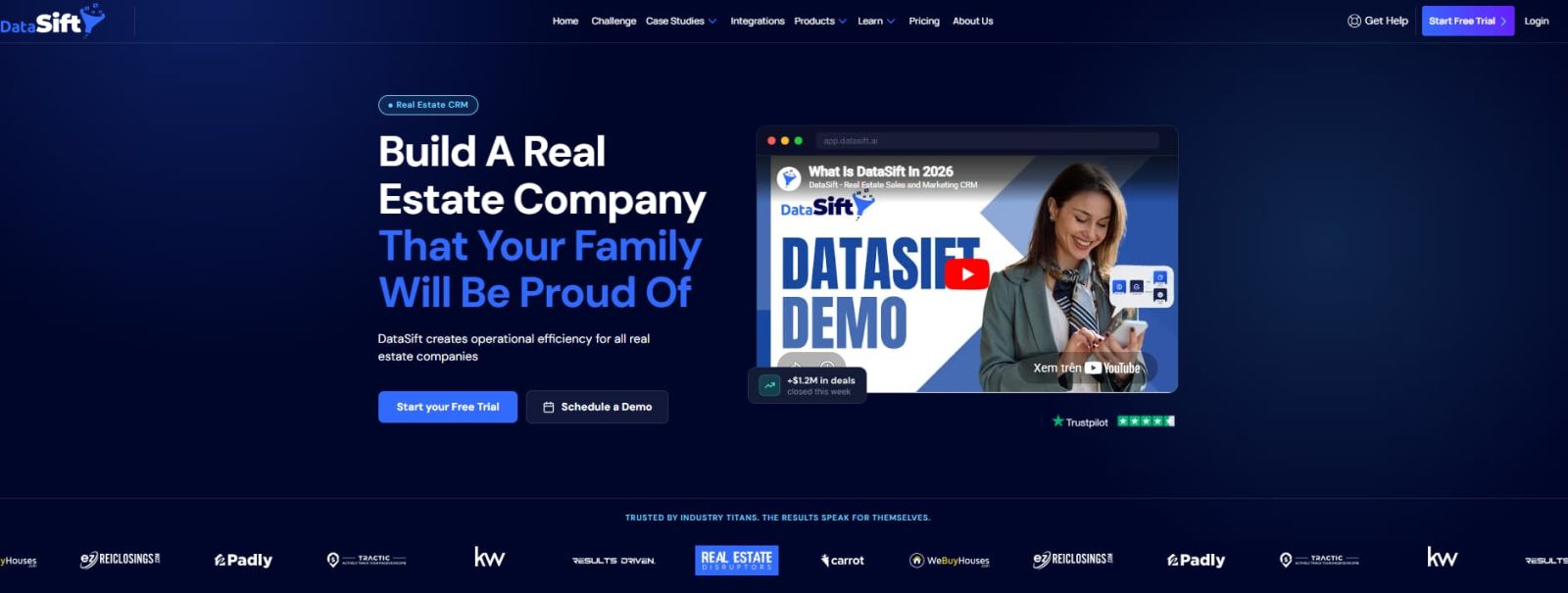
DataSift official homepage real estate sales and marketing platform DataSift official website positions the platform around real estate data, lead management, marketing execution, tasks, appointments and KPIs.


Who Should Use DataSift?

DataSift is best for teams already doing serious real estate prospecting and follow-up. It is less ideal for people still guessing their market, list strategy or outreach process.

Solo Investor or Small Team

Best fit: You need property data, lead storage, outbound workflow and enough structure to stop losing leads.

Plan to check: Professional.

Growing Acquisition Team

Best fit: You need more users, inbound and outbound integrations, unlimited sequences and more monthly new properties.

Plan to check: Business or Expert.

Data-Driven Operator

Best fit: You want skip tracing, SiftMap Pro, AI scores and stronger prospecting precision.

Plan to check: Expert or AI.

Why Real Estate Data Workflow Matters in 2026

Real estate prospecting breaks when data and action live in separate places. A list is pulled in one tool, skip tracing happens elsewhere, follow-up sits in a spreadsheet, tasks are buried in a CRM, and campaign results vanish into someone's "I'll check later" folder. Truly, a majestic temple of avoidable inefficiency.

Manual Real Estate Workflow With DataSift
Pull property data from one source and manage leads somewhere else Use a more connected platform for property records, lead management and follow-up
Manually remember who needs follow-up Use tasks, appointments and sequences to keep follow-up visible
Pay per contact for skip tracing or skip only part of a list Use included or add-on unlimited skip tracing depending on plan
Guess which lists deserve more spend Use filters, dashboards, SiftMap and AI scores to refine targeting
Build reports by stitching together lead, task and deal data Use dashboards that surface KPIs from CRM activity


Latest DataSift Pricing 2026

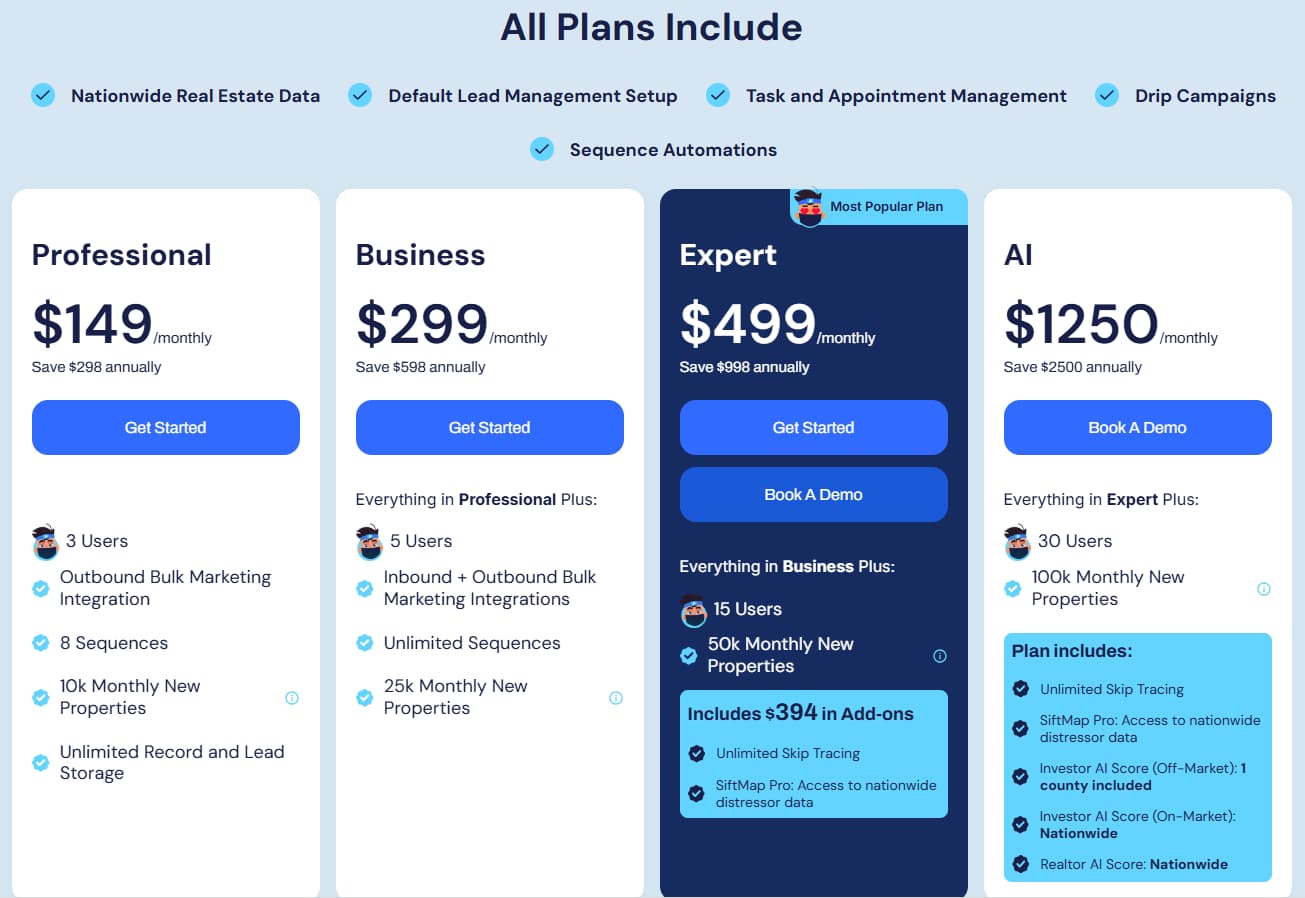
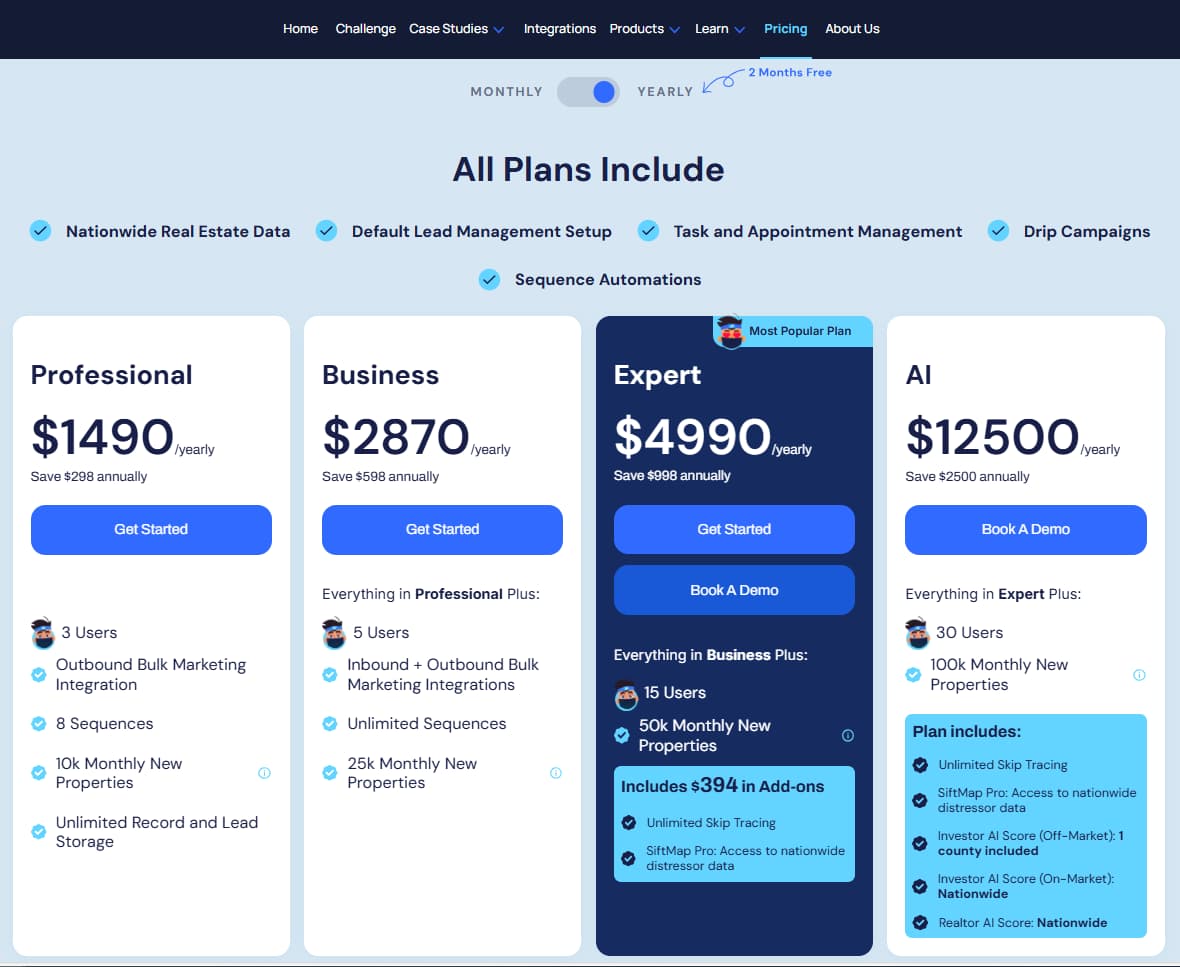
The pricing screenshots reviewed for this article show four plans. Monthly pricing: Professional $149/mo · Business $299/mo · Expert $499/mo · AI $1,250/mo. Yearly pricing: Professional $1,490/yr · Business $2,870/yr · Expert $4,990/yr · AI $12,500/yr.

DataSift monthly pricing Professional Business Expert AI plans 2026 DataSift monthly pricing 2026: Professional $149/mo · Business $299/mo · Expert $499/mo · AI $1,250/mo — based on reviewed pricing screenshots.
DataSift yearly pricing Professional Business Expert AI plans 2026 DataSift yearly pricing 2026: Professional $1,490/yr · Business $2,870/yr · Expert $4,990/yr · AI $12,500/yr — based on reviewed pricing screenshots.

Important pricing note: Pricing, plan limits, add-ons, included AI scores, skip tracing access and annual savings may change. Always confirm current details on the official DataSift pricing page before subscribing.

Professional

$149

/month  ·  $1,490/year

  • 3 users
  • Outbound bulk marketing integration
  • 8 sequences
  • 10K monthly new properties
  • Unlimited record & lead storage
Get Professional

Business

$299

/month  ·  $2,870/year

  • Everything in Professional
  • 5 users
  • Inbound + outbound bulk marketing
  • Unlimited sequences
  • 25K monthly new properties
Get Business

AI Plan — $1,250/month  ·  $12,500/year

Everything in Expert plus 30 users, 100K monthly new properties, unlimited skip tracing, SiftMap Pro and AI scoring: Investor AI Score, Investor On-Market AI Score and Realtor AI Score — based on reviewed pricing screenshots.

Free Trial and Record Pricing Notes

DataSift's official FAQ says the platform offers a 7-day free trial. The pricing page also states that plan records are stored forever and receive a free monthly vacancy check, with additional record pricing shown after included monthly new property limits.

Which DataSift Plan Is Right for You? — 2-Question Decision

Q1: Are you still testing the market with a small operation?

Start with Professional →

Q2: Do you need skip tracing and SiftMap Pro built in?

Compare Expert vs AI →


Key Features of DataSift

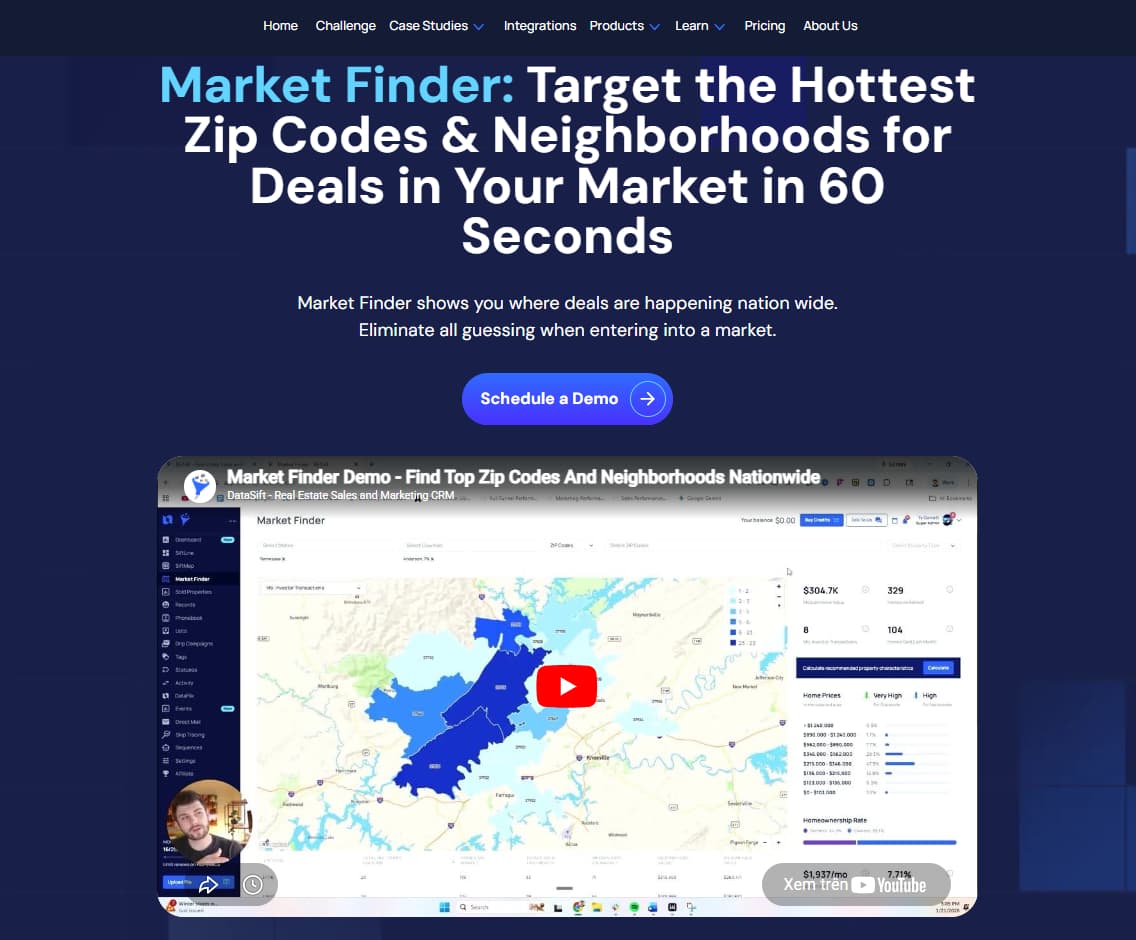
DataSift real estate data and SiftMap property prospecting workflow
Feature 01

Real Estate Data and SiftMap

DataSift helps real estate teams work with property records, targeted markets, buyer/seller signals and buy boxes. This matters when your list strategy needs more precision than "spray mail and pray," which remains a bold but expensive way to learn humility.

Example use case: An investor can refine a target market, build a list based on criteria, and push cleaner property records into follow-up workflows.

DataSift lead management CRM tasks appointments and follow up workflow
Feature 02

Lead Management, Tasks and Appointments

DataSift gives teams a place to manage leads, follow-ups, tasks, appointments and KPIs. The practical value is simple: fewer lost prospects, clearer handoffs and better visibility into what the team should do next.

Example use case: A sales manager can assign follow-up tasks, track appointments and keep lead movement tied to the underlying property records.

DataSift drip campaigns SMS email task sequences long term follow up
Feature 03

Drip Campaigns and Sequence Automation

DataSift's drip campaign workflow is built for long-term nurture. It can combine SMS, email and tasks for manual outreach, and campaigns can run automatically when records meet criteria or be applied manually.

Example use case: A team can put cold leads, ghosting prospects and long-cycle sellers into structured follow-up without relying on someone's heroic memory.

DataSift unlimited skip tracing contact data phone email status workflow
Feature 04

Unlimited Skip Tracing

DataSift offers unlimited skip tracing on supported plans or as an add-on. The official skip tracing page says DataSift can pull phone numbers, email addresses when available, phone type, connected/disconnected status and automatic updates.

Example use case: An investor can upload or download a list, apply skip tracing, and populate contact information faster than manually buying contact data in fragments.

DataSift AI powered prospecting data investor AI score realtor AI score property predictions
Feature 05

AI-Powered Prospecting Data

DataSift's AI page describes predictive prospecting scores that rank properties based on likelihood to sell off-market to an investor, sell on-market to an investor or list with a Realtor. The page says models use 1,800+ data points across nationwide property data.

Example use case: A team can use AI scores to refine large markets into smaller prospecting lists, then still verify assumptions before spending marketing budget.

DataSift dashboards KPI reporting leads conversion tasks deals performance
Feature 06

Dashboards, KPIs and Reporting

DataSift dashboards give teams a real-time performance view across leads, contacts, tasks and deals. The official dashboard page says dashboards surface KPIs and report widgets for CRM activity using charts, tables and metrics.

Example use case: A business owner can monitor leads generated, conversion rates, tasks completed, offers submitted, active contracts and closed deals from CRM activity.

Ready to Test DataSift?

Bring one real market, one messy list and one follow-up workflow. Test whether DataSift actually reduces operational friction before committing to a higher plan.

Start Your DataSift Trial →

7-day free trial · No credit card required to test · Pricing may change


DataSift Pros and Cons

✓ Pros

  • Combines real estate data, CRM workflow, tasks, sequences and dashboards in one platform
  • 7-day free trial available according to the official FAQ
  • Professional starts at $149/month — accessible for serious small operators
  • Business and Expert increase users, integrations, sequences and new property limits
  • Expert includes unlimited skip tracing and SiftMap Pro based on pricing screenshots reviewed
  • AI plan includes predictive AI scores for advanced prospecting workflows
  • Dashboards help teams monitor operational KPIs instead of guessing
  • Public Trustpilot review page that buyers can check before subscribing

✗ Cons

  • Not cheap for beginners who do not have a clear acquisition workflow yet
  • AI plan is expensive at $1,250/month or $12,500/year based on screenshots reviewed
  • AI scores should guide targeting, not replace human market judgment
  • Skip tracing and contact data still require verification and compliant outreach
  • Complex platforms can overwhelm users without disciplined setup
  • Real estate marketing rules and consent requirements still sit on the operator, not the software
  • Pricing and plan details can change, so checkout should always be verified


Which DataSift Plan Should You Choose?

Choose Professional if:

You are a smaller real estate team that needs the core platform, 3 users, outbound marketing integration, 8 sequences, 10K monthly new properties and unlimited record/lead storage.

Choose Business if:

You need 5 users, inbound and outbound bulk marketing integrations, unlimited sequences and 25K monthly new properties. Business is the safer upgrade when follow-up volume and integrations start mattering.

Choose Expert if:

You are actively prospecting and want a stronger operational plan with 15 users, 50K monthly new properties, unlimited skip tracing and SiftMap Pro. This is the best plan to evaluate for many serious teams because the included add-ons can change the economics of list building and outreach.

Choose AI if:

You are a larger operator or data-driven team that wants 30 users, 100K monthly new properties, SiftMap Pro, unlimited skip tracing and AI scoring — Investor AI Score, Investor On-Market AI Score and Realtor AI Score.

How to Use DataSift Without Damaging Trust or Compliance

Use DataSift to make your process cleaner, not louder. Real estate outreach touches sensitive rules around communication, consent, consumer protection and data accuracy. Before scaling campaigns, verify data, clean records, suppress contacts when needed, follow applicable messaging rules and keep team activity documented.

The safest workflow is to start with one clear target market, one list source, one follow-up sequence and one reporting loop. Then expand. Do not start by throwing every county, every campaign and every lead type into the system like a raccoon discovered automation.


Is DataSift Worth It?

DataSift is worth testing if you already have a real estate prospecting workflow and need better property data, record management, follow-up, skip tracing, dashboards and market execution in one place.

Professional makes sense for smaller teams that need structure. Business is better when integrations and unlimited sequences matter. Expert is the strongest first serious plan because it adds unlimited skip tracing and SiftMap Pro. AI is for larger operators who can justify predictive scoring and higher data limits.

The blunt answer: DataSift is not worth it if you have no market, no offer, no follow-up process and no plan to verify data. But for active operators, it can reduce the tool fragmentation that makes real estate marketing slower, messier and more expensive than necessary.


Alternatives and User Reviews

DataSift competes with real estate data software, real estate investor CRMs, list-building tools, skip tracing tools and predictive data platforms. The right alternative depends on whether you mainly need property data, CRM workflow, buyer lists, AI scoring, direct mail, SMS follow-up or all-in-one execution.

Tool Best Use Case How It Compares
DataSift Real estate data plus execution workflow Best fit when you want property data, CRM flow, skip tracing, campaigns, dashboards and AI data closer together.
PropStream Property research and comps Worth comparing if your main need is property search, comps and research rather than full CRM execution.
BatchLeads Lead generation, skip tracing and outreach Useful alternative for list building and outreach workflows. Compare current data coverage, pricing and compliance needs.
REsimpli Real estate investor CRM Better to compare if CRM pipeline management is more important than AI prospecting data and SiftMap-style property intelligence.
DealMachine Driving for dollars and field prospecting Stronger fit for mobile field sourcing and driving-for-dollars workflows. DataSift is broader around data, follow-up and dashboards.

What Users Are Saying About DataSift

DataSift has public review and feedback signals across Trustpilot, its own website ecosystem, and real estate investor community content. Ratings, review counts and user sentiment can change, so always check current public sources directly before choosing a plan.

ⓘ Review ratings change over time. Always check the latest public reviews directly before deciding.

Trustpilot

Useful public source for checking current customer sentiment about DataSift — support, onboarding, platform complexity, billing experiences and real estate workflow outcomes.

Positive themes
  • Workflow consolidation
  • Data breadth praised
Concern themes
  • Learning curve noted
  • Verify before scaling

Check Trustpilot reviews →

Official DataSift Website

Official pages are useful for understanding how DataSift describes its own feature set: AI data, dashboards, skip tracing, direct mail, drip campaigns, SiftMap and lead workflow. Treat official claims as product positioning, not independent proof.

Check official DataSift website →

Competitor Comparison Pages

Alternative pages can help you see how the market frames DataSift against tools like PropStream, REsimpli, BatchLeads and other investor platforms. Use them for context, not as final verdicts.

Check DataSift comparison page →

CandidCodes take: DataSift has enough public signal to justify a serious trial for active real estate operators. The real decision should come from one controlled test: import or build a real list, run a real follow-up workflow, test skip tracing, check dashboards, and decide whether the system saves more operational time than it costs.


Frequently Asked Questions

What is DataSift used for?
DataSift is used for real estate data management, lead management, skip tracing, SiftMap, dashboards, drip campaigns, task and appointment management, AI prospecting scores and targeted marketing workflows for real estate investors and teams.
How much does DataSift cost?
Based on pricing screenshots reviewed: Professional $149/month ($1,490/year), Business $299/month ($2,870/year), Expert $499/month ($4,990/year) and AI $1,250/month ($12,500/year). Pricing may change — always verify on the official DataSift website before subscribing.
Does DataSift have a free trial?
Yes. DataSift's official FAQ says it offers a 7-day free trial. Verify current trial availability and terms directly on the official website before signing up.
Which DataSift plan is best?
Expert is the best plan to evaluate for many serious real estate operators because it includes 15 users, 50K monthly new properties, unlimited skip tracing and SiftMap Pro based on pricing screenshots reviewed. Professional is the clean entry point for smaller teams.
Does DataSift include skip tracing?
DataSift offers unlimited skip tracing on supported plans or as an add-on. The official skip tracing page says teams can choose a plan that has unlimited skip tracing built in or add it to their plan. Expert and AI plans include it based on screenshots reviewed.
What are DataSift AI scores?
DataSift describes AI scores that rank properties by likelihood to sell off-market to an investor, sell on-market to an investor, or list with a Realtor, using 1,800+ data points across nationwide property data. Available on the AI plan based on screenshots reviewed.
Is DataSift good for beginners?
DataSift can help beginners who already have a market and follow-up process, but it may be too much for users who have not yet defined their acquisition strategy, outreach rules or list criteria. Start with the 7-day trial before committing.
Is DataSift worth it?
DataSift is worth testing if you actively manage real estate data, sellers, leads, follow-up, skip tracing and campaigns. It is less useful if you only need a simple CRM or have no real acquisition workflow yet. Run the free trial on your actual market before upgrading.

Best Way to Test DataSift Before Paying Long-Term

The best way to test DataSift is not to click around randomly and announce that software is confusing. Bring a real workflow.

  • Choose one target market
  • Use one list or data source
  • Apply skip tracing where appropriate
  • Create one sequence or follow-up workflow
  • Track tasks and appointments
  • Review dashboard metrics after actual activity

Test DataSift With a Real Workflow →


Final Verdict

DataSift is a strong platform for real estate teams that want to connect property data, lead management, follow-up automation, skip tracing, dashboards and AI prospecting signals in one operating workflow. Its value is strongest when the user already has real market activity and needs better execution, not when they are still figuring out the basics.

For smaller operators, Professional is the clean entry point. Business makes sense when integrations, users and unlimited sequences matter. Expert is the best plan to evaluate for serious teams because of unlimited skip tracing and SiftMap Pro. AI is a high-cost plan for operators who can justify predictive scoring and nationwide AI data access.

DataSift will not create a real estate business by itself. It can help organize and execute one. That difference matters, because software is extremely good at scaling what already exists. Sadly, that includes bad processes too.

Start Testing DataSift

7-day free trial available. Bring one real market, one list and one follow-up workflow to get the most from the trial.

Start Testing DataSift →

Pricing and plan details may change · Always confirm current pricing on official website before subscribing

-->

Popular Blog

CheckoutJoy Review 2026: Pricing, Checkout Pages, Sales Tax, Affiliate System and Best Plan

Best ONEVAN Cordless Power Tools — By Project Type

FATJOE Review 2026: Pricing, SEO Services, Link Building, Content Writing and Best Use Cases

DataSift Review 2026: Pricing, Real Estate Data, AI Scores, CRM Features and Best Plan

Tagembed Review 2026: Pricing, Social Media Widgets, Reviews, UGC and Best Plan

Dynamic Mockups Review 2026: Pricing, AI Mockups, API, Features and Best Plan